External calls don't ring ring group phones

Status
Not open for further replies.

SteveITS

3CX MVP
Silver Partner
Advanced Certified
Joined
Jun 20, 2018
Messages
4,424
Reaction score
2,153
We're helping out a new client making some changes to their system. The server isn't linked to us yet so this linked system is ours and not the right system, but it is in fact on-premises unlike ours. It is running 18.0 (Build 939). SIP provider is Vitelity.

This symptom already existed when we got involved, but we don't seem to be able to fix it. An external call that is set to ring a ring group does not, it just bounces to the "no answer" option. I've duplicated this after creating new ring groups and IVRs. Per the web client all extensions but one are Available at the moment.

What they want: external call rings Front Desk (x100) for a few seconds then goes to a RG All Phones group that rings all desks. If no answer it goes to an IVR at x803.

If I change the SIP trunk routing the call log follows the change, but still no phones ring. For example I can send it directly to x100 or send to a ring group that rings x100 and the call log reflects the change. It logs the Ring All group, then immediately logs the IVR and plays the recording.

It looks a bit like it is looping because the RG shows up multiple times...this is one call (in bottom up order):

10/18/2023 3:16:28 PM [V] [CALLERID] IVR (803) 00:00:00
10/18/2023 3:16:28 PM [V] [CALLERID] RG RG All Phones (822) Not Answered
10/18/2023 3:16:28 PM [V] [CALLERID] IVR (803) 00:00:05
10/18/2023 3:16:28 PM [V] [CALLERID] RG RG All Phones (822) Not Answered

However there is no known path to get from 803 to 822. No extensions in the ring group have forwarding enabled. All have "Accept calls from Ring Groups" checked.

If the client calls x803 or x822 directly, it works as expected, so it seems to be different for external calls?? Also internal calls between the phones succeed.

Also, I did set verbosity to Medium and the activity log shows basically the same thing, that it seems to loop.
 
Last edited:
To update my comment on the activity log, when the call hits the "ring all" group it shows each of those phones as busy, then the call moves on. But they are not busy. I did restart 3CX services so don't have the log anymore but can regenerate it if helpful.
 
So you are saying that when you call a ringall ring group internally, all phones (that are members) ring, but when you call it externally (via inbound rule to same ring group), no phones ring and the logs shows they didn't because they are busy? The call then moves onto the DNA right away (does not wait the ring time value). Am I understanding this correctly?

If you make a new ringgroup and a new extension and use only 1 webclient signed into that extension, can you replicate?
 
Correct. And yes I can. I created a new extension today and just created a new "Test SO" RG with that one in it. Logged in on my PC, pointed the trunk to it and, call log:
10/18/2023 4:43:47 PM [V] [CALLERID] RG Test SO (899) Not Answered
10/18/2023 4:43:47 PM [V] [CALLERID] IVR (803) 00:00:01
10/18/2023 4:43:47 PM [V] [CALLERID] RG Test SO (899) Not Answered
10/18/2023 4:43:47 PM [V] [CALLERID] IVR (803) 00:00:06
10/18/2023 4:43:47 PM [V] [CALLERID] RG Test SO (899) Not Answered

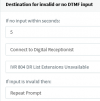
The 803 IVR plays a greeting but doesn't go to 899:
1697665707348.png

edit: also x899 gets the "New missed call from" notification email.
edit 2: x804 does not forward anywhere it just loops a message with a list of extensions.
 
A few further notes...if I call in and get to the IVR I can enter an extension and that call succeeds. So it's only RG calls that fail.

Since the log indicates the extension is busy that kind of (also) feels like call is looping? (since RG members can't receive two calls)

Whoever set up this system set up both the SIP trunk default routing and an Inbound Rule for the same number. I have deleted the Inbound Rule, no change.

I have not tried deleting the SIP trunk, since tbh that seems to be OK...
 
Hi @SteveITS may I know what endpoints are they using? Are these only deskphones? Using just the 3cx apps do you have the same behavior?

Also is this specific to those extensions or with also a brand new extension ?

Could you please check that the users are set as Available status and within the status they have enabled the parameter accept Ring Group calls.

An agent in the ring group will be polled when the extension is registered, available status, free of calls.
 
Phones and web client.

New extension and ring group has the issue. (New one was new system owner and web client)

They are available and have accept calls from RG checked.

No active calls during testing.

Even if one was not allowed/available they ALL show busy in the log.

Of note there is a “blurp” as in a 1/10 second ring before it forwards from x100 to the ring group, but the RG phones reportedly do not ring regardless of whether x100 is in the RG or not.

It feels like something is blocking the external call, or looping it since it shows in the call log (above) that way, and all RG extensions as Busy, which they aren’t.
 
Phones and web client.

New extension and ring group has the issue. (New one was new system owner and web client)

They are available and have accept calls from RG checked.

No active calls during testing.

Even if one was not allowed/available they ALL show busy in the log.

Of note there is a “blurp” as in a 1/10 second ring before it forwards from x100 to the ring group, but the RG phones reportedly do not ring regardless of whether x100 is in the RG or not.

It feels like something is blocking the external call, or looping it since it shows in the call log (above) that way, and all RG extensions as Busy, which they aren’t.
Ok could you please open a support ticket in order to gather the logs and check further the configuration.

Thanks!
 
please open a support ticket in order to gather the logs
Is there a way to find the "generate support info" URL from the management console? I was logged in using an account with our email, but I suspect it went to the license owner which in this case is the email of the currently-linked partner. Otherwise IIRC we need to have that person actively transfer the license to the customer...which I know full well is where it's supposed to be, but... If that's right, simply changing the link to us will not help, correct?
 
The support info is sent to the admin configured in settings ---- email ---- notifications
 
After log analysis, we found the calls were in fact arriving multiple times. Since the phones are "busy" from the first attempt (a millisecond earlier) the second is immediately sent to the "no answer" destination which is why the phones don't ring.

Vitelity has a feature where a given phone number can be routed to multiple connections. This client’s current partner had set up both the active connection (via register/account based username) and their office IP address. Hence the multiple inbound calls. Removing the IP fixed the issue.

So once again, the computers were all doing exactly what they were told to do...
 
  • Like
Reactions: Alejandro_3CX
After log analysis, we found the calls were in fact arriving multiple times. Since the phones are "busy" from the first attempt (a millisecond earlier) the second is immediately sent to the "no answer" destination which is why the phones don't ring.

Vitelity has a feature where a given phone number can be routed to multiple connections. This client’s current partner had set up both the active connection (via register/account based username) and their office IP address. Hence the multiple inbound calls. Removing the IP fixed the issue.

So once again, the computers were all doing exactly what they were told to do...
Yes, I could notice that in the logs, that’s why for a faster resolution I asked to open the support ticket.

Thanks also for sharing it in the forum.

Have a good one!
 
Yes, I could notice that in the logs, that’s why for a faster resolution I asked to open the support ticket.

Thanks also for sharing it in the forum.
I could see the multiple entries, but didn’t know it was possible for one call to arrive twice, as opposed to being forwarded internally. We’re cleaning up a lot on this install…!
 
Status
Not open for further replies.

Forum statistics

Threads
111,974
Messages
590,081
Members
164,899
Latest member
mazet