Solved Failed to execute 'setRemoteDescription' on 'RTCPeerConnection'

Status
Not open for further replies.

Peter Carlson

Free User
Joined
Jul 2, 2017
Messages
23
Reaction score
1
Hi there.
Are you referring to the codec G726?
 
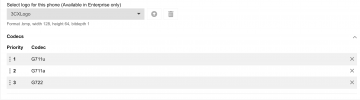
yes, in the other linked post, it described the problem as being an enabled G726 codec. And it advised to disable that codec. I didn't want to hijack an old thread, so I started a new one. However as shown in the screenshot we dont have that codec enabled for the phones, so I dont understand why it is trying to use that codec when we make a call from a phone to a webapp client
 
As it was mentioned in the other post, we don't support that codec, and the only workaround was to try and remove this codec offer in the SDP from the phone side.
 
isn't that what the screenshot shows??? that that particular codec is not enabled for the phone? How do I disable that codec if not to remove it from that list? Sorry, I'm really confused
 
In the actual phone itself and not the 3CX end.
 
I found now way to do this on the phone itself, however I was able to fix the problem by editing the following 3 files. I am not sure which of the 3 it uses (I suspect it is the 3rd one), or if it will survive a version update, we will have to see

Code:
/usr/share/3cxpbx/skel/Data/Http/Templates/phones/cisco.ph.xml
/var/lib/3cxpbx/Data/Http/Templates/phones/cisco.ph.xml
/var/lib/3cxpbx/Instance1/Data/Http/Templates/phones/cisco.ph.xml

None of those templates show up in the UI because of this line 9:
XML:
<templatetype>deleted</templatetype>

However changing this parameter from No to Yes solved the problem line 514:
XML:
<Use_Pref_Codec_Only_1_ group="Ext_1/Audio_Configuration">Yes</Use_Pref_Codec_Only_1_>
 
  • Like
Reactions: OlegR_3CX
Excellent, and thank you for the feedback as it will be handy for the others too.
I will now close this thread.
Have a nice day
 
Status
Not open for further replies.