Failover Setup - Preparation

Status
Not open for further replies.

Alan9846

Silver Partner
Joined
Aug 24, 2019
Messages
96
Reaction score
19
Hi All,

I have a client that wishes to install a failover server. They have an on-premises server, so I believe that means that the failover server must also be on-premise. They are currently on Version 16.0.9 (Pro license), but we would upgrade them to 'enterprise' so that the failover is more like five mins than six hours if we go ahead with this.

I have read the failover documentation (https://www.3cx.com/docs/failover/) and would like to clarify to ensure I understand correctly.

Currently, they have provisioning (Extension - Phone Provisioning - Network - Network interface for registration and provisioning) pointing to the internal IP Address of the single 3CX Server (10.0.0.1).

The documentation says that to setup a failover server, IP Phones must provision using the FQDN provided by 3cx (example.my3cx.nz).

However, if I query the FQDN from the Debian Server (running 3cx), I get the external, public IP of their internet connection (as expected). If I query the FQDN from any other machine on the same LAN, I get the same.

Therefore, I am expecting that, if I change the provisioning method from IP to FQDN in the 3cx Management Console, then IP Phones would fail to register. Is that correct?

If so, then does that mean I need to introduce a DNS server on the LAN that will provide the internal IP (10.0.0.1) of the 3cx server when queried for the FQDN?

I can have the router act as a DNS Server, and resolve (a limited number of) hostnames, so I can add (example.my3cx.nz) into that list, and point it at 10.0.0.1. If I do that, then the Debian host responds to a 'dig example.my3cx.nz' with 10.0.0.1 (I have tested that, then removed it from the router for now).


So, if I do that so that the FQDN resolves within the LAN to the local IP, can I now safely change the provisioning for the extensions from 'local IP' to 'FQDN'?


My concern here is that, if I make this change, then in the case of the primary server failing, external DNS would (after five mins or so - enterprise license) change to the new public IP address (for the failover server), but internally the IP Phones etc would still be looking for the primary (10.0.0.1).

Am I missing something here? If the above is not the way to do it, then how are people using the FQDN for on-premise provisioning?


Thanks,

Alan.
 
Last edited:
Therefore, I am expecting that, if I change the provisioning method from IP to FQDN in the 3cx Management Console, then IP Phones would fail to register. Is that correct?
Depending on your network configuration they might actually manage to REGISTER but this is definitely not a something you would want since it would mean that the IP Phones are contact the 3CX PBX on it's public IP which will inevitably cause issues.


If so, then does that mean I need to introduce a DNS server on the LAN that will provide the internal IP (10.0.0.1) of the 3cx server when queried for the FQDN?
That is correct, when using Local devices that use the FQDN to reach the 3CX PBX, you will want that FQDN to resolve to the PBX's local IP, meaning a local DNS server would be required. However, the problem here, is that, the secondary server will not be local to the IP Phones, meaning that when a failover event occurs, your IP Phones will not only have to be able to resolve to the public IP, but will also have to switch from a local provisioning method to a remote provisioning method (SBC/STUN). This would not be a seamless switchover since doing so requires that you reset the devices and reprovision using the correct method.

The On-Premise Topology in the guide, refers to a setup that involves two 3CX PBXs (both Primary and Secondary) that both reside on the same network. This would therefore mean that, all local IP Phones would remain local in a failover event as well. Do bear in mind that if you do end up using this type of configuration (both servers on the same LAN) you would still need to use the FQDN as the interface and also utilize a local DNS. Whenever a failover event occurs, you would have to switch that local DNS entry from one local IP to the so that all local devices can contact the correct PBX. You may also want to look into ways to automate this process using scripts since the 3CX Failover feature allows you to automatically run them upon such an event.
 
Hi Chris,

Thank you for your reply.

I have searched the site, but could not find any of the scripts that you mention - maybe I searched on the wrong terms?

Both machines would be running Debian with 3CX server installed, and nothing else - completely bog-standard setup - are there 3cx approved scripts that I would use on one or both machines (I am guessing on the secondary / failover server, since the failover event occurs when the primary is down)?

Would the suggested setup perhaps be to have Bind9 running on one or both machines, so that the script(s) could change things over if / when required?


Thanks,

Alan.
 
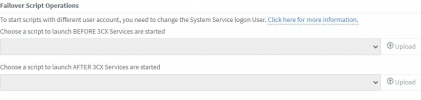
To clarify, regarding the scripts, all that 3CX offers is the ability to launch a script on the Passive server upon a failover event:
1619696454918.png


That said, how the scripts will be implemented, and what they will do depends entirely up to the administrator. You may find some sample scripts for Windows based machines at the very end of the failover guide, but again, these are merely samples and are in no means the recommended scripts to use.
 
Hi Chris,

Am I missing something, or overcomplicating this?

Is there a standard configuration that does not require scripting to implement a failover server, using just the standard Debian / 3cx servers, and the 3cx provided FQDN?

Thanks,

Alan.
 
Hi Chris,

Am I missing something, or overcomplicating this?

Is there a standard configuration that does not require scripting to implement a failover server, using just the standard Debian / 3cx servers, and the 3cx provided FQDN?

Thanks,

Alan.
The failover guide doesn't need scripts if you use the regular 3CX FQDN and the built-in Failover.
 
Hi Frederick,

That's re-assuring :-)

So, am I doing it right in my original post at the start of the thread? If so, how would things work when the failover kicks in, but the IP Phones are still looking for the primary 3cx server that has failed (which is on 10.0.0.1), while the secondary / failover 3cx server is on, say, 10.0.0.2?

Thanks,

Alan.
 
Hi Frederick,

That's re-assuring :)

So, am I doing it right in my original post at the start of the thread? If so, how would things work when the failover kicks in, but the IP Phones are still looking for the primary 3cx server that has failed (which is on 10.0.0.1), while the secondary / failover 3cx server is on, say, 10.0.0.2?

Thanks,

Alan.
Yes it's correct but cloud failover is easier lol however, the V18 DNS Helper will help with the external IP issue.
 
Yes it's correct but cloud failover is easier lol however, the V18 DNS Helper will help with the external IP issue.

Do you mean I should make the secondary / failover server a cloud-based server, rather than have it on-premise like the primary?

I had understood from the failover guide that I linked in my original post, that this was not an option?


I had seen the advance info about v18, and figured that might make all this a lot easier. I guess I could just wait for v18 to be released as a stable version, but I'm not sure if there is any firm date for it to be out. Currently it is in Alpha 3 I think, so we might speculate that it will be soon, but could also be months away?


Thanks,

Alan.
 
Last edited:
Do you mean I should make the secondary / failover server a cloud-based server, rather than have it on-premise like the primary?

I had understood from the failover guide that I linked in my original post, that this was not an option?


I had seen the advance info about v18, and figured that might make all this a lot easier. I guess I could just wait for v18 to be released as a stable version, but I'm not sure if there is any firm date for it to be out. Currently it is in Alpha 3 I think, so we might speculate that it will be soon, but could also be months away?


Thanks,

Alan.
Basically, failover works only with same types of instance, ie: on-prem + on-prem, or cloud+cloud. On-prem+Cloud could work but it's more tricky because of the DNS/IP issue when local (thus why I prefer full-cloud failover.)

As for V18, it's expected in Q2/Q3 depending on how the Beta will go. It should be released around next week from what I saw.
 
Hi,

I would prefer it was all cloud too, but there are corporate policies in place which limit the ports that can be used, so they had to get specific permission for the server to be allowed outgoing (as well as the incoming) connections.

All their PCs have to connect out via a proxy server (probably authenticating through AD in some way - not sure on that), so I guess the IP Phones would too. I have actually tried connecting an IP Phone to their LAN, and seeing if I could connect it to a different 3CX outside (unrelated to the client), but it just can't get packets out to the internet from what I can tell.

If we moved the server to the cloud, all the IP Phones would then need to be able to get out to the server too, and from what they've said, it has proven too hard to get permission (I am taking that to mean they don't want to bother going through the process with corporate IT, rather than it couldn't happen from a technical perspective).

I'll talk to them about timing and see if they would be willing to hang out with a single 3CX server until v18 is released - not a good look for us as 3cx / providers, but maybe the only viable option?

Alan.
 
So if they have corporate policies in place that limit your ability to deploy cloud, then I bet they already have something in place for DR for their other LOB applications. 3CX is just another application so it should just drop into that scenario without mucking around with 3CX's failover.
 
So if they have corporate policies in place that limit your ability to deploy cloud, then I bet they already have something in place for DR for their other LOB applications. 3CX is just another application so it should just drop into that scenario without mucking around with 3CX's failover.

Hi,

Quite the opposite, which makes sense in that, if Corporate IT were involved, then the port issues would (you'd hope) be resolved, and they would be handling 3cx like any other LoB application.

Since the local owners are doing this outside of that, the only options for any kind of DR are whatever they put in themselves (being us in this case).

Alan.
 
Status
Not open for further replies.