Fake Phone ring on 3CX soft phone

Status
Not open for further replies.

nevilleekka

Free User
Joined
Dec 1, 2021
Messages
11
Reaction score
0
It's my first time trying 3CX PBX, and I am absolutely puzzled to see 3CX soft phone producing a phone ring to a just about any outbound call number, even the ones that doesn't exist.
I've only got 001 and 222 (testing phase) as my extension, and i can definitely make calls between all my extensions. I am mainly trying to get the outbound rules correct but i doubt that it's working. For instance: I've tried dialing to my cell phone and on 3CX soft phone i see the phone ringing but my cell never gets the call (not even a missed call). I am not sure if i should be calling my SIP Trunking provider at this point or is this a bug. I've attached my settings below of the only inbound rule (only 1), i've created. Originally I've tried entering calls to number with lenbth as 10, but it's still not making a difference.
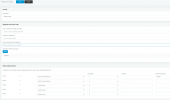


1638382424682.png
 
For the outbound call, remove the outbound caller id that will make a mess with alot of providers, as for the inbound ringing Dashboard > Call history > Filter by ext and you will see what is calling it.
 
As mentioned...outbound caller ID must be numeric, and something accepted by your provider, usually the number you were assigned by them, in the proper format. You might check the 3CX Activity Log (might require using Verbose setting) to see if the the call is sent to your provider, and, if they are rejecting it.
 
Thanks for the prompt response: I am posting the Activity Log. I am trying to determine whether I should reach out to my provider. Except for the bolded part, everything is looking normal to me.


12/02/2021 4:47:42 AM - [CM503027]: Call(C:5): From: Extn:222 ("Nex-GamingPC" <sip:[email protected]:5060>) to T:Line:10000>>xxxxxxxxxx@[Dev:sip:[email protected]:5060]
12/02/2021 4:47:42 AM - [CM503004]: Call(C:5): Route 2: from L:5.1[Extn:222] to T:Line:10000>>xxxxxxxxxx@[Dev:sip:[email protected]:5060]
12/02/2021 4:47:42 AM - Line limit check: Current # of calls for line Lc:10000(@IXICA Communications[<sip:[email protected]:5060/UDP>]) is 0; limit is 10
12/02/2021 4:47:42 AM - [CM503027]: Call(C:5): From: Extn:222 ("Nex-GamingPC" <sip:[email protected]:5060>) to T:Line:10000>>xxxxxxxxxx@[Dev:sip:[email protected]:5060]
12/02/2021 4:47:42 AM - [CM503004]: Call(C:5): Route 1: from L:5.1[Extn:222] to T:Line:10000>>xxxxxxxxxx@[Dev:sip:[email protected]:5060]
12/02/2021 4:47:42 AM - Line limit check: Current # of calls for line Lc:10000(@IXICA Communications[<sip:[email protected]:5060/UDP>]) is 0; limit is 10
12/02/2021 4:47:42 AM - Call(C:5): Call from Extn:222 to xxxxxxxxxx matches outbound rule 'External Calls'
12/02/2021 4:47:42 AM - [Flow] Call(C:5): has built target endpoint: Out#:>>Rule{External Calls}>>xxxxxxxxxx for call from L:5.1[Extn:222]
12/02/2021 4:47:42 AM - [Flow] Target endpoint for xxxxxxxxxx is Out#:>>Rule{External Calls}>>xxxxxxxxxx
12/02/2021 4:47:42 AM - [CM503010]: Call(C:5): Making route(s) from Extn:222 to <sip:[email protected]:5060/UDP>
12/02/2021 4:47:42 AM - [CM505001]: Endpoint Extn:222: Device info: Device Not Identified: User Agent not matched; Capabilities:[reinvite, replaces, able-no-sdp, recvonly] UserAgent: [3CXPhone 6.0.26523.0] PBX contact: [sip:[email protected]:5060]
 
Attached verbose log. Replaced my number with xxxxxxxxxx
 

Attachments

Remove the Outbound Caller ID from the Outbound Rule as @3cxnub and @leejor said, then make sure you have set it up exactly as described here:
https://www.3cx.com/docs/canadian-sip-trunk-ixica/

Especially check the sections on Number Formatting at the end.
If I am counting the "x" characters in the log you sent, they are 10, not 11.
 
At the top of the attached logs, last log for call 13...

12/02/2021 8:03:35 AM - ~Target=Unknown:xxxxxxxxxx@(Ln.10000@IXICA Communications)
 
  • Like
Reactions: NickD_3CX
Recent Updates:
I realized, my SIP Trunk was not being registered because I hadn't been using Register/Account based as type of Authentication. However, after changing that, i would keep getting the issue where registration would fail after some time and status would stay Red. At that point, my Activity Log would show these logs:

12/06/2021 5:16:53 PM - L:39.1[Extn:222] failed to reach Out#:>>Rule{External Calls}>>16476540054, reason Temporarily Unavailable
12/06/2021 5:16:53 PM - RerouteReq
12/06/2021 5:16:53 PM - [CM503016]: Call(C:39): Attempt to reach <sip:[email protected]:5060> from Extn:222 has failed. Reason: Temporarily Unavailable
12/06/2021 5:16:53 PM - ~Target=UnknownTrunk:6
12/06/2021 5:16:53 PM - [CM503026]: Call(C:39): Route 1 to UnknownTrunk:6 is not active (Busy/Not registered)
12/06/2021 5:16:53 PM - [CM303003]: There are no available outbound lines on gateway IXICA Communications at this time. First line: Lc:10000(@IXICA Communications[<sip:[email protected]:5060/UDP>])
12/06/2021 5:16:53 PM - External line Lc:10000(@IXICA Communications[<sip:[email protected]:5060/UDP>]) is not registered!
12/06/2021 5:16:53 PM - Line limit check: Current # of calls for line Lc:10000(@IXICA Communications[<sip:[email protected]:5060/UDP>]) is 0; limit is 10


I submitted a ticket to my provider and they would ask me to restart both hardware and the server because their service had always remained available. So i re-installed 3CX, restarted my server. And now i get the following messages. I've also followed this link: https://ixica.freshdesk.com/support...5-3cx-custom-modification-with-clip-screening


12/08/2021 7:16:27 AM - Lc:10000(@IXICA Communications[<sip:[email protected]:5060/UDP>]): Registration postponed until public IP is resolved by STUN
12/08/2021 7:16:27 AM - Dev(446457550):[sip:[email protected]:5060 / nsearche]: (!) No transport is found for destination: <sip:mad:169.55.63.65:5060/UDP>
12/08/2021 7:16:18 AM - Lc:10000(@IXICA Communications[<sip:[email protected]:5060/UDP>]): Registration postponed until public IP is resolved by STUN
12/08/2021 7:16:18 AM - Dev(446457550):[sip:[email protected]:5060 / nsearche]: (!) No transport is found for destination: <sip:mad:169.55.63.65:5060/UDP>

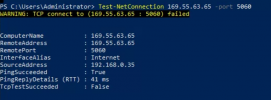
I can tell for sure, after pinging the exact port from powershell to my provider and my server's are able to reach but seems like 3CX is unable to.

1638977175475.png
 

Attachments

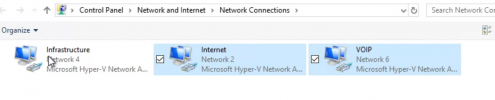
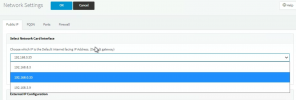
I think I may have found the cause, although i am not too sure. I've got few adapters and initially I had been giving VOIP (192.168.8.0) network as my internet facing IP address, I've changed that to Internet (192.168.0.0) network.
adapters.PNG
1638978585930.png

But then my question would be, where would put my setting for VOIP, if all the phones will be connecting from there? Would i need to have my VOIP network be able to access internet as well?
 
Alright so this has to be the root of my issue. My Gateway is 192.168.0.35 and is configured as such but 3CX is contacting SIP using my VOIP address which is 192.168.8.3. Is there a setting n 3CX console where i can choose to provision my phones through 192,168.8.0 (VOIP) network because all my phones are are in this network but connect my SIP provider through 192.168.0.0 (internet) network?


12/08/2021 8:04:13 AM - [CM503016]: Call(C:3): Attempt to reach <sip:1xxxxxxxxxx@192.168.8.3:5060> from Extn:100 has failed. Reason: Not Found


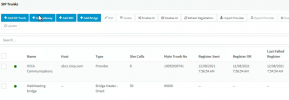
My SIP trunking registration has been resolved for now.
 

Attachments

  • Sip Registration Resolved.png
    Sip Registration Resolved.png
    251.1 KB · Views: 2
I've disabled the default gateway as per instructions but 3CX server is still connecting SIP using VOIP network. I have the 3CX softphone installed on the server itself.


Segregated VoIP network​

  1. The network interface on the 3CX Server that connects to the router/gateway must contain a Default Gateway specified in Network adapter settings.
  2. The Network adapter interface on 3CX Phone System that connects to Network B must NOT have a default gateway specified. This entry should be blank.

https://www.3cx.com/blog/docs/network-configurations-supported-3cx-phone-system/


1638980894698.png
 
I don't understand how your network is setup.
You have 2 NICs on the 3CX Server:
192.168.0.x
192.168.8.x

Please answer these questions:
  • Through which network should 3CX contact the internet (software updates, templates, activation, etc...)?
  • Through which network should 3CX contact your VoIP Provider?
  • On which network are the IP Phones connected?
 
I don't understand how your network is setup.
You have 2 NICs on the 3CX Server:
192.168.0.x
192.168.8.x

Please answer these questions:
  • Through which network should 3CX contact the internet (software updates, templates, activation, etc...)?
  • Through which network should 3CX contact your VoIP Provider?
  • On which network are the IP Phones connected?


192.168.0.x is used for Internet
192.168.8.x is used for VOIP

To answer your questions:
  • Through which network should 3CX contact the internet (software updates, templates, activation, etc...)? - 192.168.0.x
  • Through which network should 3CX contact your VoIP Provider? - 192.168.0.x
  • On which network are the IP Phones connected? - 192.168.8.x
 
Ok, first for the IP Phones.
All you need to do is in the Extension Settings of each extension, in the Phone Provisioning tab, in the network drop down select the 192.168.8.x IP.

Note that you *may* have to Factory Reset the IP Phones and reprovisoing them, especially if you have changed the network settings.

Now for the providers, given the explanation, your NIC setup looks correct, Def GW should be on 192.168.0.x.

At some point you said:
Alright so this has to be the root of my issue. My Gateway is 192.168.0.35 and is configured as such but 3CX is contacting SIP using my VOIP address which is 192.168.8.3.

Where did you see this?
 
Status
Not open for further replies.

Forum statistics

Threads
111,974
Messages
590,083
Members
164,901
Latest member
Silent_Guru