Fanvil PA2 & PA3 revert to "Generic IP Phone"

smcbride

SMB User
Joined
Aug 22, 2025
Messages
4
Reaction score
0
When I provision a new device and select either Fanvil PA2 or Fanvil PA3 from the drop down device list, once the provisioning is finished, the phone record shows the device as "Generic IP Phone" then underneath is a red bang (white exclamation mark in a red triangle) with a label "Untested phone: Quality and reliability not guaranteed" as per below.
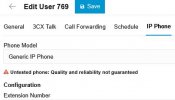
3CX Generic error.jpg

How do we get the system to show that Fanvil PA2 or Fanvil PA3 were the actual device selected during setup? We are running version 3CX version 20.
Also I notice there is no option to select Fanvil PA2S devices. Thanks.
PS: This is on a fully on-premises 3CX system. I could not find a way to create a forum account without it automatically creating a 10 user cloud system ergo there was no checkbox in the signup process that says we already have a 3CX system running so do not create a free trial or cloud account for me.
 
Hi,

Check the audit log when you notice that this happens. It will tell you if anyone else made any changes or at least confirm what was saved when you made the changes.

Also click the generic phone, that is a drop down list, you may have actually added both a generic, and a PA2 on the same account causing the appearance that it reverted.

PA2S is not a supported model, that's why you don't see it there.
 
  • Like
Reactions: KyriacosS_3CX
I could not find a way to create a forum account
Try logging into the forum with your Portal credentials, or openning the forum within the portal.
 
Hi,

Check the audit log when you notice that this happens. It will tell you if anyone else made any changes or at least confirm what was saved when you made the changes.

Also click the generic phone, that is a drop down list, you may have actually added both a generic, and a PA2 on the same account causing the appearance that it reverted.
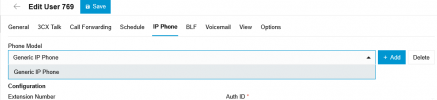
Thanks for your reply. At present I am the only person who edits the 3CX system so it cannot be someone else editing it after me. As it is, if I view the IP Phone tab immediately after adding a device, it shows as Generic IP Phone so there's not enough time for anyone to have edited it after me anyway. When I open the droplist for phone model in the IP Phone tab, it only shows Generic IP Phone as a pick option as per below, whereas if I select say a Yealink T48U phone during setup, it retains that choice. The issue happens for Fanvil PA2 and PA3 even though they are supposedly supported products. In regards to PA2S, according to the Fanvil website, the PA2 device has been depricated and replaced with the PA2S so hopefully the PA2S will become a 3CX supported device soon. In the meantime, it's puzzling why the system changes PA2 and PA3's to Generic IP Phone.
1756075326025.png
PA2S is not a supported model, that's why you don't see it there.
 
Are the phones running the official 3CX firmware?
 
Are the phones running the official 3CX firmware?
Yes. I tried it with both the firmwware available from Fanvil's support website and also the version from 3CX's download site and the Generic IP Phone type appears every time regardless of the firmware version or the source.Phones behave properly and retain their make and model info but Fanvil gateways do not for some reason.
 
Were any templates modified at any time? Any root modifications to the file system?
 
Were any templates modified at any time? Any root modifications to the file system?
Nope, the setup is bog standard out of the box. We've done no tweaking to templates.
 
Any chance of a template for another phone, or the default template being modified, leading to it being identified wrongly in the dropdown?

Perhaps do a packet capture while rebooting one of them to see how they are identifying themselves when they register to the system, to check if they are out of spec somehow.
 
At present I am the only person who edits the 3CX system so it cannot be someone else editing it after me.
You should still check the audit log. Once you see it you will understand what I mean.

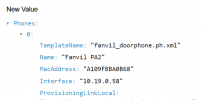
Normally you would see this when adding a PA2.
If you later see a generic phone in the user page, in contrast to what the log shows, then the problem occurs after the addition.
1756366278331.png


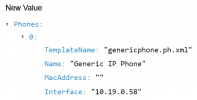
But if you see this when adding a PA2 then something is going on during the moment of addition, quite likely in the browser itself.
1756366236664.png
 

Members Online Now

Forum statistics

Threads
111,831
Messages
589,277
Members
164,660
Latest member
RJenkinsROCK