Fanvil PA3 - Working with Errors?

Status
Not open for further replies.

loyer

Silver Partner
Advanced Certified
Joined
May 5, 2016
Messages
107
Reaction score
46
I am configuring a Fanvil PA3 to act as a paging gateway to a powered speaker system. The Fanvil PA3 is connecting to the 3CX server (private hosted on AWS) via an existing dedicated SBC (raspberry pi). I followed this support doc: https://www.3cx.com/sip-phones/fanvil-sip-doorphones/

I sort of got it working but the 3CX admin management portal showed some errors and the Phone list looks unusual.

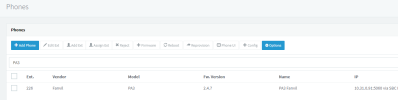
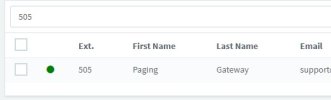
Phone list shows the fanvil device listed twice (once as "new" and the other as "unprovisioned"). See screenshot below.
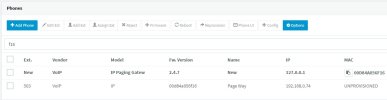
phone-list.jpg


Also in the event log there were some error messages associated to the provisioning (see below):

error-list.jpg


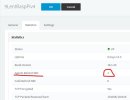
It seems to be working as I can call the extension and the audio plays over the speaker system. But I wanted to confirm before putting this in production since it looks unusual. Also, I noted that the SBC doesn't seem to see it ... when I look at the "Agents Behind SBC" in the "Statistics" tab of the SBC in the 3CX admin management page, it is still zero (and I would assume it should be 1).


Below are the notes I took during the installation and how I installed the Fanvil PA3.


3CX Phone System – Paging Gateway – Fanvil PA3 Configuration

3cx Docs: https://www.3cx.com/sip-phones/fanvil-sip-doorphones/​

Physical Installation:

  • Needs to be powered via POE. If you don’t have a POE switch, get a POE injector.
  • Determine audio system configuration and how to physically wire audio cables. Typically, you will use the audio line out terminal block on the PA3 and connect to powered amplifier. Other options are possible, see Fanvil PA3 manual for details.


Network Configuration:

  • Power on device (POE) and find it’s IP. You can use an IP scanner or look up MAC address on DHCP server, etc. (or use tool: https://downloads-global.3cx.com/downloads/misc/phonefirmware/fanvil/new_fanvil_doorphones.zip )
  • Connect to device web admin interface using IP and login with default login (admin / admin).
  • Verify firmware is up to date by checking here: https://www.3cx.com/support/phone-firmwares/
  • Log into 3CX Phone Admin; Create extension for paging device; Add new phone under “Phone Provisioning” tab; Choose type and enter MAC; Choose 3CX SBC and set options; COPY PROVISIONING LINK to be used later; Click OK.
  • Back in the Fanvil device web admin, go to: System > Auto provision > Static Provisioning Server Then enter the 3cx Provisioning Link from above. Set the following fields:
  • Server Address: {paste full provisioning link}
  • Configuration File Name: {blank}
  • Protocol Type: HTTPS
  • Update Interval: 1
  • Update Mode: Update After Reboot
  • Click SAVE the page will reload.
  • Click the “Reboot” tab on top, then click the Reboot button.
  • The Fanvil PA3 will be updated and the default admin/admin login will no longer work. You have to get the new password from the 3CX user extension provisioning tab “Phone Web Page Password”. Then login using admin and that password.
  • Back at 3CX admin, go to Updates and download the latest firmware for the Fanvil PA3 --- needs to be on the 3CX phone server too. Then go back to the Fanvil web admin and reboot device.


Fanvil Settings:

Enable line out port; Go to: Intercom Settings > Media Settings > Media Settings. Set “Enable Line-out” to “Handsfree && Lineout”; Click Apply button.
 
It's no big deal, it's just a file that the phone is trying to grab that 3CX doesn't generate because it's not needed.

Those show up in the logs now.
 
What about the phone list? It looks like I could remove the "new" one. The normal (not bold one) says unprovisioned and the mac address shows up in the firmware version field. Is that normal?

Screenshot 2023-02-12 094217.jpg
 
You are not using the 3CX Supported firmware. Do not let the version fool you, here is what a supported PA3 looks like:
1676282467143.png

Install our supported firmware from the below link, factory reset, then reprovision to ensure everything is as it should be:
https://www.3cx.com/support/phone-firmwares/
 
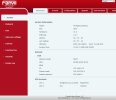
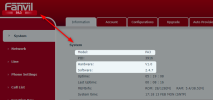
Hi John, thank you for responding. I did install the firmware from that link. Please note that this is a PA3. The link on your website is for version 2.4.7 and downloads a file named PA3_2.4.7.z After I updated the firmware, my fanvil admin screen has a red color scheme. See screenshots below. How can I tell which firmware version is running on my device if they have the same software version (2.4.7). Is there another way to identify it?

Screenshot 2023-02-13 100308.jpg


Screenshot 2023-02-13 100510.jpg
 
Hmm the upgrade seems incomplete..

Try logging in from an incognito window just in case you are seeing stale data.

It should appear like so:
1676301671444.png
 
Hi John,

I tried updating the firmware again --- downloading fresh from the 3cx firmware page https://www.3cx.com/support/phone-firmwares/

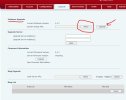
I logged into the PA3, went to the "Upgrade" tab, then under the "Software Upgrade" section, I selected the file and clicked the Upgrade button. It rebooted and when I logged back in, it still shows the old interface. I tried in an incognito windows too --- same result.

FYI, I noticed in the "Firmware Information" section that the "Server Firmware Version" always says "Checking" and the "Upgrade" button there is disabled.

See screenshot below.

Is this the correct way to upgrade the firmware on this device? Can you please verify the link in the 3CX firmware page is pointing to the latest version of the firmware (and isn't somehow wrong)?


Screenshot 2023-02-13 104900.jpg
 
Yes, as far as I'm aware you did it correctly.

You might have to contact Fanvil support for this one because it does not appear to behave as expected.

Not sure why your unit came preloaded with this "white label" version of their software, as far as I'm aware its supposed to look like the one I shared.
 
I am going to try the following....
1) Remove phone and user account from 3CX phone system
2) Factory reset PA3
3) Download an older version of the firmware directly from Fanvil here (maybe version 2.4.4) : https://www.fanvil.com/service/doc/soft/p2/wulianwangwangguan/pa3/index.html
4) Factory reset PA3 and reboot and verify all settings are cleared from the PA3
5) Install the 3CX version of the firmware, factory reset and reboot
6) Try and connect to the 3CX phone system as normal

I'll report back on what happens.
 
I tried the following....

1) Deleted the phone and extension from 3CX admin
2) Factory reset phone (PA3)
3) Downloaded the latest firmware version directly from Fanvil (version PA3-2.12.10) from here: https://www.fanvil.com/service/doc/soft/p2/wulianwangwangguan/pa3/index.html
4) After rebooting the phone, it showed up in the list of available phones (new) in the admin and was displaying the fields correctly. I created a new extension (just to start fresh) and went to the phone list and assigned the phone to the extension through the SBC. It seemed to work and show up correct --- except that the phone system displayed it in red indicating that the firmware version was wrong. But at least the phone was assigned to the extension, the model and MAC address fields were displayed correctly.

Screenshot 2023-02-13 123901.jpg


5) Attempting to use the correct firmware version, I clicked the "+ Firmware" button in the phone list of the 3CX admin to upgrade the firmware directly from the phone system (instead of manual directly in the phone's admin interface). This did NOT work. Now the PA3 is stuck in (new) and I can't assign it and it is not linked to the extension.

Screenshot 2023-02-13 133607.jpg


THIS LEADS ME TO BELIEVE THAT the current 3CX firmware version 2.4.7 is faulty. I have attempted to update the PA3 directly (via the phone's admin) and also via the 3CX admin and neither of those methods work.


Can you please verify that is the correct firmware? Is there a newer version?

I am not sure what else to try.
 
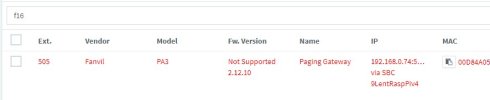
As a follow up, I factory reset the PA3 and upgraded it to the latest FANVIL firmware version 2.12.10. I configured it in the system as usual. It shows up red in the phone list as a "Not Supported" firmware version. But otherwise, it fully functions in every way. Until 3CX can fix their firmware version, I am going to leave it using the fanvil firmware.

The user/extension is registered and green status:
Screenshot 2023-02-13 141048.jpg

The SBC sees the phone correctly:
Screenshot 2023-02-13 141139.jpg


The phone listing fields are working (vendor, model, name, ip and mac all show correctly) --- other than it being red.

Screenshot 2023-02-13 141246.jpg


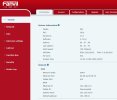
The fanvil PA3 web admin shows the correct version:
Screenshot 2023-02-13 141508.jpg


I am able to dial the PA3 extension and the audio plays over the speaker system correctly.


I am not sure what isn't functioning by having the newer firmware other than that it isn't the fully supported version by 3CX.

BUT as of now, I am not able to get the 3CX version to work. Please let me know if there is anything else I can try.

Thank you.
 
THIS LEADS ME TO BELIEVE THAT the current 3CX firmware version 2.4.7 is faulty. I have attempted to update the PA3 directly (via the phone's admin) and also via the 3CX admin and neither of those methods work.
This is a false assumption because a) we have not eliminated the possibility of a faulty unit or other, and b) I have successfully downgraded my PA3 and then upgraded it to the version 3CX provides with no ill effects just now.

But it should be noted that the unit I used did not arrive as an unbranded "IP Paging Gateway" out of the box, so that leads me to believe that you have a device that is not what we would refer to as the norm. Now would be a good time to contact Fanvil support and get clarifications about why this is the case with your unit, plus help to upgrade it to the 3CX supported version.


And just to put a little disclaimer on this:
Both the device and the firmware (whether from 3CX's website or Fanvil's website) are produced by Fanvil. The version we provide to the customer has been given to us by Fanvil, after they passed a compliance (interoperability) test with 3CX. But if you face any kind of hardware issues like the one we see above, the correct course of action is to contact Fanvil support. They own and maintain the codebase of this product and they are in the best position to explain why this is happening.
 
Thank you John. My concern is that maybe the current firmware version provided by fanvil to be used with 3CX has not been tested or updated with the latest version of 3cx and/or their latest batch of hardware. We purchased the PA3 unit directly from our distributor who is an fanvil authorized distributor just last week. (so it isn't old or used)

But regardless, for this particular PA3 I have sitting in my lab, I know this: 1) firmware version 2.4.7 (3cx version) does not work properly and 2) firmware version 2.12.10 (fanvil direct version) does function.


When did you acquire your PA3? Is it possible that Fanvil is now shipping a different base firmware on their newly produced PA3s? My confusion is that my PA3 is labeled as a "IP Paging Gateway" even when I load the 3CX firmware version successfully. It is NOT labeled that way when I load the Fanvil direct firmware. My hardware version is v1.0. So unless they made a change to their hardware without updating the hardware version, it shouldn't matter --- once I load the updated firmware (assuming the hardware is the same), it should match. I do not believe the hardware is faulty because it functions correctly with the Fanvil direct firmware --- just not the 3cx branded version.


I am not trying to assign blame to either 3cx or fanvil --- just trying to find a solution that works.

Thank you for all of your support. I'll respond back to this thread if I hear anything from Fanvil.
 
Ok, understood, but we both have the same hardware version, used the same fw. file and yet your unit does not behave in the expected way (as tested by Fanvil during interop).

It's really out of our scope and we don't have the answer - I think Fanvil is in a much better position to answer all those questions than either of us. If you could you contact them directly (or via your distributor) to have them take a look at it, please share any useful info with us on the forum! It could help other members too.

We could speculate for hours, but I think this just unintended hardware behavior. You probably ran into an unexpected edge case and Fanvil needs to take a look at it. They might even already know about it and have a solution for you if you reach out to them..
 
Thanks John. I contacted both my distributor and fanvil directly (via their support ticket). Does 3CX have a direct contact to their firmware team? If so, would you be able to send them the link to this forum post so they could review? I will post back if I get any information from them. Thank you again.
 
You've already reached them in the most direct way, let's just wait and see what they say about it!
 
I received a response from Fanvil. They said I should use the new 2.12.10. They said that 2.4.7 is too old. They said they are in the process of getting the 2.12.10 firmware approved by 3CX to be the current version. See full Fanvil response below.

John... do you know how long the process usually takes for 3CX to approve new firmware?


Dear Andrew

Thanks for contacting us and for preferring our Fanvil device.
The reply to your question is as below :
The PA3 Version 2.4.7 is too old,I recommend you to use our latest version.
It can be used normally with 3cx, and many bugs have been fixed, and some new functions have been added.
3cx shows that the firmware does not support it, because we have not done compatibility test with 3cx,We have only tested on our side.It needs to be tested by 3cx , it can display the supported firmware
But please rest assured, it will not affect the use of it and 3cx,We have been working with 3cx for a long time
Please rest assured to use 2.12.10


If there is any query, please feel free to contact us.

Kind Regards


--------------------------------
Best Regards
Jinghan
Tel:+86-755-26402199
Fanvil Technology Co.,LTD
http://www.fanvil.com
HQ Add: 10/F Block A, Dualshine Global Science Innovation Center, Honglang North 2nd Road, Bao'an District, Shenzhen, China


Screenshot:
Screenshot 2023-02-15 104818.jpg
 
Hello Andrew,

General FYI: The firmware and templates are provided to us by the manufacturers (Fanvil, Yealink etc.) and we normally publish it the same week after they pass our interop tests (which they are also responsible for conducting). This is the normal procedure we follow with everyone.

Giving their representative the benefit of the doubt, I think they might not be aware of the procedure so they simply suggested you use the latest version from their website. I would kindly reply back to them to contact 3CX so they can get the firmware released on our platform the official way like we've always done.

We will be happy to release it quickly as soon as Fanvil contacts us, but at this stage I think we might have to push things a bit from our end too. Thanks for bringing this to my attention, I will let you know when I find out more.
 
Hi John,

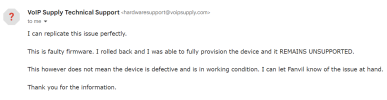
Just an FYI, I also reached out to my distributor (voipsupply) where I bought the PA3. Their hardware tech support also reviewed this issue. They said they were able to replicate my issue with their 3CX instance. So it does not seem to be specific to just me. Maybe fanvil's latest hardware batches are not compatible with firmware 2.4.7??

Screenshot 2023-02-17 172410.png
 
Status
Not open for further replies.

Latest Posts

Forum statistics

Threads
112,156
Messages
591,013
Members
165,188
Latest member
Teemal