


- Joined
- May 5, 2016
- Messages
- 107
- Reaction score
- 46
I am configuring a Fanvil PA3 to act as a paging gateway to a powered speaker system. The Fanvil PA3 is connecting to the 3CX server (private hosted on AWS) via an existing dedicated SBC (raspberry pi). I followed this support doc: https://www.3cx.com/sip-phones/fanvil-sip-doorphones/
I sort of got it working but the 3CX admin management portal showed some errors and the Phone list looks unusual.
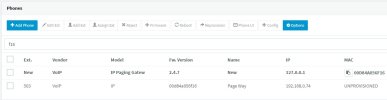
Phone list shows the fanvil device listed twice (once as "new" and the other as "unprovisioned"). See screenshot below.
Also in the event log there were some error messages associated to the provisioning (see below):

It seems to be working as I can call the extension and the audio plays over the speaker system. But I wanted to confirm before putting this in production since it looks unusual. Also, I noted that the SBC doesn't seem to see it ... when I look at the "Agents Behind SBC" in the "Statistics" tab of the SBC in the 3CX admin management page, it is still zero (and I would assume it should be 1).
Below are the notes I took during the installation and how I installed the Fanvil PA3.
Physical Installation:
Network Configuration:
Fanvil Settings:
Enable line out port; Go to: Intercom Settings > Media Settings > Media Settings. Set “Enable Line-out” to “Handsfree && Lineout”; Click Apply button.
I sort of got it working but the 3CX admin management portal showed some errors and the Phone list looks unusual.
Phone list shows the fanvil device listed twice (once as "new" and the other as "unprovisioned"). See screenshot below.
Also in the event log there were some error messages associated to the provisioning (see below):
It seems to be working as I can call the extension and the audio plays over the speaker system. But I wanted to confirm before putting this in production since it looks unusual. Also, I noted that the SBC doesn't seem to see it ... when I look at the "Agents Behind SBC" in the "Statistics" tab of the SBC in the 3CX admin management page, it is still zero (and I would assume it should be 1).
Below are the notes I took during the installation and how I installed the Fanvil PA3.
3CX Phone System – Paging Gateway – Fanvil PA3 Configuration
3cx Docs: https://www.3cx.com/sip-phones/fanvil-sip-doorphones/
3cx Docs: https://www.3cx.com/sip-phones/fanvil-sip-doorphones/
Physical Installation:
- Needs to be powered via POE. If you don’t have a POE switch, get a POE injector.
- Determine audio system configuration and how to physically wire audio cables. Typically, you will use the audio line out terminal block on the PA3 and connect to powered amplifier. Other options are possible, see Fanvil PA3 manual for details.
Network Configuration:
- Power on device (POE) and find it’s IP. You can use an IP scanner or look up MAC address on DHCP server, etc. (or use tool: https://downloads-global.3cx.com/downloads/misc/phonefirmware/fanvil/new_fanvil_doorphones.zip )
- Connect to device web admin interface using IP and login with default login (admin / admin).
- Verify firmware is up to date by checking here: https://www.3cx.com/support/phone-firmwares/
- Log into 3CX Phone Admin; Create extension for paging device; Add new phone under “Phone Provisioning” tab; Choose type and enter MAC; Choose 3CX SBC and set options; COPY PROVISIONING LINK to be used later; Click OK.
- Back in the Fanvil device web admin, go to: System > Auto provision > Static Provisioning Server Then enter the 3cx Provisioning Link from above. Set the following fields:
- Server Address: {paste full provisioning link}
- Configuration File Name: {blank}
- Protocol Type: HTTPS
- Update Interval: 1
- Update Mode: Update After Reboot
- Click SAVE the page will reload.
- Click the “Reboot” tab on top, then click the Reboot button.
- The Fanvil PA3 will be updated and the default admin/admin login will no longer work. You have to get the new password from the 3CX user extension provisioning tab “Phone Web Page Password”. Then login using admin and that password.
- Back at 3CX admin, go to Updates and download the latest firmware for the Fanvil PA3 --- needs to be on the 3CX phone server too. Then go back to the Fanvil web admin and reboot device.
Fanvil Settings:
Enable line out port; Go to: Intercom Settings > Media Settings > Media Settings. Set “Enable Line-out” to “Handsfree && Lineout”; Click Apply button.


