Fanvil phones not upgrading?

Status
Not open for further replies.

MPServeline

Bronze Partner
Basic Certified
Joined
Mar 1, 2022
Messages
115
Reaction score
14
Hi all,

I didn't know whether best to post this here or in the forum specific to the Fanvil phones so can be moved as needed.

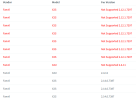
Basically I noticed with one customer a number of the phones were showing as unsupported but when I try clicking the firmware button and also rebooting the devices (which seems to work as they disappear) they don't seem to be updating?
1678785351329.png
 
  • Like
Reactions: MPServeline
Thanks, shouldn't it be upgradeable via the PBX? Would it require going onto the web interface of the phones to do it then?
 
Yes it should be. How are these provisioned?

Yes you would need to do it manually.
 
  • Like
Reactions: MPServeline
Might have to arrange access in that case as we don't support their router or have access to the network so would need to either get ports allowed through the router or do it via a PC on the network there.
 
Try getting them to reboot the phone and try again.
Where they ever on supported firmware or they using stock fw?
 
  • Like
Reactions: MPServeline
I must admit I'm not too sure sorry as someone set the tenancy up who has since left and I happened to notice when I configured another phone for them but will ask them if they can try rebooting the phones there. I did the reboot via the web interface and they seemed to disappear from the list for a couple of minutes so seemed like that worked at least. Hard reboot may help.
 
Hi @MPServeline this cannot be done.

Those phones are running a very old firmware with expired root certificates.

Expired Root Certificates mean that phone cannot establish a TLS connection to 3CX.

This means that you can no longer reprovision or upgrade them from the 3CX management console.

The firmware needs to be upgraded manually on those phones one by one.
 
  • Like
Reactions: MPServeline
Thanks John, I'll get on to that as we seem to have another customer the same but have access to their network so easier in that case at least.
 
Sure no problem, and as a general rule while reviewing devices:

  • U-series devices like the X4U need a minimum version of 2.4.12
  • S-series devices like the X3S need a minimum version of 2.14.0.7387
If you need any further assistance please let us know ;)
 
  • Like
Reactions: MPServeline
Excellent, much appreciated. :)

I've downloaded the firmware for one tenancy ready to do.

Should it be possible to upgrade them or do they automatically upgrade once on those versions?
 
I think those are the latest version anyway, so you won't need to do anything else.

However, if Fanvil releases newer firmware in the future, you will be able to upgrade normally again via the management console.
 
Status
Not open for further replies.

Forum statistics

Threads
111,974
Messages
590,081
Members
164,899
Latest member
mazet