Solved Fanvil v65 as router phone at remote office does not register (WiFi)

Status
Not open for further replies.

ArtoSkogman

Silver Partner
Basic Certified
Joined
Feb 5, 2021
Messages
57
Reaction score
3
Hi! When setting up Fanvil v65 phone in a remote office it does not register. I have done factory reset, rebooted, entered required SBC codes for the phone ect. Phone does the provisioning, since it get all blfs correctly, but then comes "Sip registering failed". Our pbx is on Win10 pro,pbx version v18 update 6, license Pro.When done this inside office, router phone worked fine. Any idea what to do?
 
Hi Arto,

Can you please tell us what version the V65 firmware is?
 
Hi! Version 2.12.15.6
 
Ok great, we can confirm this is the correct version.
Let's check some basics:


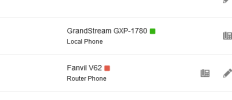
1 .Edit your extension and confirm this is a router phone
1675080088390.png

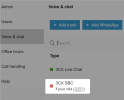
2. Check to see if the embedded SBC of the router phone is active:
1675080274615.png

If the phone is indeed shown as a router phone, and the SBC is red, then this means the phone is not able to reach 3CX.

Would you be able to move it to another network and re-test? (without factory reset, keep it as is).
 
That is the current situation. I can go after one hour to remote office and put it in other network.
 
Even on the current network, before you move it, please try to unplug and re-plug the phone.

A reboot might bring it back. If not, move it to another network and let us know how it went.
 
I did rebooting several times this morning, but no luck. Phone gets the settings, but then comes "Sip registering failed".
 
I did rebooting several times this morning, but no luck. Phone gets the settings, but then comes "Sip registering failed".
Check the WAN hasnt been blacklisted.
 
Hi! Now the was in a different network, same result. Phone shows: Sip register failed. All blfs, account are there. So phone get info from pbx, but then something happens. I also did factory reset, removed the user, no luck.
 

Attachments

  • ROUTER PHONE.PNG
    ROUTER PHONE.PNG
    3.6 KB · Views: 4
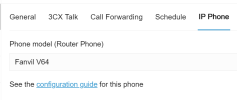
Btw you mentioned V65 in title, but I see V62 in your screenshot.

Your phone's built in SBC will connect via port 5090 (by default at least).

If this port is not reachable from the outside (or from the remote site) then the SBC will stay down.

This does not prevent you from provisioning clearly, but it will 100% prevent you from registering.

Can you check this next? You can do it from the remote site:

telnet example.mycompany.com 5090

it should connect, then disconnect (indicating the port is reachable)
 
Phone is V65. I get APK1 and after awhile connection was lost.Normal phone eg Granstream GXP2170 registers fine from same location
 
Normal phone eg Granstream GXP2170 registers fine from same location
But this model does not have a built in SBC. How does it connect to 3CX?
 
Sorry to mix you up. I meant that GXP works fine as normal phone in remote office.
 
A normal phone still needs a way to reach 3CX remotely.

Is this GXP STUN or do you perhaps have another SBC on the site?

Or do you have a VPN connecting the two sites maybe?

I'm asking about this because this changes everything in the troubleshooting direction.
 
GXP is/was on STUN. No other SBCs or VPN.
 
Ok that clears up everything. One last thing to try:

Install the PC version of the 3CX SBC on one of the computers on the same remote network as the phones.

Let's see if the Windows or Debian SBC also fails to connect from the remote network or if it's just the Fanvil facing this problem.
 
  • Like
Reactions: Evolute IT
SBC works fine, blfs came to live, phone is registered
 
Ok one last thing you can do, add the phone back as a router phone on its own (like you did originally).

Wait for it to provision and reboot.

When it comes back and fails to register, go into the web UI and you will find an SBC log you can download.

This will contain some useful information hopefully.
 
Hi! I swithced the connection from wifi to cable with phone, and then it stared to work after factory reset to the phone.
SBC log was empty when there was no connection to SBC. After connection, data came in.
 
  • Like
Reactions: grcomm
Status
Not open for further replies.

Members Online Now

Forum statistics

Threads
111,834
Messages
589,287
Members
164,663
Latest member
svdDGS