Fanvil x4u ONE way audio-sitting behind D-link DWR 921 router.

Status
Not open for further replies.
Ok, please read this and share more information about your system to see if we can help:
https://www.3cx.com/community/threads/information-to-provide-when-requesting-help.67558/
3CX Version --> Standard Annual 16.0.2.910
Server OS --> Windows
Is the 3CX Server Hosted and where? --> On-premises
IP Phone Make/Model/Firmware version --> Fanvil x4u version 2.4.12
Provisioning Method --> Local
Trunk Provider or VoIP Gateway Make/Model --> Default
Has the Firewall Checker passed --> YES
Are custom Phone Templates being used --> YES, 3CX templates
 
You are using a very old and outdated version of 3CX from 3 years ago. The latest version V18 has had many fixes and improvements since then, and it's not worth troubleshooting the old version at this point.

My advice is to get a 3CX backup off the machine, uninstall 3CX then install the latest version and restore your backup.

Also:
3CX Templates = the ones shipped with your 3CX system
Custom templates = a version that you personally have modified. If you haven't then you are not using custom templates
 
Alright, so the latest version is free to download right, i just need to go on to 3cx website to download or if there is a different link to dowload.

For the Templates, i am not using any custom one, but rather the one of 3cx templates
 
  • Like
Reactions: JohnS_3CX
Please do i need to do anything before the backup and then uninstallation of the 3cx
 
Please do i need to do anything before the backup and then uninstallation of the 3cx
Does my license require me to do anything else, or i can simply uninstall and then install the new version without and worries
 
If you take your backup, you should be able to use the same license to install V18.

Instructions to install can be found here with details:
https://www.3cx.com/docs/manual/phone-system-installation-windows/

The when the guide ends, it also links you to the first time configuration wizard.

Make sure to follow that link, there is a step there that tells you how to restore the backup.
 
Great.
Thanks,i will do that
 
  • Like
Reactions: JohnS_3CX
Great.
Thanks,i will do that
Quick One please, the public IP which will be used by the SBC is the same Public IP used by the 3CX server.
There is a NAT config done, which allows the 3cx to communicate to the internet through the IP and receive traffic theough that same IP.

Will that be a problem?
 
If they are all in the same premise then the SBC is not needed.

Make sure that the PBX and the phones are all on the same subnet and you should not have any problems.


As we discussed earlier, you do not need an SBC. Please remove the SBC and forget about it entirely.


You should only install the 3CX system and nothing else for now. The NAT config only needs to be done for the 3CX system, not the SBC.
 
  • Like
Reactions: Nii
installation complete upgraded to the version 18, but still encountering the one way way audion on the phones.
 
Do me a favor please, make one fanvil call the other, but use Loud Speaker mode (do not use the handsets!).

Does it still have one way audio?
 
  • Like
Reactions: Nii
Do me a favor please, make one fanvil call the other, but use Loud Speaker mode (do not use the handsets!).

Does it still have one way audio?
Yes still has one way audio.

But quick one, does the router really play any part in the issue, because the phone is connectec via wirless.
 
Unknown, because we do not support wireless connections at all.

You must absolutely have all the phones connected via LAN cable.
 
Unknown, because we do not support wireless connections at all.

You must absolutely have all the phones connected via LAN cable.
Ok, but here is the issue.

We also have another Fanvil x4u phone connected via wireless(2 actually) on a ubiquiti device, but that works well with no audio issue
 
That's irrelevant because you still have one way audio issues to solve, and using the phones in an unsupported way only makes things more unnecessarily complicated.

First solve the issues while the phones are running in a 3CX-supported way, and then experiment with wireless later if you want.
 
That's irrelevant because you still have one way audio issues to solve, and using the phones in an unsupported way only makes things more unnecessarily complicated.

First solve the issues while the phones are running in a 3CX-supported way, and then experiment with wireless later if you want.
Alright, i will try with the LAN cable and check for the results.
 
Tried it still didnt work.
Alright, i will try with the LAN cable and check for the results.
i even did the echo test, yet still nothing.
 
Edit all your extensions, Under Options >> Troubleshooting >> enable PBX Delivers Audio and press Ok to save

Then try one more time to check
 
Edit all your extensions, Under Options >> Troubleshooting >> enable PBX Delivers Audio and press Ok to save

Then try one more time to check
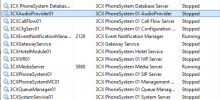
The 3cx service all stopped, just all of a sudden. i was goin to login and do the troubleshooting you mentioned, but i wasnt able to login only for me to find out the services have stopped. i have tried restating it but still cant run.

The only service running is the 3cx event notification manager and 3cx media server.

1652783602604.png
 
I see you are having a lot of problems here. Maybe it's time to start again from scratch.

Normally you should not be having these issues, so I don't know what is wrong with the machine and it is not worth spending more time troubleshooting.

1. Format the server, and put Windows 10 only (do not install any programs at all - only Windows 10)
2. Then install a fresh 3CX V18
3. Factory Reset your phones, one by one, and begin assigning them to new extensions.

When you have 2 phones ready and assigned, make a call between them, and see what is happening.
 
Status
Not open for further replies.

Members Online Now

No members online now.

Forum statistics

Threads
111,835
Messages
589,289
Members
164,665
Latest member
dominik.pepel