FanvilV V65 guide is not provisioning!

BKSupport

SOHO User
Joined
Oct 3, 2024
Messages
15
Reaction score
1
Hey all.

I am currently using

3CX Version 20.0 Update 2 (Build 715 Release)
With a FANVIL V65 with the latest firmware = 2.12.20

I can't seem to get the phone to provisional at all.
Can anyone help me get this provisioned as soon as possible?
I'm not entirely sure where to add the provisioning links and the auth id and pass from 3CX since the guide doesn't actually tell you anything about the phone's dashboard despite it being supported.

Appreciate any support!

Thanks!
 
https://www.3cx.com/docs/manual/ip-phones/

I suggest you refer to this link. In fact, you do not need to add the 3CX link to the V65 configuration. Instead, you should add the MAC of the V65 to the 3CX extension.
 
Hi Fanvil, thanks for your help, I did indeed refer to this link but it didn't help, in the end, I managed to figure it out with the help of another colleague. Still some hiccups but I do have it provisioned at long last.

On another note - I've noticed that when I make a call on fanvil, it shows my DID first and then the number I called instead of the other way around - is there a way to swap that?
 
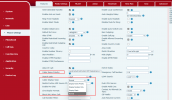
This feature is not currently supported for swapping display, but you can set the display format in the configuration shown in the following image.


1728715344855.png
 
Thank you for your response!

I don't seem to have the "normal option"

Just the following

"Display Number And Name"

Should I assume that is the same thing?
 
I'd also like to ask if there's a way to make the UI for the sidekeys wider?
For example, my F1/F2/F3 are cut off due - I have first name & last name as the speed dial and it cuts it off quite bad.
In addition to that, FanviLV65 has 3 pages of speed dials, but I can only add 9 speed dials?
At least according to the web UI. How can I add additional contacts via the device or the web gui?

Thanks for all your help!
 
I'm not entirely sure where to add the provisioning links and the auth id and pass from 3CX since the guide doesn't actually tell you anything about the phone's dashboard despite it being supported.
You shouldn't be adding anything manually at all, in fact once you define a phone under a user by providing model/MAC we are able to remotely provision your phone automatically.

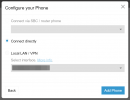
1. Delete phone from user
2. Add phone again, with correct model / MAC
3. Choose connect directly
1728914358237.png
4. Hold down the middle circle button and factory reset the phone.

If you phone is connected via LAN, and it has internet access, it should come online and auto-provision itself within a couple of minutes after being reset.

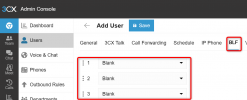
Your user's BLFs are also defined from 3CX and will overwrite anything you put manually on the phone.
1728914699744.png
 
  • Like
Reactions: BKSupport
Scratch that. I've figured it out.
For those who might be wondering.
On the funtion key tab, there's an option for sidekey label length, This changes the length of the label on the UI.

Thanks.
 
Thank you for your response!

I don't seem to have the "normal option"

Just the following

"Display Number And Name"

Should I assume that is the same thing?
yes, they are same.
 

Members Online Now

Forum statistics

Threads
111,832
Messages
589,284
Members
164,662
Latest member
DejanMDS