


- Joined
- Jan 5, 2022
- Messages
- 2
- Reaction score
- 0
Hi Everyone,
First time i've needed to ask for support for 3CX, this one has me scratching my head.
another IT company was onsite when i was on Christmas leave to fix a fax server issue with 3CX, they removed the default details from fax server without copying them down first and added another extensions details (didn't work), I don't believe you can change or modify the default 8888 (888) extension details ?, this extension obviously isn't in the the fax extension area, now I'm struggling to figure out how to put the default details back in or figure out how to change them, no amount of googling has helped.
I put in a grandstream ATA as a temporary solution as i ordered one to play with, but for some reason its not function very well either, if you try send a fax over 2 pages to it, the fax errors on the 2nd page.
So strange.
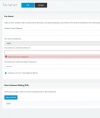
Thanks everyone
John.
First time i've needed to ask for support for 3CX, this one has me scratching my head.
another IT company was onsite when i was on Christmas leave to fix a fax server issue with 3CX, they removed the default details from fax server without copying them down first and added another extensions details (didn't work), I don't believe you can change or modify the default 8888 (888) extension details ?, this extension obviously isn't in the the fax extension area, now I'm struggling to figure out how to put the default details back in or figure out how to change them, no amount of googling has helped.
I put in a grandstream ATA as a temporary solution as i ordered one to play with, but for some reason its not function very well either, if you try send a fax over 2 pages to it, the fax errors on the 2nd page.
So strange.
Thanks everyone
John.
Last edited:


