- Joined
- Oct 8, 2021
- Messages
- 24
- Reaction score
- 2
I want to setup a fax server to forward incoming faxes to an email address as a .pdf file. This looks like it is relatively easy to setup, and doing a quick google search, the instructions which were taken straight from the 3CX website seem pretty easy and straightforward as well..
To configure fax reception:
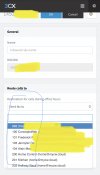
The "Fax Server Extension" dropdown menu under the Fax Server menu, is locked on 8888 and I cannot change it to a fax extension that I have setup.. And, even if I could, under the DID section, no DID's show up and I cannot add them.. I have a specific number I am trying to do this with, and if I click on "Add a DID" there is nothing there and I cannot for the life of me figure out how to add them?
What am I doing wrong here?
To configure fax reception:
- In the 3CX Management Console, go to “Settings” > “FAX Server.”
- Enter an email address to forward the faxes received on this number.
- Select the fax extension that should receive incoming faxes. You can use the default built-in ‘888’ extension.
- Assign one or more available DIDs to the fax server.
- Click “OK” to save. Your fax server is now configured!
The "Fax Server Extension" dropdown menu under the Fax Server menu, is locked on 8888 and I cannot change it to a fax extension that I have setup.. And, even if I could, under the DID section, no DID's show up and I cannot add them.. I have a specific number I am trying to do this with, and if I click on "Add a DID" there is nothing there and I cannot for the life of me figure out how to add them?
What am I doing wrong here?