FDQN question

Status
Not open for further replies.

Scot Busby

Customer
Joined
Jun 8, 2017
Messages
87
Reaction score
19
Our v18 FDQN is XXXX.3cx.us

I know that FDQNs have changed since then with the addition of, in our case, the US State in between XXXX and 3cx. I tried a migration over the weekend to v20 (I've done another v18 to v20 migration without issue) and for some reason, I had issues where the FDQN was not resolving correctly. Before I dig into the split DNS to see if there is an issue with this, I wanted to see if anyone had run into any issues with just using the 3cx.us FDQN.

I apologize for being confusing if this does not make sense.

Thank you!
 
Our v18 FDQN is XXXX.3cx.us

I know that FDQNs have changed since then with the addition of, in our case, the US State in between XXXX and 3cx. I tried a migration over the weekend to v20 (I've done another v18 to v20 migration without issue) and for some reason, I had issues where the FDQN was not resolving correctly. Before I dig into the split DNS to see if there is an issue with this, I wanted to see if anyone had run into any issues with just using the 3cx.us FDQN.

I apologize for being confusing if this does not make sense.

Thank you!
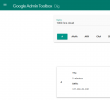

To determine if the issue might be related to your network configuration or DNS propagation, you can use an online tool like this one. Enter your FQDN without the port number. For example: 1000.3cx.cloud

Google Dig Toolbox

It will provide (under Data) the IP address behind the FQDN.
(In my example, the IP address behind the FQDN 1000.3cx.cloud is currently 137.184.81.190.)
Compare this with your iP PBX.

If the result is correct, then it is not a DNS propagation issue.


1724093032726.png
 
Thank you for the suggestion. I have verified this, so I guess it's not a split DNS issue since this resolves fine. I will keep digging into what else it could be.

Thank you!
 
Thank you for the suggestion. I have verified this, so I guess it's not a split DNS issue since this resolves fine. I will keep digging into what else it could be.

Thank you!

What I shared with you is to determine if the FQDN directs traffic to your Public iP 3CX PBX ( from external network ).
It does not help diagnose a potential Split DNS issue that could be caused by your network configuration.

To diagnose Split DNS configuration, open a
Command Prompt ( cmd ) on a computer trying to access the 3CX PBX and run the following command:

Code:
tracert 1000.3cx.cloud

Replace 1000.3cx.cloud with your FQDN.
If Split DNS is configured correctly, the number of hops should be low, very low.
Hide your FQDN and public IP address (if visible) and share the result here.

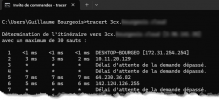
Here’s an example of a configuration WITHOUT Split DNS.

We can easily see that my traffic is routed over the internet and is not being directly directed to my local 3CX PBX, which is on the same network as my computer.

1724095809133.png


If Split DNS (local DNS records) had been correctly configured, you would not have seen a public IP address. In the case of a Hairpin NAT configuration, you would have seen only one public IP address: the public IP address assigned to your router..

This only applies if your 3CX PBX is installed locally, on the same local network as the computers.
 
Status
Not open for further replies.

Forum statistics

Threads
111,953
Messages
589,914
Members
164,849
Latest member
BillyAkansel