feature ask on call ID through ivr

Status
Not open for further replies.

simplyict

Bronze Partner
Joined
Mar 24, 2022
Messages
30
Reaction score
2
Hello
I am fairly new to 3CX and am learning heaps.
I have my system set up now and all is working including the IVR

However, I have an ask on a feature I am not sure if it is possible.

I have a sip trunk coming into the IVR from a 1300 number.
The IVR runs its messaging and the user selects where they want to go.
When the call reaches the final extension, it shows the caller ID.
as we have a number of selections on where they choose to go and the different options, is there a way to show the caller selection instead of the caller ID?

ie, the Caller rings in and selects option 2 which then shows up as from option 2 instead of caller ID? or perhaps caller ID followed by the extension selected.
We have about 10 options on the IVR and we need to know which option so the end-user can answer it appropriately.

any help would be appreciated here
David
 
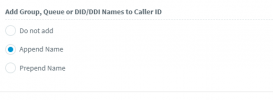
You could have the call routed to a ringgroup/queue and then have that forward to the user. Turn on the option to prepend/append the ringgroup/queue name and viola - you have that information displayed.

1648688956775.png
 
  • Like
Reactions: ChrisC_3CX
Hello Chris. thanks for your input.

So ok here is my setup.
I have a sip trunk coming in.
that is connected to an IVR.
The digital receptionist has a bunch of options and sub options running via ring groups pointing to extensions.
Those extensions are all auto forwarding to 1 main extension.
I checked the setting in the ring groups and that option was already turned on.
but it still only passes my external number through to the answering display.
is there something else I haven't done correctly?

1300 number points to ivr 8001, which then has options to sub digital receptionists, which then point each option to an extension. those extensions are not real handsets. just auto forwarded to the primary receiving handset.
would this be incorrect?
 
Instead of pointing to dummy extensions, try updating 1 to point to a dummy ringgroup and have the real extension be a member of that group. Call the ring group the name you want to appear on screen. Test and see if the name now shows.
 
Hi. Sorry, Excuse my not understanding here.
point 1 what?

i made a dummy ring group called test and added the real extension to it.
but do i point the did, or an option from the welcome message and options?
 
What I think @SweetAction is saying is to make the call flow like this:
SIP Trunk --> Digital Receptionist --> Ring Group --> primary receiving handset

Instead of like this:
SIP Trunk --> Digital Receptionist --> Dummy Extension --> primary receiving handset


This way the Name of "Ring Group" will appear on your phone.
 
ok thanks for that Nick. I thought it might be that way so i set it up while i was waiting.
and it still only shows the caller ID and the inbound 1300 number. is there something else i missed
sip trunk to main digital receptions, set button 7 to ring the new ring group called test, which the real extension of 1111 ie David is in that group. but still only outside numbers and not the name of the ring group
 
Hi all.
I am still not getting anywhere with the ring group name showing up in the caller ID
I have followed the directions exactly and it will still only show the external caller ID not the ring group

anything else I can check or do?
 
What are the agents using to answer the calls? An IP Phone, mobile client, the 3CX Windows Desktop App?
 
Status
Not open for further replies.

Forum statistics

Threads
111,974
Messages
590,083
Members
164,900
Latest member
Silent_Guru