Solved Firewall Check does not finish ... stuck on testing ports 9000..9398

Status
Not open for further replies.

Jacob Creech

Free User
Joined
Sep 5, 2019
Messages
13
Reaction score
1
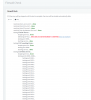
I am using the debian-amd64-netinst-3cx.iso after install and initial setup everything looked ok. So I went to run the Firewall Check and it made it through everything fine until it got to the testing ports and nothing it just sits there. I have tried a reboot of the system (I did do a controlled restart) and ran the Firewall Check again with the same results it gets stuck on the Firewall check. It has been in this state for over 15 hours

Are there any logs to see what the issue is or anything to do to help remedy this issue.
12264
 
Well, there's clearly an issue here as the SIP ALG is detected.
 
  • Like
Reactions: John Dugan
Any suggestions on how to fix the issue?
Where is your 3CX hosted?

Have you opened all ports needed for 3CX? Port forward done if needed?

Disable SIP ALG in any way you can.
 
  • Like
Reactions: Jacob Creech
Where is your 3CX hosted?

Have you opened all ports needed for 3CX? Port forward done if needed?

Disable SIP ALG in any way you can.

It is hosted on a Hyper-V server that is at my location. Yes, all ports are open. I have run this under the same setting on my Cisco ASA with Windows installation on windows 10 and had no issue now that I am ready to purchase and go to production I wanted to switch over to the Debian iso and run my production environment on that but am having these new issues.
 
It is hosted on a Hyper-V server that is at my location. Yes, all ports are open. I have run this under the same setting on my Cisco ASA with Windows installation on windows 10 and had no issue now that I am ready to purchase and go to production I wanted to switch over to the Debian iso and run my production environment on that but am having these new issues.
How is your firewall configured?

As again, make sure SIP ALG is disabled in the ASA. This is reallllllly important.

Once that is disabled, try the tester again.
 
  • Like
Reactions: Jacob Creech
How is your firewall configured?

As again, make sure SIP ALG is disabled in the ASA. This is reallllllly important.

Once that is disabled, try the tester again.
Ok that did it once I disable that in the Cisco ASA the firewall check finished below is what I had to do in the Cisco ASA
Configuring via ASDM (ASA Only)

  1. Connect into the device using ASDM
  2. Select Configuration, Firewall, Service Policy Rules
  3. Open the Global Policy rule
  4. Select Rule Actions, Protocol Inspection
  5. Uncheck SIP
  6. Click OK
  7. Click Apply
  8. Click Save
Thank you very much for your help.
 
  • Like
Reactions: Evolute IT
I seem to be having the same problem after migrating from v15.5 on Windows to v16 on Linux.

I have no issues with SIP ALG, but firewall checker just stuck on port test

12376
 
I seem to be having the same problem after migrating from v15.5 on Windows to v16 on Linux.

I have no issues with SIP ALG, but firewall checker just stuck on port test

View attachment 12376
You may want to open a new thread as this was has been resolved and most likely will not get any new attention.

Also, one other thing I did do was to completely shut down and restart the server you may want to try that as well. Make sure you follow the proper shutdown sequence for your version of Linux.
 
Status
Not open for further replies.

Latest Posts

Forum statistics

Threads
111,933
Messages
589,817
Members
164,810
Latest member
astrobalaji