Firewall Check Fails After Upgrade to v16

Status
Not open for further replies.

Frank86

Bronze Partner
Joined
Jan 18, 2018
Messages
300
Reaction score
26
Just upgraded from v15.5 SP6 to v16.
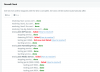
All good, except that the firewall check fails, even though nothing has changed on the Firewall side.
The firewall is a Meraki, which does not use SIP ALG.
All the same ports as v15.5 are set up in the firewall.
Ran the test twice, with the same result (the 2nd test also added the mapping issue between port 9192 and 9194
Am I missing something?
 

Attachments

  • Screen Shot 2019-04-13 at 2.23.44 PM.png
    Screen Shot 2019-04-13 at 2.23.44 PM.png
    87.5 KB · Views: 40
  • Screen Shot 2019-04-13 at 2.23.49 PM.png
    Screen Shot 2019-04-13 at 2.23.49 PM.png
    29.8 KB · Views: 39
Hi ,
others 3cx users related same problem with V16 FWC, is the FWC giving you some bad different ports each time you run it ?
If it was good in v15.5 ,that's the same for V16
 
Last edited:
Yes, it shows random bad ports every time I run it.
Thank you.
 
Have you rebooted the firewall to clear out routing and such? Sometimes that can resolve this issue.
 
Done , change nothing on my side
 
is this a Windows instance? if so, have you checked windows firewall
 
Windows on premise, FWC green in v15.5 and red in V16, same PC, no ports change on FW rules nor in computer side.
 
We have also seen this issue with multiple upgrades. On a couple if you run the FWC a couple times it shows good, we do have one that has yet to pass but everything seems fine. All issues have been Windows hosts.
 
And what happens if you turn off Windows Firewall and run the test?

Your Windows Firewall might be set to exclude ports 1234 for 3cxapp.exe.

V16 might have installed 3cxappv1.exe, you'd have to look in Advanced Windows Firewall at the rule maybe.
 
i will try this tonight out of office hours and will let you know if it was the point.
 
My windows firewall is off, the check still fails for me too.
 
Please note that we have identified an issue with the Firewall checker on V16 which could cause some RTP ports to be flagged with the mapping does not match error.
If you are failing random ports every time with the same error then just ignore it for now until we can get this resolved. Your firewall configuration should be fine.
 
  • Like
Reactions: SussekNick
So, it may not have been necessary to add the extra OPN Sense firewall config?
It depends on what error you were getting back from the firewall checker. If the issue was the one described above then your firewall was probably setup correctly. If the guide helped you overcome the issues though then i would assume you were facing a different issue.
 
Status
Not open for further replies.

Forum statistics

Threads
111,921
Messages
589,746
Members
164,796
Latest member
Dame24
