Firewall check ports remail closed for almost all port - on premise debian 9

Status
Not open for further replies.
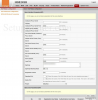
Hi @ECOM GROUP (Mauritius) are you able to send a screenshot of the voice tab in the router, maybe something in there is conflicting?

I found this, this will mean the router is expecting the packets on those ports for itself.

13857

Go through basic and advanced and change all port numbers that seem to conflict with 3cx ports
 
@ECOM GROUP (Mauritius)

You can change the ports as per the above post's suggestion but keep in mind that providers autoprovision their modems so they might overwrite your changes at any given time.

From what I see, your modem has DMZ mode. Go ahead remove the port forwards, and just add the PBX machine IP in DMZ as a test.

This will bypass the modem firewall and allow you direct access to the internet. If your firewall checker passes while in DMZ mode, then clearly the firewall is blocking you. You can now remove the IP from DMZ.

What you can do then is reinstall and avoid 5060 as your SIP port (if the provider is using that port as per the above post screenshot). Then you have to manually port-forward again and see if you can get it to work. Maybe your provider needs to enable "advanced view" on the modem as some modems hide many settings that the customer is "not supposed to see".
 
Hi @ECOM GROUP (Mauritius) are you able to send a screenshot of the voice tab in the router, maybe something in there is conflicting?

I found this, this will mean the router is expecting the packets on those ports for itself.

View attachment 13857

Go through basic and advanced and change all port numbers that seem to conflict with 3cx ports
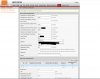
13858

here is mine, i have changed the port to 5063 so that it does not conflict and also deleted the voip phone line config.

i have change the sip port of 5060 to 6060 during installation of 3cx, and 5090 to 5092. i have also tried to open those port in IT Tables debian as per this guide: https://www.3cx.com/docs/manual/firewall-router-configuration/

but nothing seem to work.

when i test port 6060 and 5092, it seem open via pfportchecker.
 
@ECOM GROUP (Mauritius)

You can change the ports as per the above post's suggestion but keep in mind that providers autoprovision their modems so they might overwrite your changes at any given time.

From what I see, your modem has DMZ mode. Go ahead remove the port forwards, and just add the PBX machine IP in DMZ as a test.

This will bypass the modem firewall and allow you direct access to the internet. If your firewall checker passes while in DMZ mode, then clearly the firewall is blocking you. You can now remove the IP from DMZ.

What you can do then is reinstall and avoid 5060 as your SIP port (if the provider is using that port as per the above post screenshot). Then you have to manually port-forward again and see if you can get it to work. Maybe your provider needs to enable "advanced view" on the modem as some modems hide many settings that the customer is "not supposed to see".

@JohnS_3CX Thanks for your response,
i have change the sip port of 5060 to 6060 during installation of 3cx, and 5090 to 5092. i have also tried to open those port in IT Tables debian as per this guide: https://www.3cx.com/docs/manual/firewall-router-configuration/

but nothing seem to work. May be how will i know if debian have accepted the new port?

when i test port 6060 and 5092, it seem open via pfportchecker.

i have also enabled DMZ, restart router and debian, still having same issue. i think issue is on 3cx side or debian.
 
@ECOM GROUP (Mauritius) check here for commands for checking listening ports on debian

https://www.cyberciti.biz/faq/unix-linux-check-if-port-is-in-use-command/

Then you will just have to check the iptables match


@diamond9 it seem ok right? check below \

root@debian:# root@debian:# sudo netstat -tulpn | grep LISTEN
-bash: root@debian:~#: command not found
root@debian:~# tcp 0 0 0.0.0.0:22 0.0.0.0:* LISTEN 461/sshd
-bash: tcp: command not found
root@debian:~# tcp 0 0 127.0.0.1:5432 0.0.0.0:* LISTEN 465/postgres
-bash: tcp: command not found
root@debian:~# tcp 0 0 0.0.0.0:5000 0.0.0.0:* LISTEN 473/nginx: master p
-bash: tcp: command not found
root@debian:~# tcp 0 0 0.0.0.0:5001 0.0.0.0:* LISTEN 473/nginx: master p
-bash: tcp: command not found
root@debian:~# tcp 0 0 127.0.0.1:5482 0.0.0.0:* LISTEN 1179/3CXPhoneSystem
-bash: tcp: command not found
root@debian:~# tcp 0 0 0.0.0.0:6060 0.0.0.0:* LISTEN 1179/3CXPhoneSystem
-bash: tcp: command not found
root@debian:~# tcp 0 0 127.0.0.1:5484 0.0.0.0:* LISTEN 529/3cxSystemServic
-bash: tcp: command not found
root@debian:~# tcp 0 0 0.0.0.0:6061 0.0.0.0:* LISTEN 1179/3CXPhoneSystem
-bash: tcp: command not found
root@debian:~# tcp 0 0 127.0.0.1:5485 0.0.0.0:* LISTEN 516/3CXSLDBServ
-bash: tcp: command not found
root@debian:~# tcp6 0 0 :::22 :::* LISTEN 461/sshd
-bash: tcp6: command not found
root@debian:~# tcp6 0 0 ::1:5432 :::* LISTEN 465/postgres
-bash: tcp6: command not found
root@debian:~# tcp6 0 0 :::5092 :::* LISTEN 1259/3CXTunnel
-bash: tcp6: command not found
root@debian:~# tcp6 0 0 :::5000 :::* LISTEN 473/nginx: master p
-bash: tcp6: command not found
root@debian:~# tcp6 0 0 :::5001 :::* LISTEN 473/nginx: master p
-bash: tcp6: command not found
root@debian:~# tcp6 0 0 :::6060 :::* LISTEN 1179/3CXPhoneSystem
-bash: tcp6: command not found
root@debian:~# tcp6 0 0 :::6061 :::* LISTEN 1179/3CXPhoneSystem
-bash: tcp6: command not found
root@debian:# root@debian:#
-bash: root@debian:~#: command not found
root@debian:~#
 
That looks all fine, can you run sudo iptables -S and post results please
 
That looks all fine, can you run sudo iptables -S and post results please

@diamond9 what about this @ the new port 6060 that is replacing 5060 and 5092 replacing 5090 " root@debian:~# tcp 0 0 0.0.0.0:6060 0.0.0.0:* LISTEN 1179/3CXPhoneSystem "


those 00.0.0.0.0:6060 is normal?

after running the test sudo iptables -S , here is the result

root@debian:~# sudo iptables -S
-P INPUT DROP
-P FORWARD DROP
-P OUTPUT ACCEPT
-N ICMPFLOOD
-N SSHBRUTE
-A INPUT -d 224.0.1.75/32 -p udp -j ACCEPT
-A INPUT -p tcp -m multiport --dports 5000,5001,6060,6061,5092 -m tcp --tcp-flag s FIN,SYN,RST,ACK SYN -m conntrack --ctstate NEW -j ACCEPT
-A INPUT -p udp -m multiport --dports 6060,5092 -j ACCEPT
-A INPUT -d 224.0.1.75/32 -p udp -j ACCEPT
-A INPUT -p tcp -m multiport --dports 5000,5001,6060,6061,5092 -m tcp --tcp-flag s FIN,SYN,RST,ACK SYN -m conntrack --ctstate NEW -j ACCEPT
-A INPUT -p udp -m multiport --dports 6060,5092 -j ACCEPT
-A INPUT -d 224.0.1.75/32 -p udp -j ACCEPT
-A INPUT -p tcp -m multiport --dports 5000,5001,6060,6061,5092 -m tcp --tcp-flag s FIN,SYN,RST,ACK SYN -m conntrack --ctstate NEW -j ACCEPT
-A INPUT -p udp -m multiport --dports 6060,5092 -j ACCEPT
-A INPUT -i lo -j ACCEPT
-A INPUT -m conntrack --ctstate RELATED,ESTABLISHED -j ACCEPT
-A INPUT -m conntrack --ctstate INVALID -j DROP
-A INPUT -s 127.0.0.0/8 ! -i lo -j DROP
-A INPUT -d 224.0.1.75/32 -j ACCEPT
-A INPUT -m addrtype --dst-type BROADCAST -j DROP
-A INPUT -p tcp -m multiport --dports 80,443,5000,5001,5015,6060,5063,5092 -m tc p --tcp-flags FIN,SYN,RST,ACK SYN -m conntrack --ctstate NEW -j ACCEPT
-A INPUT -p udp -m multiport --dports 69,6066,5092,9000:10999 -j ACCEPT
-A INPUT -d 224.0.0.0/4 -j DROP
-A INPUT -p tcp -m multiport --dports 80,443,5000,5001,5015,6060,5063,5092 -m tc p --tcp-flags FIN,SYN,RST,ACK SYN -m conntrack --ctstate NEW -j ACCEPT
-A INPUT -p udp -m multiport --dports 69,6060,5092,9000:10999 -j ACCEPT
-A INPUT -p udp -m multiport --dports 137,138 -j ACCEPT
-A INPUT -p tcp -m multiport --dports 139,445 -j ACCEPT
-A INPUT -p tcp -m tcp --dport 22 --tcp-flags FIN,SYN,RST,ACK SYN -m conntrack - -ctstate NEW -j SSHBRUTE
-A INPUT -p icmp -m icmp --icmp-type 0 -m conntrack --ctstate NEW -j ACCEPT
-A INPUT -p icmp -m icmp --icmp-type 3 -m conntrack --ctstate NEW -j ACCEPT
-A INPUT -p icmp -m icmp --icmp-type 11 -m conntrack --ctstate NEW -j ACCEPT
-A INPUT -p icmp -m icmp --icmp-type 8 -m conntrack --ctstate NEW -j ICMPFLOOD
-A INPUT -p udp -m multiport --dports 135,445 -j DROP
-A INPUT -p udp -m udp --dport 137:139 -j DROP
-A INPUT -p udp -m udp --sport 137 --dport 1024:65535 -j DROP
-A INPUT -p tcp -m multiport --dports 135,139,445 -j DROP
-A INPUT -p udp -m udp --dport 1900 -j DROP
-A INPUT -p udp -m udp --sport 53 -j DROP
-A INPUT -p tcp -m tcp --dport 113 --tcp-flags FIN,SYN,RST,ACK SYN -m conntrack --ctstate NEW -j REJECT --reject-with tcp-reset
-A INPUT -m limit --limit 1/sec --limit-burst 100 -j LOG --log-prefix "iptables[ DOS]: "
-A ICMPFLOOD -m recent --set --name ICMP --mask 255.255.255.255 --rsource
-A ICMPFLOOD -m recent --update --seconds 1 --hitcount 6 --rttl --name ICMP --ma sk 255.255.255.255 --rsource -m limit --limit 1/sec --limit-burst 1 -j LOG --log -prefix "iptables[ICMP-flood]: "
-A ICMPFLOOD -m recent --update --seconds 1 --hitcount 6 --rttl --name ICMP --ma sk 255.255.255.255 --rsource -j DROP
-A ICMPFLOOD -j ACCEPT
-A SSHBRUTE -m recent --set --name SSH --mask 255.255.255.255 --rsource
-A SSHBRUTE -m recent --update --seconds 300 --hitcount 10 --name SSH --mask 255 .255.255.255 --rsource -m limit --limit 1/sec --limit-burst 100 -j LOG --log-pre fix "iptables[SSH-brute]: "
-A SSHBRUTE -m recent --update --seconds 300 --hitcount 10 --name SSH --mask 255 .255.255.255 --rsource -j DROP
-A SSHBRUTE -j ACCEPT
root@debian:~#
 
Im not sure is this will work, but your iptables looked alot different to mine, what i have done is taken mine and replaced the ports with that you used

-P INPUT DROP
-P FORWARD DROP
-P OUTPUT ACCEPT
-N ICMPFLOOD
-N SSHBRUTE
-A INPUT -d 224.0.1.75/32 -p udp -j ACCEPT
-A INPUT -p tcp -m multiport --dports 5000,5001,6060,6061,5092 -m tcp --tcp-flags FIN,SYN,RST,ACK SYN -m conntrack --ctstate NEW -j ACCEPT
-A INPUT -p udp -m multiport --dports 6060,5092 -j ACCEPT
-A INPUT -i lo -j ACCEPT
-A INPUT -m conntrack --ctstate RELATED,ESTABLISHED -j ACCEPT
-A INPUT -m conntrack --ctstate INVALID -j DROP
-A INPUT -s 127.0.0.0/8 ! -i lo -j DROP
-A INPUT -d 224.0.1.75/32 -j ACCEPT
-A INPUT -m addrtype --dst-type BROADCAST -j DROP
-A INPUT -m addrtype --dst-type MULTICAST -j DROP
-A INPUT -m addrtype --dst-type ANYCAST -j DROP
-A INPUT -d 224.0.0.0/4 -j DROP
-A INPUT -p tcp -m multiport --dports 80,443,5000,5001,5015,6060,6061,5092,5432 -m tcp --tcp-flags FIN,SYN,RST,ACK SYN -m conntrack --ctstate NEW -j ACCEPT
-A INPUT -p udp -m multiport --dports 69,6060,5092,7000:10999 -j ACCEPT
-A INPUT -p udp -m multiport --dports 137,138 -j ACCEPT
-A INPUT -p tcp -m multiport --dports 139,445 -j ACCEPT
-A INPUT -p tcp -m tcp --dport 22 --tcp-flags FIN,SYN,RST,ACK SYN -m conntrack --ctstate NEW -j SSHBRUTE
-A INPUT -p icmp -m icmp --icmp-type 0 -m conntrack --ctstate NEW -j ACCEPT
-A INPUT -p icmp -m icmp --icmp-type 3 -m conntrack --ctstate NEW -j ACCEPT
-A INPUT -p icmp -m icmp --icmp-type 11 -m conntrack --ctstate NEW -j ACCEPT
-A INPUT -p icmp -m icmp --icmp-type 8 -m conntrack --ctstate NEW -j ICMPFLOOD
-A INPUT -p udp -m multiport --dports 135,445 -j DROP
-A INPUT -p udp -m udp --dport 137:139 -j DROP
-A INPUT -p udp -m udp --sport 137 --dport 1024:65535 -j DROP
-A INPUT -p tcp -m multiport --dports 135,139,445 -j DROP
-A INPUT -p udp -m udp --dport 1900 -j DROP
-A INPUT -p udp -m udp --sport 53 -j DROP
-A INPUT -p tcp -m tcp --dport 113 --tcp-flags FIN,SYN,RST,ACK SYN -m conntrack --ctstate NEW -j REJECT --reject-with tcp-reset
-A INPUT -m limit --limit 1/sec --limit-burst 100 -j LOG --log-prefix "iptables[DOS]: "
-A ICMPFLOOD -m recent --set --name ICMP --mask 255.255.255.255 --rsource
-A ICMPFLOOD -m recent --update --seconds 1 --hitcount 6 --rttl --name ICMP --mask 255.255.255.255 --rsource -m limit --limit 1/sec --limit-burst 1 -j LOG --log-prefix "iptables[ICMP-flood]: "
-A ICMPFLOOD -m recent --update --seconds 1 --hitcount 6 --rttl --name ICMP --mask 255.255.255.255 --rsource -j DROP
-A ICMPFLOOD -j ACCEPT
-A SSHBRUTE -m recent --set --name SSH --mask 255.255.255.255 --rsource
-A SSHBRUTE -m recent --update --seconds 300 --hitcount 10 --name SSH --mask 255.255.255.255 --rsource -m limit --limit 1/sec --limit-burst 100 -j LOG --log-prefix "iptables[SSH-brute]: "
-A SSHBRUTE -m recent --update --seconds 300 --hitcount 10 --name SSH --mask 255.255.255.255 --rsource -j DROP
-A SSHBRUTE -j ACCEPT
 
Hi,

During your installation you only need to change the SIP port to 6060 (to avoid the 5060 the provider uses). The rest of the ports are ok and don't need to be changed. The IP tables will be set up automatically on 6060 during installation too.

When you check to see if 6060 is open using pfportchecker, you are not seeing where it remaps to, only that it is open. Port remapping will not necessarily prevent calls, but it may cause issues later on that are best avoided.

If DMZ did not work (ie firewall checker still detects you have remapping) then perhaps you did not enable it correctly or you may have done everything correctly indeed, but the modem still remaps the ports. (DMZ is implemented differently from manufacturer to manufacturer so it doesn't always work)

Since you are a business customer, perhaps you can get the provider to bridge the modem for you so that you bypass its own NAT and firewall entirely. Then connect your own router or firewall, one that you can configure manually to work as intended.
 
@ECOM GROUP (Mauritius)

Your iptables list is a mess.
A lot of duplicate lines, port numbers that not belong to 3CX, e.g. 6063 and 6066, you use port range 9000-10999 instead of 7000-10999.
May I suggest to reinstall the 3CX from ISO and do not touch the iptables.
 
The rest of the ports are ok and don't need to be changed. The IP tables will be set up automatically on 6060 during installation too.
Not so sure , because in France Orange in their livebox (modem, router , FW, phone and tv), push some restrictions on 5060 for their voip use but also on RTP range so may be this is why that's not working.
I've already set something to use unusual sip port 4959 instead of 5060, but 3CX firewall checker can't be ok with that so even if pbx works, firewall test fails.
 
Since you are a business customer, perhaps you can get the provider to bridge the modem for you so that you bypass its own NAT and firewall entirely. Then connect your own router or firewall, one that you can configure manually to work as intended.
most of the time Orange devices are not able to be bridgeable even in business offer, the only way it can be available is when they use devices not branded by Orange, like cisco router for example
 
most of the time Orange devices are not able to be bridgeable even in business offer, the only way it can be available is when they use devices not branded by Orange, like cisco router for example
Thats True!

@JohnS_3CX It cannot be possible as most individual and business use same router. I am testing this as we are planning to sell 3cx with a readymade debian mini pc. Do you think it will be possible to add another router on the huawei HG8245H to fix the nat issue?

The port has been remapped in the router, forwarded port 6060 for 3cx IP.
In this case , i will re-install debian 3cx iso and will not touch any IPTable, because i have seen this here for user who change their port, this is why i was confused. https://www.3cx.com/docs/manual/firewall-router-configuration/
 
Im not sure is this will work, but your iptables looked alot different to mine, what i have done is taken mine and replaced the ports with that you used

-P INPUT DROP
-P FORWARD DROP
-P OUTPUT ACCEPT
-N ICMPFLOOD
-N SSHBRUTE
-A INPUT -d 224.0.1.75/32 -p udp -j ACCEPT
-A INPUT -p tcp -m multiport --dports 5000,5001,6060,6061,5092 -m tcp --tcp-flags FIN,SYN,RST,ACK SYN -m conntrack --ctstate NEW -j ACCEPT
-A INPUT -p udp -m multiport --dports 6060,5092 -j ACCEPT
-A INPUT -i lo -j ACCEPT
-A INPUT -m conntrack --ctstate RELATED,ESTABLISHED -j ACCEPT
-A INPUT -m conntrack --ctstate INVALID -j DROP
-A INPUT -s 127.0.0.0/8 ! -i lo -j DROP
-A INPUT -d 224.0.1.75/32 -j ACCEPT
-A INPUT -m addrtype --dst-type BROADCAST -j DROP
-A INPUT -m addrtype --dst-type MULTICAST -j DROP
-A INPUT -m addrtype --dst-type ANYCAST -j DROP
-A INPUT -d 224.0.0.0/4 -j DROP
-A INPUT -p tcp -m multiport --dports 80,443,5000,5001,5015,6060,6061,5092,5432 -m tcp --tcp-flags FIN,SYN,RST,ACK SYN -m conntrack --ctstate NEW -j ACCEPT
-A INPUT -p udp -m multiport --dports 69,6060,5092,7000:10999 -j ACCEPT
-A INPUT -p udp -m multiport --dports 137,138 -j ACCEPT
-A INPUT -p tcp -m multiport --dports 139,445 -j ACCEPT
-A INPUT -p tcp -m tcp --dport 22 --tcp-flags FIN,SYN,RST,ACK SYN -m conntrack --ctstate NEW -j SSHBRUTE
-A INPUT -p icmp -m icmp --icmp-type 0 -m conntrack --ctstate NEW -j ACCEPT
-A INPUT -p icmp -m icmp --icmp-type 3 -m conntrack --ctstate NEW -j ACCEPT
-A INPUT -p icmp -m icmp --icmp-type 11 -m conntrack --ctstate NEW -j ACCEPT
-A INPUT -p icmp -m icmp --icmp-type 8 -m conntrack --ctstate NEW -j ICMPFLOOD
-A INPUT -p udp -m multiport --dports 135,445 -j DROP
-A INPUT -p udp -m udp --dport 137:139 -j DROP
-A INPUT -p udp -m udp --sport 137 --dport 1024:65535 -j DROP
-A INPUT -p tcp -m multiport --dports 135,139,445 -j DROP
-A INPUT -p udp -m udp --dport 1900 -j DROP
-A INPUT -p udp -m udp --sport 53 -j DROP
-A INPUT -p tcp -m tcp --dport 113 --tcp-flags FIN,SYN,RST,ACK SYN -m conntrack --ctstate NEW -j REJECT --reject-with tcp-reset
-A INPUT -m limit --limit 1/sec --limit-burst 100 -j LOG --log-prefix "iptables[DOS]: "
-A ICMPFLOOD -m recent --set --name ICMP --mask 255.255.255.255 --rsource
-A ICMPFLOOD -m recent --update --seconds 1 --hitcount 6 --rttl --name ICMP --mask 255.255.255.255 --rsource -m limit --limit 1/sec --limit-burst 1 -j LOG --log-prefix "iptables[ICMP-flood]: "
-A ICMPFLOOD -m recent --update --seconds 1 --hitcount 6 --rttl --name ICMP --mask 255.255.255.255 --rsource -j DROP
-A ICMPFLOOD -j ACCEPT
-A SSHBRUTE -m recent --set --name SSH --mask 255.255.255.255 --rsource
-A SSHBRUTE -m recent --update --seconds 300 --hitcount 10 --name SSH --mask 255.255.255.255 --rsource -m limit --limit 1/sec --limit-burst 100 -j LOG --log-prefix "iptables[SSH-brute]: "
-A SSHBRUTE -m recent --update --seconds 300 --hitcount 10 --name SSH --mask 255.255.255.255 --rsource -j DROP
-A SSHBRUTE -j ACCEPT
@diamond9 I am lost for this explanation. How to do this?
 
Is it possible to use directly on your own fiber or ethernet router (don't know how your fiber ends) instead of one from Orange.
 
This is up to the provider, there isn't much else you can do if they do not provide any way for the customer to bypass their router like to use your own GPON terminal or a Fiber-to-ethernet media converter.

If the provider does not have any solutions for business customers for bypassing the modem's NAT/Firewall (I'm a bit skeptical on this) then you need to use a cloud hosted PBX and SBC to bypass them altogether.
 
This is up to the provider, there isn't much else you can do if they do not provide any way for the customer to bypass their router like to use your own GPON terminal or a Fiber-to-ethernet media converter.

If the provider does not have any solutions for business customers for bypassing the modem's NAT/Firewall (I'm a bit skeptical on this) then you need to use a cloud hosted PBX and SBC to bypass them altogether.
@JohnS_3CX Very strange, The provider said the never blocked any port,
Cloud pbx work well, the only thing is we use full SIP esbc sip line via via none account base, and come with local IP, i have to use a ddns to make it work, it work well, the only issue is each time the internet ip change, i have to refresh the sip registration then i can make calls. otherwise i can only receive calls.

i am looking for a cheap and easy solution to target Small businesses. else i would offer cloud and VPN. But all small business have the correct hardware to perform vpn
 
@ECOM GROUP (Mauritius) you dont need VPN for cloud based systems, you can use direct SIP on the phones or install a SBC then you can have the system in the cloud without the need for VPN as long as you use the compatible phones.
 
If they don't block any port, and you forward them correctly, then you should not have any issues I would expect.. so I'm fairly confident that this is a firewall issue.

I think what was being questioned here was whether the ISP router allows full cone NAT port forwarding. Maybe you just need to experiment a bit more with it and avoid 5060 using a fresh install. The do not change the 5060 on the ISP modem since they will reprovision it automatically again.
 
Status
Not open for further replies.

Forum statistics

Threads
111,935
Messages
589,823
Members
164,816
Latest member
natedog