Solved Firewall Checker Failed - full cone test failed port 9000 onwards

Status
Not open for further replies.

D Bedford

Forum User
Basic Certified
Joined
Oct 17, 2017
Messages
66
Reaction score
39
Hi all,

I'm hoping someone more knowledgeable than me can assist here.

Our 3CX instance is working fine, except for Dial-In and Web users cannot hear each other when in a Video Conference. Web users can hear each other (and WebMeeting App users), and dial-in users can hear each other, but nothing across Web - Dial In.

So I ran a firewall test which fails. Here's the result:
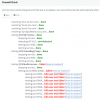
3cx-firewall-checker-fail.png
And the rest of the ports down to 9398 fail with the same "full cone test failed (how to resolve?)" error, as do 10600 - 10998.

Our firewall is a Fortigate 100D. I have confirmed with our firewall provider that SIP ALG is disabled, that all outbound traffic from our phone system is allowed and all translating to our external IP address assigned to our phone system. Ports are forwarded according to https://www.3cx.com/docs/ports/ except SMTP.

I disabled the Windows firewall when running this test, although the same ports are allowed, in addition to the 3CXPhoneSystem.exe application.

I'd be immensely grateful if someone more knowledgeable could point me in the right direction for getting our firewall checker to pass, and thus possibly solve our issue.

Thanks in advance.
 
  • Like
Reactions: D Bedford
I've only seen this on installs that have multiple static IPs coming into a NAT Gateway.

The firewall/port forwarding correctly directs incoming traffic from the internet via the 3CX Static IP and correctly maps this to the private IP of box running 3CX, however when that box is the one that imitates the connection out to the internet it goes out on a different IP Address from the phone systems assigned static IP. If you can fire up a browser window on the box and google "what's my ip" and check the public address matches the one one your 3CX FQDN is pointing at.

If not as keiferschild has already said there should be a way of setting up rules on your router to direct all traffic from a particular IP (in this case your 3CX server) to go out onto the internet using a specific public address.
 
  • Like
Reactions: D Bedford
Thanks for the advice kieferschild and willowsv.

WhatIsMyIP returns back with the correct static IP assigned to the phone system, so all outbound traffic is being translated correctly to that static IP.

That post on the fortinet forums is detailed, thanks! I hadn't come across it. From the steps, our configuration matches it, except for the IP Pool:

2. Create a new address for the EXTERNAL (public) device IP Pool
  1. Navigate to: Policy & Objects > Objects > IP Pools
  2. Type = Select “One-to-One” Ours says 'Overload'
  3. ARP Reply = Uncheck this (defaults to checked) Ours is checked
 
To add some more information, I ran a Wireshark Capture last night when I ran the Firewall Checker again.
It looks like I can see the packets mentioned in Tests 1 & 2 here https://www.3cx.com/docs/firewall-checker/ and I see what is shown in the screenshots which looks like the ports are being passed correctly. Hopefully I've santitised these enough!
 

Attachments

  • Capture-Test1-3CXFirewall.png
    Capture-Test1-3CXFirewall.png
    24.6 KB · Views: 99
  • Capture-Test2-3CXFirewall.png
    Capture-Test2-3CXFirewall.png
    29.1 KB · Views: 85
Hi,

Full cone test failed - would indicate that a packet was sent, but the PBX never received a reply.

This could be a firewall issue, or an OS issue.

Remember that just because you see the traffic returning on the NIC, does not mean that the application layer got the packet.

So captures need to be performed on both the firewall and the PBX simultaneously, comparing them and seeing that the resulting traffic actually reaches the PBX NIC. Then IF it is confirmed to be OK, you need to look at the OS whether it is blocking traffic, although in most complaints you will see on the forum its almost always the firewall.
 
  • Like
Reactions: D Bedford
I had the same issue with my ubiquiti Edgerouter. I ended up just open the ports manually via the firewall. Still trying to figure out how to do Full cone NAT on the Edgerouter.
 
  • Like
Reactions: D Bedford
I recommend rebooting the fortigate first and seeing if you see any different behavior.
 
  • Like
Reactions: D Bedford
Thank you all so far for your advice.

The firewall is a shared device so it can't be rebooted, but I've been told all sessions were killed after SIP ALG was disabled.

Phone calls, internal and external, (using Windows softphones and Android/iOS Apps) all work without any problems at all.

Our firewall provider are asking what the firewall checker does so that they can narrow down their capture. I've sent them https://www.3cx.com/docs/firewall-checker/ and https://www.3cx.com/docs/troubleshooting-firewall-checker/ but that doesn't seem to answer their question in enough detail.

Here's the support information as I should have provided in the first post:
  • 3CX Version, e.g. Professional Perpetual 16.0.6.655
  • Server OS, e.g. Windows Server 2019
  • Phone Client: Windows Softphone, iOS App
  • Has the Firewall Checker passed: NO
  • Are custom Phone Templates being used: NO
 
Last edited:
I've 100% seen situations where a Fortigate firewall reboot resolved similar issues.
 
  • Like
Reactions: D Bedford
The above article does describe how the checker works and goes into some detail so perhaps they should give it another read or tell us if they have any specific question it does not cover.

The main idea with full cone NAT is that the port is forwarded 1:1 (port is preserved) but it should also be a static forward, meaning that it is always active, never closed due to inactivity.

Most firewalls allow outgoing connections by default, and close them when they are no longer active. This is a good policy, but is not good for servers, only clients mostly.
 
  • Like
Reactions: amir_ and D Bedford
The above article does describe how the checker works and goes into some detail so perhaps they should give it another read or tell us if they have any specific question it does not cover.

The main idea with full cone NAT is that the port is forwarded 1:1 (port is preserved) but it should also be a static forward, meaning that it is always active, never closed due to inactivity.

Most firewalls allow outgoing connections by default, and close them when they are no longer active. This is a good policy, but is not good for servers, only clients mostly.

I will add that our firewall rules are very restrictive for security purposes and only allow inbound traffic to 5060 from our SIP telephony provider IP ranges. For the 3CX firewall check to succeed, we had to very briefly open up our firewall rules to allow other IP ranges, run the firewall check successfully, and then restrict the INBOUND firewall ACL rules.
 
That's fine, so long as you test it beforehand and know what your are doing it should be no prolblem at all
 
  • Like
Reactions: amir_
Successfully resolved this morning. Both of these changes together resolved it:

We changed IP Pool assigned to the outbound NAT from overload to one-to-one (nothing in Fortinet's documentation mentioned that this affected ports as well as IP's).

On Policies & Objects -> Services, when the 3CX port range was created I had ticked Specify Source Ports and set it to the same as the Destination (9000-10999). This needed to be unticked so that only the destination port was set.

We had absolutely no audio issues with phone calls for the multiple years we have run 3CX, despite this misconfiguration.

I hope this may help someone in the future to avoid making such a mistake. Thanks to those who have contributed to helping me solve it!
 
Glad to hear it was resolved, thanks for sharing your solution
 
  • Like
Reactions: D Bedford
Status
Not open for further replies.

Forum statistics

Threads
111,974
Messages
590,081
Members
164,899
Latest member
mazet