firewall checker

Status
Not open for further replies.

Peter Carlson

Free User
Joined
Jul 2, 2017
Messages
23
Reaction score
1
can the firewall checker be run on the command line with more verbosity? I'm getting pretty much complete failure with it.
packet capture is run on 3cx and on the firewall internal and external interfaces
packet capture shows that stun and alg servers are being resolved, but I never see a connection attempt to either
Code:
resolving 'stun-us.3cx.com'... done
resolving 'stun2.3cx.com'... done
resolving 'stun3.3cx.com'... done
resolving 'sip-alg-detector.3cx.com'... done
testing 3CX PhoneSystem 01 SIP Server... failed (How to resolve?)
stopping service... done
detecting SIP ALG... failed (How to resolve?)
testing port 5060... not reachable (How to resolve?)
starting service... done
testing 3CX PhoneSystem Media Server... failed (How to resolve?)
stopping service... done
testing port 5090... not reachable (How to resolve?)
testing ports [9000..9398]... failed (How to resolve?)

I can connect to my sip provider and receive calls. Just no audio, which would indicate potentially a problem with the udp ports not being forwarded, but I want to make sure the firewall checker can run before testing any further.

firewall is iptables. I can telnet from outside to the static ip port 5060 and 5090 and get to the 3cx server, udp rules are identical to the tcp rules except of course the proto and port.

I'm really trying to figure out what the firewall checker is doing since packet capture seems to show it doing nothing, this way I can see what might be broken in my config
 
just adding a few more details, I rant the test twice, once capturing all traffic to any of the IPs for STUN and ALG test servers. The second time capturing any and all traffic on port 5060 or 3478. No data was ever captured. Other than the DNS traffic I see nothing else

Code:
root@3cx:~# tcpdump -i ens18 host 45.32.68.101 or host 207.246.124.251 or host 54.39.188.188 or host 54.39.179.240 or host 54.39.179.240 or host 147.135.193.83 or host 34.141.156.185
tcpdump: verbose output suppressed, use -v or -vv for full protocol decode
listening on ens18, link-type EN10MB (Ethernet), capture size 262144 bytes
^C
0 packets captured
0 packets received by filter
0 packets dropped by kernel

root@3cx:~# tcpdump -i ens18 port 5060 or port 3478
tcpdump: verbose output suppressed, use -v or -vv for full protocol decode
listening on ens18, link-type EN10MB (Ethernet), capture size 262144 bytes
^C
0 packets captured
0 packets received by filter
0 packets dropped by kernel

Here is the base net config:
Code:
root@3cx:~# ip a s
1: lo: <LOOPBACK,UP,LOWER_UP> mtu 65536 qdisc noqueue state UNKNOWN group default qlen 1000
    link/loopback 00:00:00:00:00:00 brd 00:00:00:00:00:00
    inet 127.0.0.1/8 scope host lo
       valid_lft forever preferred_lft forever
    inet6 ::1/128 scope host
       valid_lft forever preferred_lft forever
2: ens18: <BROADCAST,MULTICAST,UP,LOWER_UP> mtu 1500 qdisc pfifo_fast state UP group default qlen 1000
    link/ether 4a:72:d1:19:fd:9d brd ff:ff:ff:ff:ff:ff
    inet 192.168.1.13/24 brd 192.168.1.255 scope global ens18
       valid_lft forever preferred_lft forever
    inet6 fe80::4872:d1ff:fe19:fd9d/64 scope link
       valid_lft forever preferred_lft forever
root@3cx:~# ip r s
default via 192.168.1.1 dev ens18 onlink
192.168.1.0/24 dev ens18 proto kernel scope link src 192.168.1.13
 
This test checks that the 3CX PBX is able to communicate with the STUN server running on the internet from the port being checked. This test will also perform a DNS resolution check if the STUN server’s hostname is specified. This test checks basic connectivity to the internet and that the STUN server is reachable.

so why doesn't the firewall checker even attempt to make a connection to any of the servers or ports? as was explained in my previous post tcpdump shows no attempts made. No connection requests ever leave 3cx

and how can the checker be run with more debug info? if it doesn't even attempt to connect, tcpdump wont help
 
Run the capture from the management console > activity log section and make sure you choose all interfaces from the drop-down. Then, run the firewall checker from the new tab into the management console, allow it to finish, and stop and save the capture. You can then filter with classicstun to see all traffic to and from the configured stun servers.

I do, though, feel you are missing the point of making sure the required ports are open and forwarded correctly.
 
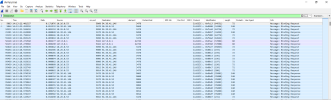
here are the results. never tries 3478Screenshot from 2022-08-11 06-37-29.png

I can't upload the dump, but I can throw it on my drive if that is permissible
 
Last edited:
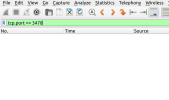
Filter like this with classicstun

1660227753390.png
 
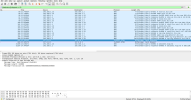
I filtered with dns and classicstun only connection is from localhost to localhost
Screenshot from 2022-08-11 07-27-59.png
 
This means that the traffic from your machine is sent from the local host loopback adapter and not the network card configured for the network with address 192.x.x.x. Check this and ensure traffic is routed through the correct network card.
 
not sure what else to check other than these settings:
Code:
root@3cx:~# ip a s
1: lo: <LOOPBACK,UP,LOWER_UP> mtu 65536 qdisc noqueue state UNKNOWN group default qlen 1000
    link/loopback 00:00:00:00:00:00 brd 00:00:00:00:00:00
    inet 127.0.0.1/8 scope host lo
       valid_lft forever preferred_lft forever
    inet6 ::1/128 scope host
       valid_lft forever preferred_lft forever
2: ens18: <BROADCAST,MULTICAST,UP,LOWER_UP> mtu 1500 qdisc pfifo_fast state UP group default qlen 1000
    link/ether 4a:72:d1:19:fd:9d brd ff:ff:ff:ff:ff:ff
    inet 192.168.1.13/24 brd 192.168.1.255 scope global ens18
       valid_lft forever preferred_lft forever
    inet6 fe80::4872:d1ff:fe19:fd9d/64 scope link
       valid_lft forever preferred_lft forever
root@3cx:~# ip r s
default via 192.168.1.1 dev ens18 onlink
192.168.1.0/24 dev ens18 proto kernel scope link src 192.168.1.13

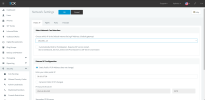
Screenshot from 2022-08-11 07-46-10.png
 
This means that the traffic from your machine is sent from the local host loopback adapter and not the network card configured for the network with address 192.x.x.x. Check this and ensure traffic is routed through the correct network card.
Other traffic I have checked routes out correctly (ie: ping, wget http://www.google.com, telnet stun-us.3cx.com), so if the firewall checker is using 127.0.0.1 it has nothing to do with my network config or firewall config. What else should I be looking at?
 
How was this machine deployed? Please, was this through the 3cx ISO?
 
yes, it was deployed on proxmox host, using the 3cx iso and guided install debian-amd64-netinst-3cx.iso
 
Please clarify the VM host I don't recognize the proxmox host part.
 
proxmox is a well known hypervisor running on debian based on KVM. I have another proxmox hypervisor with a 3CX guest running with no problems. While it is possible that the hypervisor is causing problems, I kind of doubt it because all other network communications are working without issue on the guest
 
As this may be the case, please see our supported hypervisors Supported VM Platforms. Of which your chosen hypervisor is not on our tested and supported list and can not, therefore, predict the outcome specifically when it comes to networking. Now, why your loopback adapter is first in the order of network adaptors, and why is traffic routing through the loopback and not the correct network card is something that you will now need to work out, but now also note, that the system is unsupported and should the need arise to open a ticket with 3cx support, no advise or troubleshooting will be undertaken. I suggest using a supported and tested hypervisor infrastructure to avoid these issues.
 
every linux system I have ever encountered lists lo as the first interface, even on bare metal. why 3CX and only 3CX is using the lo interface is a 3CX problem.

Additionally since your supported hypervisors include
Code:
KVM 2.8 and up
since proxmox is just a GUI on top of KVM, then I would say I am using a supported hypervisor.
 
Have you checked the routing table to see where traffic is being directed to? 3cx is not a router. It can not decide where to send traffic. This is decided by the OS network configuration and not 3cx.
 
yes and i posted the routing table above, I also posted that ping, wget and telnet are all working just fine both inbound and outbound.
 
ok, I have stumbled on to the solution.

3CX does not support virtio. I dont know what 3CX is doing under the hood, but virtio is out

Virtio:
  • DNS - ok
  • ping - ok
  • telnet - ok
  • wget - ok
  • 3CX firewall checker fails on all tests but DNS
Switching to E1000 adapter and the firewall checker passes all tests.
 
Status
Not open for further replies.

Forum statistics

Threads
111,974
Messages
590,083
Members
164,899
Latest member
mazet