Firewallchecker

Michael_Sigmavista

Silver Partner
Advanced Certified
Joined
Oct 31, 2024
Messages
42
Reaction score
5
Hi 3CX!

To set up our Firewall correctly we woud need to know the ip Adresses which are used from 3cx to execute the Firewallchecker.

It will only get green when we usy *any source in our ruleset.

So to avoid this the used ips would be awesome to have.
 
They use the stun server to check the firewall. But anyway, only the sip port should be restricted to your sip provider, any other port should be free.
 
well you know for sure the discussion with the FW Admin.
Mine anyhow persits to restrict the RTP Ports too. Iam Ok with that - the only thing is that the FWChecker is then not working properly.

BITN2 why would i need any other RTP port range open except that one to the sip provider?
Mobile is NOT using the RTP Ports.

Anyway - i can see in the Firewall that the FWchecker from 3CX wants to establish com. to 51.91.201.86.
which belongs to 3cx.
 
Because you are getting calls from different providers, if you restrict the ports you wont hear anything.
 
you realy sure?

afaik:
a call will be sent to the sip provider - he will send the call on the sip trunk an then i get it on the PBX.

3CX to 3CX is established over Bridges....

I can not share your logic right now ....
 
Some providers do direct media and this won't work with your restrictions.
 
Allow Direct SIP is disabled per default..... so it cannot be the reason
 
Ok fine, lets go back to Topic:

i want (more or less my FWadmin) to build the FW Rules as tight as possible.

So please can someone from 3CX can share some Informations about destinations used from the 3CX Firewallchecker ?
 
Allow Direct SIP is disabled per default..... so it cannot be the reason
That hasn't anything to do with direct sip.

Anyway, you can only restrict sip port to your provider if you want to use any app or phone from outside your network. Also if you want to call people outside your provider.
 
Ok fine, lets go back to Topic:

i want (more or less my FWadmin) to build the FW Rules as tight as possible.

So please can someone from 3CX can share some Informations about destinations used from the 3CX Firewallchecker ?
 
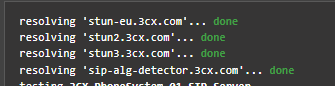
Restrict your SIP port to the IPs of your SIP provider and the STUN servers of 3CX. These hosts are clearly shown when you do the firewall check.

You will see that the PBX is trying to resolve these 4 hosts. 3 STUN servers and 1 SIP ALG detector.

Allow the TUNNEL port from anywhere, otherwise your APPS will NOT connect.

Allow the RTP ports from ANY, as this will severely impede your usage of the Web Client or PWA from outside the network. These use the RTP ports to connect the payload.

The PBX is NOT listening to these ports and will only enable these ports duiring the negotiation of a call. It wont respond when someone is doing a scan.

Also open up the HTTPS port from ANY as this will allow provisioning and exchange of presence on your web devices and APPS.

The responses from @bitn2 are valid. I cant see a reason for you to kick back on the advice given.

1743601338965.png
 
  • Like
Reactions: fxbastler and bitn2
Hi Nick!

Thanks a lot for your detailed answer.
Thats a valid answer IMHO.
Thats all i was asking for.

Please tell me, where did i kick back on the advice given from BITN2 ?
Have i been rude ?

How should i tell my concerns else? Couse i think this Statement is just not true:
"Because you are getting calls from different providers, if you restrict the ports you wont hear anything."

Regards
Michael
 
Hi Nick!

Thanks a lot for your detailed answer.
Thats a valid answer IMHO.
Thats all i was asking for.

Please tell me, where did i kick back on the advice given from BITN2 ?
Have i been rude ?

How should i tell my concerns else? Couse i think this Statement is just not true:
"Because you are getting calls from different providers, if you restrict the ports you wont hear anything."

Regards
Michael
Again, because some provider do direct media and this wont work if you restrict your ports to your provider. Direct media hastn anything todo with direct sip.
 
The only port which should be restricted on the firewall is the SIP port as this is the one which most often attacked on a comms system.

But do let your network team know that the RTP ports, eventhough it is a large range are only active during an actual call, and that the web client uses the last 500 ports of that range for processing its audio. A lot of network admins get antsy opening up 2000 ports on their network.

Also be very careful when restricting the SIP Port to the provider, as this will cause issues if the provider renumbers or adds subnets to their network. You will miss incoming calls.
 
  • Like
Reactions: bitn2

Latest Posts

Forum statistics

Threads
111,964
Messages
590,000
Members
164,869
Latest member
hpgitsupport