• We do not provide troubleshooting help for unsupported phones. Please try with a supported phone.
  • V20 Update 10 Alpha 2 Learn more

Firmware 404 for Grandstream grp2601

Status
Not open for further replies.

greychain

Gold Partner
Advanced Certified
Joined
Jul 13, 2018
Messages
779
Reaction score
122
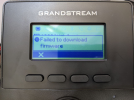
I'm getting this 1651023429306.png
So looking around my server I cant find the grp200fw.bin file. The quick solution is to manually download and copy to the required directory.

What is causing this not to happen automatically? The server is the latest V18 and fully updated , it's a Windows install.
 
Any AV grabbing it?
 
Hi,

You shouldn't really be putting a file in that path, phones are not meant to pick up firmware from there.

Is this during the initial provisioning of the device? If so then it is normal, you should ignore it.
Share some details of how/why you came across this so we can better understand the conditions.
 
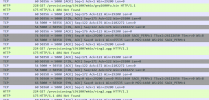
This is from a Wireshark capture of traffic from the phone, the phone is requesting a firmware update and some other files. The phone then reports . Where should the firmware be updating from?

1651121115178.png

1651121049444.png
 
Hi,

This happens during the initial provisioning so you should ignore it.
Grandstream is already aware of this error and it will be corrected in a future update.
 
Great thanks for the update, so I will need to manually update the firmware?
 
No, if you already installed the 3CX provided firmware, the upgrade should happen automatically when Grandstream sends us the update.
 
  • Like
Reactions: Evolute IT
Well it's been a while and I am still having the issue of it trying to pull from the wrong directory
 
We recently released an upgrade for the GRP260x series.
I have successfully upgraded the GRP2601 in both LAN and Remote scenarios.
Once the firmware is deployed to the first device (admin action in MC), the file is pushed into the right path.
After each reboot the phone will now find the firmware in the directory it expects and if needed download it.
It will also stop generating the notification.

General info:
The phones always request files from directories that don't exist, and if the files are not there the phone will ignore them. This is actually perfectly normal.

What isn't normal, is the fact that Grandstream decided to generate notification messages whenever this happens, for the GRP260x series specifically, which led you to think that there is a problem. We notified them about this, but I guess the behavior will not be changing any time soon, and the customers will be alarmed that something went wrong. The simple solution is to ignore this message, or contact Grandstream and suggest them that they make this series of phones behave like the GXP or GRP261x instead.

All that aside, the phones appear to work fine if you ignore the nag messages they generate.
 
  • Like
Reactions: Evolute IT
The only way I could get the firmware update to work was to dump the bin files into the provisioning directory, not recommended but it solved the problem.
 
Status
Not open for further replies.

Forum statistics

Threads
112,147
Messages
590,959
Members
165,167
Latest member
Finatra.us