Unsupported Firmware Update, Reboot, Provisioning Buttons not Working on STUN TLS Phones

Status
Not open for further replies.

Martin_Thomas_HPA

Premier Customer
Advanced Certified
Joined
Aug 27, 2019
Messages
83
Reaction score
16
Hello,
i have a Problem with our Fanvil x6u Phones running on STUN. If i enable TLS i can not remote Controll the phones for Firmware update etc. on the 3cx Admin interface. If i press the Buttons (Reboot, Provisioning or Firmware Update nothing happens. If i Switch the Phone to TCP or UDP everything is ok.

Versions:
3cx: 18.0 (Build 461)
Fanvil x6u: 2.4.12
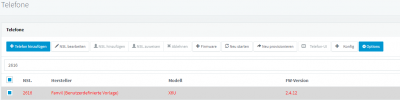
 

Attachments

  • Screenshot 2022-05-05 093539.png
    Screenshot 2022-05-05 093539.png
    17.3 KB · Views: 13
Hi Martin,

Those buttons rely on SIP, which is how the instruction is sent to the phone.
When you switch to TLS you are probably breaking the SIP registration so those commands never reach the phone.

While it is available as a service, we do not provide support for SIP TLS - you will have to troubleshoot it yourself.

I can make a suggestion though which might be helpful. Please follow all these steps, do not skip anything;

  1. Edit your extension settings and delete the phone. Press OK to save.
  2. Make brand new extension - Do NOT change any of the settings - all must remain default except the following:
    - Enable "PBX Delivers Audio" setting
    - Disable "Disallow use of extension outside the LAN".
  3. Add the phone to this new extension - Do NOT use the custom template - use the official one.
  4. Factory reset the phone, and it will ask for user/pass, enter the extension number and PIN and wait for it to provision.
  5. When the phone is ready make a call *888 to confirm your calls work first - if they don't you cannot proceed until they do (this is critical let me know if you are stuck on this step before moving further).


  6. If the calls work, you can now login to the phone Web UI and go to the Line > Register settings
    - Change SIP port by adding +1 (for example if it was 5060, you must replace it with 5061)
    - Change Transport protocol to TLS
    - Click Apply
  7. Do NOT restart the phone - try to make a couple of calls like this. If the call works the phone will show a lock icon when the call is connected


Let me know if this worked, if it did then the Reprovision / Reboot / Firmware buttons will also work.

If you could not make calls, then you will have to look elsewhere, like whether you correctly forwarded your SIP TLS port on the PBX side firewall. Without this, SIP TLS will not be possible no matter what you do.
 
Hello,
i have no problems with calling on this phones. All configurations are correct. Only the buttons does not work on TLS.
Factoryreset an Original Template without any changes....
The issue is on all our STUN Phones...

STUN Phones without security is not an option.....
 
Why not test it anyway?
 
I have tested it alog your steps. No changes.....
 
Hi,

I have also tested now using Fanvil X6U v2.4.12 by using my instructions from above.

Results:
Register SIP TLS 5061 = Success
Restart Command = Success
Reprovision Command = Success
Firmware Upgrade = N/A my phone is already 2.4.12

Make sure all your phones are on 2.4.12 because anything lower than that cannot reprovision or upgrade via management console because of expired certificates.

I hope this information is helpful to you!
 
Hi,
i dont understand why it is ok at your test. I have exactly made your steps. I have attaced a Screenshot from the phone. Is there a logfile where i can see anything. Wireshark is no option on tls...
 

Attachments

  • Bildschirmfoto 2022-05-05 um 16.05.05.png
    Bildschirmfoto 2022-05-05 um 16.05.05.png
    126.8 KB · Views: 8
  • Screenshot 2022-05-05 160932.png
    Screenshot 2022-05-05 160932.png
    22.6 KB · Views: 8
Wireshark will not be much help in this case because SIP traffic is encrypted but you can filter for
Code:
tcp.port == 5001 or tcp.port == 5061
to see if there is activity on the SIP port and Provisioning port when pressing the reprovision button.

You can't be sure about the content, but the phone usually hits 5001 only for provisioning and phonebook. If you see absolutely zero traffic on your provisioning port then no attempt was even made. But I think you will see the attempt at least because you are able to make calls like you said, and the device appears registered.

You can also change the logging level of 3CX to Verbose, perform the action, then filter the logs for 9959@ to see any SIP messages logged by the specific extension. This might be helpful in troubleshooting or as a cross-reference.

Important Note: Fanvils have a peculiarity where if you include any special characters in the config, it will try to reprovision but will actually fail. That's why I said to follow my instructions and build a new default extension with nothing modified at all. Your screenshot shows a name so I'm not sure if you actually carried out the steps as strictly as I described, you may have missed something I'm not aware of..
 
Hello again,
after a long search for the Reason i have found the source of the issue. It occurs when i enable the Teams Direct Routing. After disabling it today everything is ok. Please fix this in the next updates...
 
Hello Martin,

Thanks for reporting this. I was not aware that you were running Teams otherwise we would have found this sooner!

There are some changes coming but it's too early to say yet how this will affect that specific issue you were facing.
https://www.3cx.com/blog/news/microsoft-teams-direct-routing/


I would like to offer a suggestion if I may. Do you by any chance have one of these models available to you that appear in this article? https://www.3cx.com/blog/docs/sbc-router-phone/

You can try using a router phone (which encrypts communication by default, using a built in SBC). It might be a better solution than STUN with TLS.
 
Thank you,
i know sbc and new router phone. but for security reasons we also need to encrypt in our local LAN. Here sbc is no option. teams integration where only in test state on our company. so there is no problem at the moment. but when you make it offical in future whe hope that it runs together.

kind regards
 
@Martin_Thomas_HPA
Your original post about the buttons being grayed out had to do with STUN and TLS... and for this you should use SBC instead of STUN for remote phones. You wouldn't be using STUN for phone in LAN, unless I am misunderstanding something.

In LAN you can use TLS without an issue.

What remains the issue?
 
After a while of testing i have found, that the problem is on all TLS enabled Phones, not only on STUN Phones. For remote phones we can use SBC for the future but first we must change it to the new models. Higher priority is to enable TLS/SRTP for all internal devices for security reasons...
If Teams Connector is enabled u can use TLS/SRTP for Fanvil devices but you don't can use the Buttons in Admin GUI

kind regards.
 
Thank you,
i know sbc and new router phone. but for security reasons we also need to encrypt in our local LAN. Here sbc is no option.
Just a clarification here: If you enable SBC mode on one of those phones, the phone will act as its own internal SBC. You will not see any SIP traffic on the LAN, it will pass over the encrypted tunnel.
 
Yes i know. but this is only practicable for some remote phones and not for thousands of LAN Phones. And the danger is for example that anyone criminal installs a snifferbox to a target phone. If it is hidden good enough you will don find it fast enough. Since last year we are classified as critical infrastructure and encryption is a thing we must do...
Second thing is that all our x6u don't support internal SBC. Changing one Phone to a new one don't help because the traffic between the normal Phones and the RouterPhone is not encrypted so it does not help for a Snifferbox attack
 
  • Like
Reactions: JohnS_3CX
Understood, in this case you have very specific requirements and it is understandable that you must enable encryption manually for SIP TLS and SRTP.
 
Yes that are the problems of Enterprise Customers. Don't forget us on your development ;-)
 
Hello,

Yes that are the problems of Enterprise Customers. Don't forget us on your development ;-)

We didn't forget ;)

You can expect this issue to be resolved in V18 Update 8.
 
Status
Not open for further replies.

Members Online Now

Forum statistics

Threads
111,834
Messages
589,287
Members
164,663
Latest member
svdDGS