Solved Formatting the CID as displayed by the 3CX app

Status
Not open for further replies.

stevehughes

Trainee Partner
Joined
Feb 8, 2022
Messages
6
Reaction score
2
When we receive an incoming call, the Caller's ID is displayed in the app, but in a rather untidy manner that I'd really like to optimise. Are there any controls/settings that allow control of the formatting of the displayed CID?
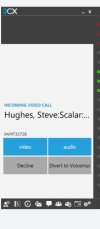
 
I'm referring to the attached. It seems to default to <Caller Surname>, <Caller Firstname>:<Inbound Rule name>:<Ring Group name> all in a single line which is too long to display correctly. I'd like to use the available vertical space to display this information in a multi-line format.
 

Attachments

  • Capture.JPG
    Capture.JPG
    24 KB · Views: 3
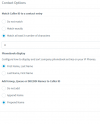
If you log in to the management console and go to Settings > Contacts then hit the options button you can specify the order.

1644481366205.png
 
Just want to add that, as @kieferschild said you can indeed specify the order but not the way it is presented in the 3CX App say in a multi-line format as you mentioned.
 
  • Like
Reactions: stevehughes
Thanks both. I appreciate your help.
 
  • Like
Reactions: ChrisC_3CX
You're welcome!

Do feel free to start a new thread should you need additional information!
 
Status
Not open for further replies.

Forum statistics

Threads
111,974
Messages
590,081
Members
164,899
Latest member
mazet