Forward external calls - system extensions not listed anymore

Status
Not open for further replies.

marew

Customer
Joined
Aug 6, 2020
Messages
12
Reaction score
0
Hello,

since the UI has updated, we aren't able anymore to set forwarding of calls for extensions to system extensions like ring groups.

To reproduce:
Create a Ring Group via Admin Interface on 3CX.
Then, log into the Web client, with any user extension, go to Settings -> Status-> "Available" -> "Forward external calls to" -> Select "Extension number".
Now, in the dropdown menu below, where one is supposed to search or enter an extension number, are only other user extension numbers, but no system extensions. They aren't searchable either.

So the problem is missing system extensions. Please, add system extensions in the dropdown menu for forwarding calls back again.
 
Last edited:
May I ask to which system extension exactly do you need to forward calls to?
 
Confused, edited my post.

With system extensions, in this context, I am referring to ring groups or IVRs.
In our case, it is a ring group with number 81.
 
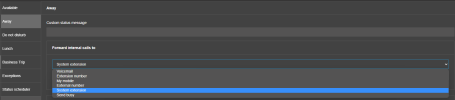
Can you lease try to choose the system extensions section within the drop down

1663073933033.png
 
It is not listed under "system extension" either. I am not sure, which feature qualifies as "system extension" and which as "extension number". I just called the ring group "system extension", because it is not a user extension.

Update: after fiddling with the settings menu, I found out that it is not possible to just type in the correct number. It worked the first time because of the old setting (I suppose...). After changing the setting and "saving" it (closing/reopening the client) I am unable to set the correct number anymore.

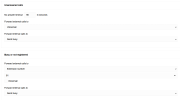
After opening my settings, It looks like this. Pay attention to the loaded setting at the bottom: Extension 81 really exists (on the server/PBX) and is still saved.

3cx_settings_no_modfication.png

But when I try to forward to 81 for unanswered calls, I cannot make this setting anymore:
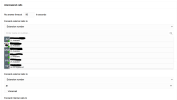
It is not in "extension numbers", manually entering 81 doesn't help either, because the UI throws it out as soon as focus leaves the textfield...
3cx_settings_not_extensionnumbers.png

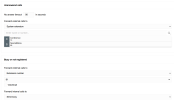
And 81 is nowhere seen under "system extensions":
3cx_settings_not_systemextensionnumbers.png
 
Last edited:
Kindly navigate under the management console > settings > Options and uncheck the option "Hide System Extensions (IVR, RingGroup, Queues, and FAX) from 3CX Apps Company Phonebook" press Ok at the top of the page and check.
 
Ah, thank you, that way, our ring group is selectable again, now, how do you hide the other extensions from the users as it has been before the ui change?
 
Are you referring to the option to 'Hide this extension from 3CX company phonebook and 3CX Apps', available under extensions settings > Options tab > Options section?
 
Yeah exactly, but for system extensions, as far as I know, it is only available for user extensions?
 
There were never any options to choose which users to allow to see system extensions. It's either all or nothing, I'm afraid.
 
I talked about it with my colleague and the problem isn't really to be able to filter the extensions, but to be able to select extensions while they are hidden.

In my case, it would be great to just type in the correct extension number 81, even if it is hidden.
 
Not possible, I'm afraid; although you can type the extension number in the drop-down, only if visible otherwise, the hide system extensions option is not valid
 
Status
Not open for further replies.