FQDN not resolving

Status
Not open for further replies.

skymilenio

Customer
Joined
Dec 28, 2021
Messages
11
Reaction score
1
Hi,

Having installed Ver 16 Pro, and now trying to setup remote SBC, but assigned FQDN is not resolving when posted as URL.
I can ping and trace it ok to our external dynamic IP, but not browse nor remote connection.
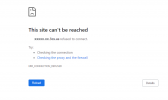
1640727022763.png

We already switched from dynamic to static and backward without any results after couple of days.
Please let me know how to refresh FQDN resolution.

Thank you
 
Thank you for your prompt response, and regarding to your questions:
1. Yes, nslookup resolves to our external IP
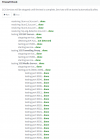
2. Yes, firewall checker was ran and below are results:
1640738278429.png
we still getting same issue, no access.
As an extra comment, we don't know if the fact that we used to have another 3cx instance with an older version, but same FQDN could be the reason.

Thank you
 
What about management port 443 or 5001 tcp. Is that opened?
 
Thank you for your response.
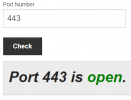
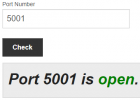
Yes, both ports are open:
1640749154233.png

1640749182572.png

Thank you
 
Thank you for your response.
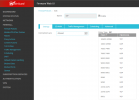
Firewall is hardware controlled by our Watchguard SIP protocol policy and 3CX is using 5001 port, among other several ports assigned to SIP policy, pointing to our 3CX server internal IP:
1640802763755.png

port 443 is used by IIS running on another machine at our office, and our 3CX is a dedicated HP Proliant server, without any other app nor service running there.

Regarding requested information, this is what we have:
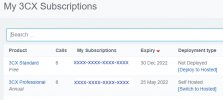
  • 3CX Professional Annual 16.0.8.16
  • Server running Windows server 2012 Pro, and located on-premises
  • We have 5 local and 3 remote extensions, using Linksys SPA-3102 devices
  • Our SIP trunk provider is Nexvortex
  • As mentioned before, firewall checker passed all green OK
  • No phone templates used
  • Now trying to add 3 remote softphone extensions via SBC, but FQDN not resolving.
Also, as I mentioned before, originally we had installed version 8 perpetual license at same location and same FQDN assigned

1640805242743.png


Thank you for your help/
 
On the sbc server , what are the dns settings - have you tried settings them the google 8.8.8.8

Can you access the 3cx management console from an external site (not sbc location)
 
You keep saying the FQDN is not resolving, but it doesn't sound like that is correct. Resolving is the the process of converting the name (FQDN) to an IP address. So if you can ping the FQDN and it responds with an IP address, then it is actually resolving. Now it may not be resolving correctly (different IP than you expect) but that would still mean it is resolving. So it sounds like the devices aren't connecting.

You need to troubleshoot this from the inside out.

- From the same network as the 3CX server, go to https://internalip or https://internalip:5001 to confirm which port is being used. You will get a certificate error but should be able to click through. That will confirm what port you are on as well as if a host firewall is blocking things.
- If that works, then from outside the network try https://publicip or https://publicip:5001 depending on which port worked in step one. That will confirm if your edge device is configured correctly.
 
On the server 2012, goto www.ipchicken.con does the IP match the settings within 3cx - settings - network

Noticed : 3cx soft phones , 3cx mobile applications do not use the sbc server (only supported physical handsets), they connection to the 3cx server directly via the 3cx tunnel port 5090

What softphone are you using ?
 
Last edited:
You keep saying the FQDN is not resolving, but it doesn't sound like that is correct. Resolving is the the process of converting the name (FQDN) to an IP address. So if you can ping the FQDN and it responds with an IP address, then it is actually resolving. Now it may not be resolving correctly (different IP than you expect) but that would still mean it is resolving. So it sounds like the devices aren't connecting.

You need to troubleshoot this from the inside out.

- From the same network as the 3CX server, go to https://internalip or https://internalip:5001 to confirm which port is being used. You will get a certificate error but should be able to click through. That will confirm what port you are on as well as if a host firewall is blocking things.
- If that works, then from outside the network try https://publicip or https://publicip:5001 depending on which port worked in step one. That will confirm if your edge device is configured correctly.
Hi Cobaltit and thank you for the explanation.
Sorry if I misused the term "not resolving" to communicate that FQDN is not finishing the process to get me to 3CX.
Regarding your suggestion, both processes, internal IP from LAN, as well as external IP from WAN, are taking me to 3CX Management console login screen, in both cases using port 5001.

https://xxx.xxx.xxx.xxx:5001

Thank you again
 
On the sbc server , what are the dns settings - have you tried settings them the google 8.8.8.8

Can you access the 3cx management console from an external site (not sbc location)
Hi Saqqara,
Yes, DNS on 3CX server are google IP
No, we cannot access 3CX management by FQDN, only by IP
 
Does the IP address in https://xxx.xxx.xxx.xxx:5001/ , match the fqdn

When you do an nslookup using the fqdn, does it match the ip used to access the server external - url as above

Do you have any setting on the firewall that has a dns setting that may be pointing to the incorrect internal IP address

Have you setup spilt dns so that you can access the server internally using https;//fgdn:5001, - is the server IP address correct ; https://www.3cx.com/docs/creating-fqdn-split-dns/

Can you access the server internally using https;//fgdn:5001
 
Last edited:
Does the IP address in https://xxx.xxx.xxx.xxx:5001/ , match the fqdn

When you do an nslookup using the fqdn, does it match the ip used to access the server external - url as above

Do you have any setting on the firewall that has a dns setting that may be pointing to the incorrect internal ip address
Saqqara,

What do you mean "Match the FQDN"? the IP is landing at 3CX management console login screen, the way it should be, if that is what you want to know.
At Watchguard settings the only DNS is the external provided by ISP with dynamic IP. No firewall DNS policy has been created.
 
Running nslookup command using the fqdn , match the IP address you used to access the server https://IP address:5001 on a remote machine

If you have a isp dynamic IP address, you should set the network setting under settings to dynamic. It can take 6hrs for the fgdn to be updated

For a test, change the server dns servers to google 8.8.8.8
 
Last edited:
Yes, NSLookup A record for FQDN is matching our external IP
Yes, 3CX network settings are set to Dynamic as well

1640817325036.png

Thank you
 
@skymilenio
Do you manage to sort this out?
If no, in a PM, can you send me the FQDN of your 3CX installation, as well as the IP you actually use that allows you to log in?
 
Status
Not open for further replies.

Forum statistics

Threads
111,974
Messages
590,083
Members
164,901
Latest member
Silent_Guru