FQDN Not updating after 12 hours

ChrisMSL

Free User
Joined
Dec 3, 2024
Messages
8
Reaction score
0
I had to re-install 3cx PBX on a machine which suffered a failed drive. I had to remove the machine the PBX was running on and work on it from home. I got it all running and restored from a backup but the FQDN has not updated to the public IP of the business when I returned it back to where it belonged, instead it is still showing my own public IP from home. I assumed the PBX would update, it has internet access and although behind the firewall it was on before the drive failure. It's been 24 hours. I can access the PBX over command line, I have run ping stun2.3cx.com and it returns the ip of the 3cx server.
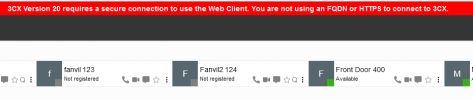
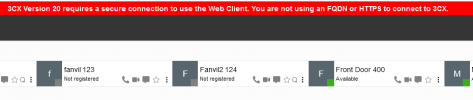
Because it is v20 Debian I can't access the admin web interface because there is no SSL so can't see if the PBX has realised it has a different public IP

How can I access the admin web interface without an SSL to try and fix this?
Are there any comands I can run from command line to update the public IP.

Any help much appreciated.
 
I can see an activation from an IP ending in 118. The yesterday another activation from an IP ending in 193, which was the IP it was activating from previously.

But this activation came 3 days later.
 
Yes the 118 Ip was my own one and incorrect. The 193 was correct but in order to make the PBX switch over I had to re-install the whole thing and go through the setup again. Is there any other way I could save this pain in the future? Some method of forcing a renewal of the FQDN, given that there is no possible way to access the management console without a SSL even locally on the same network seems crazy to me.
 
Yes the 118 Ip was my own one and incorrect. The 193 was correct but in order to make the PBX switch over I had to re-install the whole thing and go through the setup again. Is there any other way I could save this pain in the future? Some method of forcing a renewal of the FQDN, given that there is no possible way to access the management console without a SSL even locally on the same network seems crazy to me.
just switch the PBX to dynamic IP address and restart the services! As you probably had it with a static IP address it wasnt sending the new activation to the licensing server.
 
  • Like
Reactions: Greg_G
How do i switch the pbx to dynamic ip? This is a Debian install. I do have access to it via command line
 
No, this is not about the IP Address on the server itself. This should always be static. Your external public IP address however can be. Just switch it over in your PBX network settings

1733737890714.png
 
Lol this is all well and good but, the point is I can't get into the management console in the first place because the FQDN does not resolve to the correct location. I have to have a valid SSL certificate. This would be easy if it were the old version of 3cx as I could still access the old management console with the ip address on the local network of the PBX.
 
can you not call your customer and hop on to one of their machines and just access it via local IP?
 
can you not call your customer and hop on to one of their machines and just access it via local IP?
I take it you haven't had the pleasure of v20 of 3cx yet have you? I am onsite with my laptop on the customers internal network. However you cannot access the management console without a SSL so no local IP access whatsoever
 
I take it you haven't had the pleasure of v20 of 3cx yet have you? I am onsite with my laptop on the customers internal network. However you cannot access the management console without a SSL so no local IP access whatsoever
On the contrary, all my installs are v20.

Im able to log in to my instance with the IP.

You should try using the internal IP of the 3CX and not the external since you're behind the firewall.

1733740375515.png
 

Attachments

  • 1733740388304.png
    1733740388304.png
    12.3 KB · Views: 3
You would need to ensure that internally you have the IP internally resolving correctly.

This would require split DNS. https://www.3cx.com/docs/creating-fqdn-split-dns/
The firewall is configured correctly prior to the hardware failure with the PBX. All ports are forwarding as intended and from the command line I can ping the outside world from the PBX. It just does not update as it says it should.

Just so you know I do now have this working again but the fix for me was totally unnecessary. Whilst at my customers I had to do a complete re-install of the OS and 3cx and basically start again. FQDN resolved as it should then. The point of all of this is that I think there is a serious limitation on 3cx v20 and forcing access only to the management console with a SSL is a serious problem. I fully understand that this is done for security reasons, however there needs to be a way of accessing this locally even if it shows a big warning sign at the top saying '3cx does not take responsibility for this users actions whilst not under the protection of a valid SSL certificate'.
On the contrary, all my installs are v20.

Im able to log in to my instance with the IP.

You should try using the internal IP of the 3CX and not the external since you're behind the firewall.

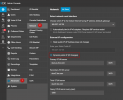
View attachment 45505
Can you actually access the management console and not just the webclient? By this I mean do you have the cog in the bottom left corner? For me this does not exist if I do not have valid SSL
 
The firewall is configured correctly prior to the hardware failure with the PBX. All ports are forwarding as intended and from the command line I can ping the outside world from the PBX. It just does not update as it says it should.

Just so you know I do now have this working again but the fix for me was totally unnecessary. Whilst at my customers I had to do a complete re-install of the OS and 3cx and basically start again. FQDN resolved as it should then. The point of all of this is that I think there is a serious limitation on 3cx v20 and forcing access only to the management console with a SSL is a serious problem. I fully understand that this is done for security reasons, however there needs to be a way of accessing this locally even if it shows a big warning sign at the top saying '3cx does not take responsibility for this users actions whilst not under the protection of a valid SSL certificate'.

Can you actually access the management console and not just the webclient? By this I mean do you have the cog in the bottom left corner? For me this does not exist if I do not have valid SSL
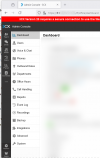
Yup, got full control.

1733740999026.png
 
Yup, got full control.

View attachment 45507
Wow! I couldn't get past the login even accepting the risk on the browser and trying to proceed. Did you have a special setting or anything I am missing? Of course I now have a valid SSL so can't test it any other way but it would be fantastic to know for next time.
 
Nothing special, just used firefox.
 
Nothing special, just used firefox.
Ok well thank you for showing me that it maybe possible to still access the management console without a valid SSL. I will no doubt be given the opportunity to put this info to good use in the future.
 

Members Online Now

Forum statistics

Threads
111,835
Messages
589,291
Members
164,668
Latest member
Infinity Network