Solved FQDN Seems Broken?

Status
Not open for further replies.

TechDoctor

Bronze Partner
Basic Certified
Joined
Mar 25, 2019
Messages
16
Reaction score
6
I have a 3cx PBX V20 hosted on a lightsail VM. The VM rebooted, public IP changed. I've adjusted in the SIP trunk and can access the seemingly functional PBX via IP address, but we are unable for over 24 hours at this point to access via FQDN thus rendering the phone system at the client down. Is there a way to update this or am I going to have to reinstall?
 
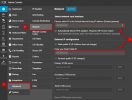
First thing you should do is access the Phone System and check the settings under Admin Console → Advanced → Network

Make sure both fields contain the new IP. Apply and then just to be safe go to the Dashboard → Services and restart the 3CX System Service. Give it like 10 minutes and check the DNS maybe using a public DNS query tool to see if it updated.


1769782048379.png
 
@TechDoctor as a first validate your FQDN and check on which ip it resolves to : https://dns.google/
Then make an nslookup on your local network and check if the ip address resolves to the same ip like on Google DNS.
There you will have your answers.
 
First thing you should do is access the Phone System and check the settings under Admin Console → Advanced → Network

Make sure both fields contain the new IP. Apply and then just to be safe go to the Dashboard → Services and restart the 3CX System Service. Give it like 10 minutes and check the DNS maybe using a public DNS query tool to see if it updated.


View attachment 50814
Thank you, this worked. Then I dumbly tried to move to an upgraded VM for more storage, and it appears that did not, but I think now it's just a matter of waiting on the DNS propagation. I appreciate the assistance.
 
Status
Not open for further replies.

Forum statistics

Threads
111,974
Messages
590,081
Members
164,899
Latest member
mazet