- Joined
- Sep 29, 2023
- Messages
- 12
- Reaction score
- 0
Hi,
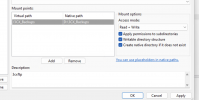
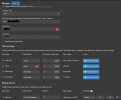
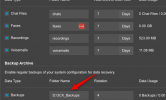
I have issue setting up my 3CX Cloud Hosted Storage Backup via FileZilla FTP.
I was able to connect the 3CX Cloud to my On-prem Windows using Filezilla but having issue within permission base on log from FIleZilla.
<Date/Time> Info [Type] Message
<05/02/2026 10:07:51 am> File-based Authenticator, FTP Session: 8 [Status] Invoking get_auth_data
<05/02/2026 10:07:51 am> FTP Session 8 xxx.xxx.xxx.xxx [Response] 331 Please, specify the password.
<05/02/2026 10:07:51 am> FTP Session 8 xxx.xxx.xxx.xxx [Command] PASS ****
<05/02/2026 10:07:51 am> FTP Session 8 xxx.xxx.xxx.xxx [Response] 230 Login successful.
<05/02/2026 10:07:51 am> FTP Session 8 xxx.xxx.xxx.xxx Technical [Command] FEAT
<05/02/2026 10:07:51 am> FTP Session 8 xxx.xxx.xxx.xxx Technical [Response] 211-Features:
<05/02/2026 10:07:51 am> FTP Session 8 xxx.xxx.xxx.xxx Technical [Response] 211 End
<05/02/2026 10:07:51 am> FTP Session 8 xxx.xxx.xxx.xxx Technical [Command] OPTS UTF8 ON
<05/02/2026 10:07:51 am> FTP Session 8 xxx.xxx.xxx.xxx Technical [Response] 202 UTF8 mode is always enabled. No need to send this command
<05/02/2026 10:07:51 am> FTP Session 8 xxx.xxx.xxx.xxx Technical [Command] SYST
<05/02/2026 10:07:51 am> FTP Session 8 xxx.xxx.xxx.xxx Technical [Response] 215 UNIX emulated by FileZilla.
<05/02/2026 10:07:51 am> FTP Session 8 xxx.xxx.xxx.xxx Technical [Command] PWD
<05/02/2026 10:07:51 am> FTP Session 8 xxx.xxx.xxx.xxx Technical [Response] 257 "/" is current directory.
<05/02/2026 10:07:51 am> FTP Session 8 xxx.xxx.xxx.xxx Technical [Command] TYPE I
<05/02/2026 10:07:51 am> FTP Session 8 xxx.xxx.xxx.xxx Technical [Response] 200 Type set to I
<05/02/2026 10:07:52 am> FTP Session 8 xxx.xxx.xxx.xxx Technical [Command] EPSV
<05/02/2026 10:07:52 am> FTP Session 8 xxx.xxx.xxx.xxx Technical [Response] 229 Entering Extended Passive Mode (|||55689|)
<05/02/2026 10:07:52 am> FTP Session 8 xxx.xxx.xxx.xxx Technical [Command] MLSD /D:/3CX_Backups
<05/02/2026 10:07:52 am> FTP Session 8 xxx.xxx.xxx.xxxTechnical [Response] 550 Invalid file name or path
<05/02/2026 10:07:52 am> FTP Session 8 xxx.xxx.xxx.xxx Technical [Command] QUIT
<05/02/2026 10:07:52 am> FTP Session 8 xxx.xxx.xxx.xxxTechnical [Response] 221 Goodbye.
<05/02/2026 10:07:52 am> FTP Server [Status] Session 8 ended gracefully.
I have issue setting up my 3CX Cloud Hosted Storage Backup via FileZilla FTP.
I was able to connect the 3CX Cloud to my On-prem Windows using Filezilla but having issue within permission base on log from FIleZilla.
<Date/Time> Info [Type] Message
<05/02/2026 10:07:51 am> File-based Authenticator, FTP Session: 8 [Status] Invoking get_auth_data
<05/02/2026 10:07:51 am> FTP Session 8 xxx.xxx.xxx.xxx [Response] 331 Please, specify the password.
<05/02/2026 10:07:51 am> FTP Session 8 xxx.xxx.xxx.xxx [Command] PASS ****
<05/02/2026 10:07:51 am> FTP Session 8 xxx.xxx.xxx.xxx [Response] 230 Login successful.
<05/02/2026 10:07:51 am> FTP Session 8 xxx.xxx.xxx.xxx Technical [Command] FEAT
<05/02/2026 10:07:51 am> FTP Session 8 xxx.xxx.xxx.xxx Technical [Response] 211-Features:
<05/02/2026 10:07:51 am> FTP Session 8 xxx.xxx.xxx.xxx Technical [Response] 211 End
<05/02/2026 10:07:51 am> FTP Session 8 xxx.xxx.xxx.xxx Technical [Command] OPTS UTF8 ON
<05/02/2026 10:07:51 am> FTP Session 8 xxx.xxx.xxx.xxx Technical [Response] 202 UTF8 mode is always enabled. No need to send this command
<05/02/2026 10:07:51 am> FTP Session 8 xxx.xxx.xxx.xxx Technical [Command] SYST
<05/02/2026 10:07:51 am> FTP Session 8 xxx.xxx.xxx.xxx Technical [Response] 215 UNIX emulated by FileZilla.
<05/02/2026 10:07:51 am> FTP Session 8 xxx.xxx.xxx.xxx Technical [Command] PWD
<05/02/2026 10:07:51 am> FTP Session 8 xxx.xxx.xxx.xxx Technical [Response] 257 "/" is current directory.
<05/02/2026 10:07:51 am> FTP Session 8 xxx.xxx.xxx.xxx Technical [Command] TYPE I
<05/02/2026 10:07:51 am> FTP Session 8 xxx.xxx.xxx.xxx Technical [Response] 200 Type set to I
<05/02/2026 10:07:52 am> FTP Session 8 xxx.xxx.xxx.xxx Technical [Command] EPSV
<05/02/2026 10:07:52 am> FTP Session 8 xxx.xxx.xxx.xxx Technical [Response] 229 Entering Extended Passive Mode (|||55689|)
<05/02/2026 10:07:52 am> FTP Session 8 xxx.xxx.xxx.xxx Technical [Command] MLSD /D:/3CX_Backups
<05/02/2026 10:07:52 am> FTP Session 8 xxx.xxx.xxx.xxxTechnical [Response] 550 Invalid file name or path
<05/02/2026 10:07:52 am> FTP Session 8 xxx.xxx.xxx.xxx Technical [Command] QUIT
<05/02/2026 10:07:52 am> FTP Session 8 xxx.xxx.xxx.xxxTechnical [Response] 221 Goodbye.
<05/02/2026 10:07:52 am> FTP Server [Status] Session 8 ended gracefully.