- Joined
- Feb 21, 2019
- Messages
- 168
- Reaction score
- 41
Good Day,
Found something last night and this may save you some grief if in the same situation.
If you have country or geolock restrictions on your firewall, the firewall test may fail. We had an issue yesterday. I ran the firewall checker and saw this:
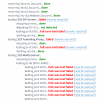
After a long session of checking various causes we turned off the country restrictions on the FW access rule to get this:
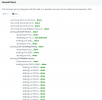
It would be helpful to know where the FW check runs from (Specific IP's would be helpful) so we can add that to our exception list. As we had US and Canada in the allowed list, it isn't coming from there. Restricting country access dramatically cuts down on hack attempts.
Anyway, FYI in case you see something similar. May save you some time.
Found something last night and this may save you some grief if in the same situation.
If you have country or geolock restrictions on your firewall, the firewall test may fail. We had an issue yesterday. I ran the firewall checker and saw this:
After a long session of checking various causes we turned off the country restrictions on the FW access rule to get this:
It would be helpful to know where the FW check runs from (Specific IP's would be helpful) so we can add that to our exception list. As we had US and Canada in the allowed list, it isn't coming from there. Restricting country access dramatically cuts down on hack attempts.
Anyway, FYI in case you see something similar. May save you some time.