• We do not provide troubleshooting help for unsupported phones. Please try with a supported phone.
  • V20 Update 10 Alpha 2 Learn more

Gigaset N870 Phonebook / Contacts

Status
Not open for further replies.

Florian87

Silver Partner
Basic Certified
Joined
Mar 11, 2018
Messages
21
Reaction score
29
Hi 3CX-Team,

I've identified two bugs with the 3CX Gigaset PhoneBook:

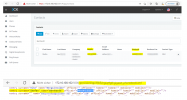
1. Firstname and Lastname are transposed (3CX Firstname should map to Gigaset Name, 3CX Lastname should map to Gigaset Surname)
2. The 3CX-Contacts Mobile number is assigned to office1, the business number is not assigned at all. The Business Number is more important than the mobile, for most cases.

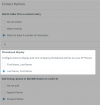
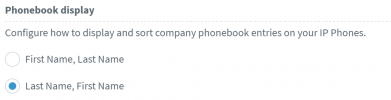
Advanced -> Contacts -> Contact Options -> Phonebook display ist set to "Last Name, First Name"

You can see the wrong mapping in the screenshot below. (To make it clear surname means lastname)
3CX_Gigaset_Phonebook.png
 
3cx default will only shown the mobile number in the address book on physical handsets

This cannot be changed
 
3cx default will only shown the mobile number in the address book on physical handsets

This cannot be changed

Yes - but that is just a bug/limitation of the addressbook xml creation process. Should be very simple to fix that for 3CX.
 
  • Like
Reactions: MarcoT67
Hi Florian,

There are no plans to change this, it's the intended behavior.

For all the hardware phones supported, only the Mobile field from 3CX is sent to the phonebooks.

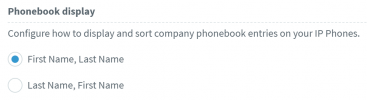
The first / last name can be swapped (if you want) by changing this setting in 3CX, then rebooting your Gigaset to reprovision
1642580114470.png
 
Hi Florian,

There are no plans to change this, it's the intended behavior.

For all the hardware phones supported, only the Mobile field from 3CX is sent to the phonebooks.

The first / last name can be swapped (if you want) by changing this setting in 3CX, then rebooting your Gigaset to reprovision
View attachment 27230

Hi John,
yes, but if I change the setting "Phonebook display", to be "First Name, Last Name", then Gigaset will be "Last Name, First Name" and the 3CX Desktop App will be "First Name, Last Name".
So obviously there is a bug in the code that creates the Gigaset Phonebook.

Can you please make sure that this is beeing looked into?
 
Hi Florian,

The Gigaset (and other legacy phones) does not have an option to control how the contacts are displayed (First-Last VS Last-First).

The only way to achieve that functionality is by swapping the fields. This is not a bug, it's a deliberate work-around to at least give you the ability to swap them around.


Example 1

1643112104547.png
1643112136480.png

Example 2
1643112167048.png
1643112198982.png
 
  • Like
Reactions: Florian87
Hi Florian,

The Gigaset (and other legacy phones) does not have an option to control how the contacts are displayed (First-Last VS Last-First).

The only way to achieve that functionality is by swapping the fields. This is not a bug, it's a deliberate work-around to at least give you the ability to swap them around.


Example 1

View attachment 27366
View attachment 27367

Example 2
View attachment 27368
View attachment 27369

Hi John,
I understand the intention behind this feature, for sure it is good to have it. I think in any enterprise business use case you would allways want to have "lastname, firstname".

If I set 3CX to "lastname, firstname" Gigaset is "firstname, lastname". That means every user that is searching for a contact in the Gigaset handset needs to enter the lastname in the firstname search box.
If I follow your recommendation to swap 3CX to "firstname, lastname" then the 3CX APP is doing "firstname, lastname" but I need "lastname, firstname". So there is no solution to have both, the 3CX App and also the Gigaset Phonebook both do "lastname, firstname".

The root cause of the issue is that 3CX did mistakenly just swapped the firstname lastname fields in their Gigaset Phonebook implementation. Please just swap it the other way arround, then it will be correct.
 
Since Gigaset firmware version 2.43 there is an option to change this. See provisioning example here:
https://teamwork.gigaset.com/gigawiki/pages/viewpage.action?pageId=902955346

XML:
<!-- New in SW 2.43.0 or higher name = Display results: name surname, surname = Display results: surname name -->
<param name="CentralBook.0.SortBy" value="name"/>
There are other legacy devices that also rely on this, so unfortunately the behavior cannot change without affecting them too..

Hi John,
I understand the intention behind this feature, for sure it is good to have it. I think in any enterprise business use case you would allways want to have "lastname, firstname".

If I set 3CX to "lastname, firstname" Gigaset is "firstname, lastname". That means every user that is searching for a contact in the Gigaset handset needs to enter the lastname in the firstname search box.
If I follow your recommendation to swap 3CX to "firstname, lastname" then the 3CX APP is doing "firstname, lastname" but I need "lastname, firstname". So there is no solution to have both, the 3CX App and also the Gigaset Phonebook both do "lastname, firstname".

The root cause of the issue is that 3CX did mistakenly just swapped the firstname lastname fields in their Gigaset Phonebook implementation. Please just swap it the other way arround, then it will be correct.

You are correct, there is no solution to have both the app show Last,First and the Gigaset handset also show Last, First at the same time.

While I have already explained the reasoning behind this, thanks for your feedback, we will take it into consideration.
 
Status
Not open for further replies.

Forum statistics

Threads
112,149
Messages
590,965
Members
165,170
Latest member
SupportRock