• We do not provide troubleshooting help for unsupported phones. Please try with a supported phone.
  • V20 Update 10 Alpha Learn more

Grandstream GRP2604 Multipurpose keys not provisioned

Status
Not open for further replies.

evanlonden

Free User
Joined
Jul 10, 2024
Messages
14
Reaction score
0
hello all,

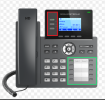
I have a set of GRP2604p phones who have the option of 10 MPK's to be used for various functions like speeddail and BLF keys. When provisioning a user in 3CX 20U2 or before, these keys are not provisioned but instead the "Virtual MPK" are configured instead. The BLF function doesn't seem to work there either as the entries show up with a question mark in front of them.

The phone itself has firmware version 1.0.5.54 and 3cx runs (Version 20.0 Update 2 (Build 715 Release)).

I haven't been able to find a setting in 3CX where I can change this behaviour.

If anyone has an idea on how to resolve this, that would be great.

Thank you
Erwin
 
Hello Theodoros,

As I mentioned the phone itself runs The phone itself has firmware version 1.0.5.54 but that has no influence on the configuration of the phone as the 3CX IP Phone or BLF page of that phone does not show an option to configure the MPK's and the BLF fields will be applied to the virtual MPK's which are not useful as they have limited funtionality and do not provide a good overview in the screen on the phone.
 
When you mentioned the "Multipurpose keys" you mean the keys next to the screen?
 
1720584722082.png

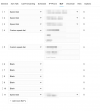
The ones in the red square are the virtual ones (VMPK) which are programmed by 3CX on the BLF page of the phone. The ones in the green square are not programmed at all in 3CX and even when configuring them in the phone itself, there isn't any interaction with 3CX in the sense that busy lights are used.
 
You will need to skip the screen side keys in the BLF configuration in the extension settings.
For example if there are 2 pages of the MPK's you will start the BLF from position 7 and those will start directly in the BLF keys page.
 
  • Like
Reactions: Evolute IT
There is only one page. I found when I enter a speed dial entry in the BLF page in 3CX from postion 10 onwards, it will program this under the first MPK button. This does not work when I set that to BLF. The led's on the MPK do not light up, nor can I make use it to pick up a call or even make a call to the number programmed under that button.
 
The first two keys are configured as line keys (via the template). This cannot be changed, otherwise the phone will not be able to make calls. From the template i can see that it will start from position 11, can you please check?
 
Yes you are correct. The BLF function does not work but the speed dial does. No idea why that is.
 
I think this part is not configured via 3CX in the "accounts section"

1720587577708.png
 
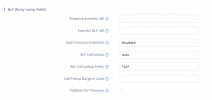
It has to be configured from the extension's BLF tab in the PBX.
Manually adding in the phone's web interface is not supported and in the next reprovisioning they will be removed.
 
There is nothing to configure in that tab besides the MPK/VPK numbers. The other tabs also don't provide any options to do this.

1720587866970.png
 
hello Theodoros,

That's what I'm saying, when I select BLF the key under which I program it doesn't do anything. No busy light, no call pick up, no call being made when I touch that button.
 
Do you reprovision the phone?
 
I can see this is done automatically when I click on save. I can see the phone downloading the new config via the provisioning URL.
 
Hi,

This model has 3 line keys on top and 10 BLF keys on the bottom as per Grandstream's documentation.
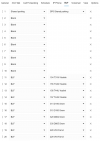
To use the bottom BLF keys you need to assign BLFs from position 11 on your extension settings in 3CX.
Avoid positions 2 - 10 as these will become virtual keys.

Use this layout below and it should work fine.
But factory reset and reprovision the phone, to make sure you start clean:

1720597028684.png

They should all light up green if:

- you are using a Professional or Enterprise license (not Free/Standard edition)
- you have provisioned the phone as local or via SBC (not STUN).

The firmware version you have does not affect the above AFAIK.
 
  • Like
Reactions: Evolute IT
Hello John,

I do have a Pro license and the phone is provisioned as Local but non of the lights turn on. Even after factory resets and reprovisioning from scratch it's a no go.
 
Right, found the issue after some wireshark exercise. When I looked at the SIP traffic I saw that the SUBSCRIBE request from the phone to the 3CX PBX was using the private AWS address instead of the public IP address that I linked to the EC2 instance. This simply means that these packets are immediately discarded at the router as I don't have a link into that subnet.
So obviously this is a NAT issue.

When I turned on NAT traversal and set it to Auto, all programmed BLF lights turned on and I could make a call to the respective extensions.

Second issue is that the default Grandstream template has this turned off as per this section:

```
{IF network=LOCALLAN}
<!-- SIP Server Local configuration - Local internal IP Address of the server -->
<P47>%%pbx_ip%%:%%param::sipport%%</P47>
<!-- Outbound Proxy - The "P48" field contains the ip address and SIP port of the SIP Outbound Proxy - in this case 3CXPS. The "pbx_ip" and "param::sipport" variables will be replaced by the IP Address and SIP Port of 3CXPS. -->
<P48></P48>
<!-- Local SIP port (default 5060) -->
<P40>5060</P40>
<!-- NAT Traversal. 0 - no, 1 - STUN, 2 - keep alive, 3 - UPnP, 4 - Auto, 5 - VPN -->
<P52>0</P52>
<!-- Use SBC. 0 - Disable, 1 - Enable -->
<P26090>0</P26090>
{ENDIF}
```

This means I have to re-provision the phone with a custom template and set this to Auto in the template.

I'll let you know how that goes.

Cheers
Erwin
 
Setting this to Auto in the custom template, factory reset the phone and re-provision the phone with that custom template resolved the issue.
 
Status
Not open for further replies.

Members Online Now

No members online now.

Forum statistics

Threads
111,831
Messages
589,277
Members
164,660
Latest member
RJenkinsROCK