• We do not provide troubleshooting help for unsupported phones. Please try with a supported phone.
  • V20 Update 10 Alpha Learn more

Solved GRANDSTREAM GXP-2160 LOOSING BLF'S IN REPROVISON OR FW UPGRADE

Status
Not open for further replies.

Avat

Silver Partner
Basic Certified
Joined
Nov 19, 2020
Messages
14
Reaction score
1
Hi to all,
We have a problem with the Grandstream 2160 ip phone, it has virtual blf's and physical blfs, from the 3cx blf conf we can configure only the virtual and from web phone configuration we configure the physical blf.
After a reprovision we loose the phone configuration (the physical blfs).
The phone is behind an SBC phone fw 1.07.13 3cx version 18.0 (Build 965)
Any ideas not to loose user conf ?
 
Last edited:
Hello,

As should be clear by now, any BLF configuration always needs to be done on the 3CX extension, which then gets pushed to the phone during reprovisioning. If you were editing the phone settings via the GXP1628 Web UI, the settings will be lost.

Please make your assignments for all your BLFs in the 3CX extension settings so they will remain permanent.
 
Yes we know that but the BLF conf in 3cx extension sets only the virtual BLF's not the Physical !
Thats the problem
 

Attachments

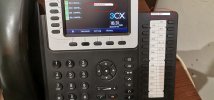
  • 1628.jpg
    1628.jpg
    355.1 KB · Views: 11
Ah this is not a GXP-1628 in the picture..

Can you please confirm the following?

- Model number (check the back of the phone to be sure)
- Firmware version
- 3CX Version
- Are you using custom templates (yes/no)
 
Terrible Sorry for that "wrong copy-paste" Its a Grandstream 2160 fw 1.0.11.35...

- 3CX Version = version 18.0 (Build 965
- Are you using custom templates (yes/no) =no
Thanks again,
 
Thanks for confirming!

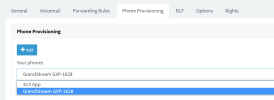
Kindly check the user's extension, open the drop down to see all the possible entries here:
1661429492863.png


Was it perhaps added as a 1628 by mistake instead of 2160?
 
No it was wrong copy paste... we have also 1628 in this installation butr works fine..
The problem is clear on 2160
 
I will check and get back to you shortly
 
I think I understand what may have caused the confusion.

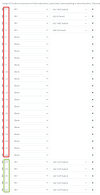
BLF 1 to 22 = Virtual BLFs on screen
BLF 23 to 46 = Physical BLF Keys on side-car

So add 46 total BLF entries in your extension, and then put the keys you want where you prefer them according to what I said above. You can keep the virtual BLFs 5 to 22 blank if you don't want to use the extra pages.

Reprovision your phone, and they will all be in the correct positions.

1661430588672.png
 
Solved .It works fine.
Thank you
 
  • Like
Reactions: JohnS_3CX
Status
Not open for further replies.

Members Online Now

No members online now.

Forum statistics

Threads
111,831
Messages
589,277
Members
164,660
Latest member
RJenkinsROCK