- Joined
- Sep 29, 2019
- Messages
- 5
- Reaction score
- 0
I just put a PBX in a small hotel with only 11 rooms, installed a GXW4216 to handle the guest room calls. (I've used the larger versions in bigger hotel builds no issues)
I can call out from the phone to an external number and I get two way audio, I can call in and call one of the extensions and I get two way audio.
But when we call from a phone to the internal phones, we only get audio in one direction from the phone answering the call. all calls to and from the gxw4216 to the office phones, a fanvil x5s and a yealink w60b can't have a conversation.
I'm unable to diagnose this and am hoping someone here might have an idea.
Feel like I should mention, the pbx is hosted. my previous setups were all on premise.
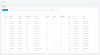
Weirdly the ip showing in the status for the "phone status" is a local IP 192.168.1.237 not the external IP from the ISP. where as the other phones are registering as the external IP.
I can call out from the phone to an external number and I get two way audio, I can call in and call one of the extensions and I get two way audio.
But when we call from a phone to the internal phones, we only get audio in one direction from the phone answering the call. all calls to and from the gxw4216 to the office phones, a fanvil x5s and a yealink w60b can't have a conversation.
I'm unable to diagnose this and am hoping someone here might have an idea.
Feel like I should mention, the pbx is hosted. my previous setups were all on premise.
Weirdly the ip showing in the status for the "phone status" is a local IP 192.168.1.237 not the external IP from the ISP. where as the other phones are registering as the external IP.
Attachments
Last edited: