- Joined
- May 12, 2022
- Messages
- 8
- Reaction score
- 0
I've put off upgrading from V18 to V20 for months now, as it hasn't imported my working V18 config properly and my phones and FXS ended up orphaned. However after the recent email, it seems I have no choice.
Fortunately with Version 20.0 Update 5 (Build 551) my Yealink T58 are at least transferring as active devices.
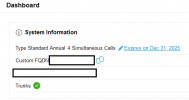
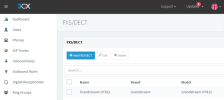
However my Grandstream HT801 FXS transfers as a inactive device that I cant access within the GUI. It shows under the Admin->Advanced->Fax config menu (which apparently in V20 is only for Professional and Enterprise license holders, though in V18 it could be used on the free license as well). This disables the Add, Edit and Delete buttons, and the selection checkboxes, so I have no way to remove/edit the device.
How do I reactivate my FXS without buying a $1K license for the 3 devices I have? The cost is just not justifiable. I dont need a FAX Server - I need the FXS support I had under V18.
Fortunately with Version 20.0 Update 5 (Build 551) my Yealink T58 are at least transferring as active devices.
However my Grandstream HT801 FXS transfers as a inactive device that I cant access within the GUI. It shows under the Admin->Advanced->Fax config menu (which apparently in V20 is only for Professional and Enterprise license holders, though in V18 it could be used on the free license as well). This disables the Add, Edit and Delete buttons, and the selection checkboxes, so I have no way to remove/edit the device.
How do I reactivate my FXS without buying a $1K license for the 3 devices I have? The cost is just not justifiable. I dont need a FAX Server - I need the FXS support I had under V18.