


- Joined
- Aug 18, 2017
- Messages
- 99
- Reaction score
- 10
Hello,
where is my problem? All buttons are greyed out.
Latest 3cx professional version 16.0.9 with maintenance
And template is default latest version from 3cx (yealinkt4x.ph.xml)
<type>phone-template</type>
<version>109361</version>
<time>2021-04-12 16:30:00</time>
<name>Yealink T4X</name>
<url>http://www.yealink.com</url>
<templatetype>supported</templatetype>
Phone firmware ist latest supported.
I think with old custom template we do not have this problem.
Thank you
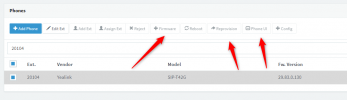
where is my problem? All buttons are greyed out.
Latest 3cx professional version 16.0.9 with maintenance
And template is default latest version from 3cx (yealinkt4x.ph.xml)
<type>phone-template</type>
<version>109361</version>
<time>2021-04-12 16:30:00</time>
<name>Yealink T4X</name>
<url>http://www.yealink.com</url>
<templatetype>supported</templatetype>
Phone firmware ist latest supported.
I think with old custom template we do not have this problem.
Thank you


