Greyed Out Live Chat

Status
Not open for further replies.

MomentoBen

Free User
Joined
Aug 10, 2023
Messages
2
Reaction score
2
Hello,

Just installed the live chat, and followed all instructions.

Domain: www.momentocoins.com

Here is my dashboard on 3CXScreenshot 2023-08-10 at 1.58.24 PM.png
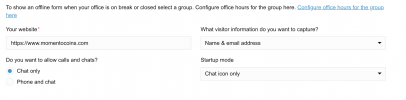
In my 3CX plugin on wordpress I have the correct URL input and ALL pages suggested.

As a final step, I generated the HTML code and placed it in the header of the website as well. Any other suggestions?
 
Hello,

Just installed the live chat, and followed all instructions.

Domain: www.momentocoins.com

Here is my dashboard on 3CXView attachment 36755

In my 3CX plugin on wordpress I have the correct URL input and ALL pages suggested.

As a final step, I generated the HTML code and placed it in the header of the website as well. Any other suggestions?
Please add the URL within the live chat as https://momentocoins.com then generate a new code and try it again
 
Please note that first, with WordPress, you do not need to place a generated code instead, you only copy the link in the section below to place it into the WordPress live chat configuration.
1691691082237.png

And as my colleague has replied, your website address is https://momentocoins.com, which needs to be placed in the admin console Live chat configuration section.
 
This worked! Thank you
 
Status
Not open for further replies.

Forum statistics

Threads
112,147
Messages
590,961
Members
165,167
Latest member
Finatra.us
