Solved HA Cluster new SBC provisioning

Status
Not open for further replies.

rbailey101

Trial User
Basic Certified
Joined
Nov 23, 2023
Messages
7
Reaction score
0
I'm installing the SBC .iso on a NUC as the first node in what will be a HA cluster setup.

I've got through everything fine until it asks for the Provisioning URL & Authentication KEY ID

I went onto 3CX - SIP Trunks - Add SBC and created a new SBC. When I enter the URL & Authentication KEY ID I get back:
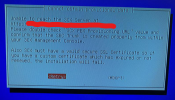
1700748226575.png

We currently have an SBC in place on a VM and working fine. I've made sure the NUC has a static IP on the same scope as the existing SBC. I presume they can share public IPs?

The NUC is pingable too and shows up on the firewall with no errors connecting to the 3CX controller on Azure
 
Are you using a 3CX SMB or 3CX Free that you are trying to connect to the SMB to posted this thread in the SBC section by mistake?
 
3CX Enterprise - for the company I work for this is just my account I do the 3CX certifications on
 
Do you have your own certificate (custom FQDN and certificate) on the 3CX install? And is the 3CX system reachable via the FQDN from the network where the SBC is located?
 
Yes we have our own GoDaddy cert & custom FQDN and yes the fqdn is reachable from the same location as the SBC
 
Then, it may be that the SBC machine requires the intermediate certificate from the CA installed for the certificate you have used in the 3CX System. Additionally, have you included the CA's intermediate and root certificates within the certificate you uploaded to the 3CX system?
 
I've not done anything with the certs in regards to the enterprise 3cx system I've only added it to new phones when provisioning. It's all be setup before I started.

But I've also not included the cert when installing the SBC on the NUC. how do I add the certificate while installing the SBC? because I could do it from the bash commands but the problem is I don't know how to get back to the stage where you provision the SBC once I've left it.
 
Hi guys,

So I figured it out in the end.

when installing the 3CX SBC I needed to press ALT F2 to go to the login page of debian and inject my custom certificate via it's godaddy url and install it to the machine.

then I press ALT F10 to return to the provisioning page and enter in my SBC trunk url and code. worked a treat!
 
Glad to know this is resolved. ;)
 
  • Love
Reactions: rbailey101
Status
Not open for further replies.

Members Online Now

No members online now.

Forum statistics

Threads
111,831
Messages
589,277
Members
164,660
Latest member
RJenkinsROCK