Having issue with Meeting !!

Status
Not open for further replies.

rbdukes

Free User
Joined
Apr 15, 2022
Messages
6
Reaction score
0
Hello , for some days now , when i setup a meet i click join and my staff click after me it's showing you can not join because you are already in the meeting. ?? only i came in .
I have tested the issues with two phones and tablet side by side , the same thing happened, one one device click join other get message you can't join you are already in the meeting?

2nd ) When in the meeting there is no option to invite others , this option was there before ???

Rob
 
What link exactly are you providing the participants with?

2nd ) When in the meeting there is no option to invite others , this option was there before ???
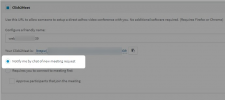
Go to the Click2Talk/Click2Meet tab in the Management Console >> Extension settings of the meeting's organizer and check if the following is selected:
1650018945798.png
If it is, that is the reason.
 
Ok I am still having issue with web meetings . 1st before when i click on schedule a meeting . I enter all the details and send the link to my staff. They click on they join. now i do the same but when i click to join and one of my staff do the same i get kick out or they get message stating they are already in a meeting and can't join the meeting with the same link. ??? 2 ) when i was in meeting before i see an option to invite another person to the meeting i click it and it give me a link to send them. now i not see this option as well. There is no way to add someone to the meeting once you are in it yourself even as a host. Please fix this issue. As this is very import option for use .
 
the link for you as moderator is different than the link to your staff.
Meetings consist of 3 links
  • Moderator
  • Invited Participants
  • Open Link

The first two are not reusable and only work for one user as they identify a specific user. Also, the user is not required to enter a name on join as it is related to the link. The last one can be handed out freely and users can join when they have the link.

I assume you join not with your mod link or the users share the personal links.

Let's start with the simplest meeting.
Just go to the meeting tab, and start a meeting without scheduling anything.
You will see within the first 5s a popup with a link. This handout freely and all users can join using this link.
 
  • Like
Reactions: ChrisC_3CX
ok this is asking me to add people after i start a meeting . I type in the meeting name set time and then click next it tell to add participant ? I just want to invite user that are guest
like before
 
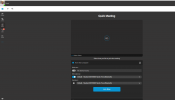
I did what you told, but no popup only needed to pick an app outlook or calendar
 
Can you please provide screenshots of every step you take and the problems you face?
 
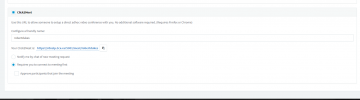
Not checked this is from my extension. We never changed anything from before when it was working.
1650542993810.png
 

Attachments

  • 1650542884903.png
    1650542884903.png
    30.4 KB · Views: 9
Last edited by a moderator:
I will continue a bit later i have to run out of the office
Sorry
 
Status
Not open for further replies.

Forum statistics

Threads
111,973
Messages
590,078
Members
164,896
Latest member
sameage