


- Joined
- Jul 1, 2016
- Messages
- 6,682
- Reaction score
- 2,669
18.0 (Build 418)
Good morning,
Im having some trouble setting up FTP for my backup location on 3CX.
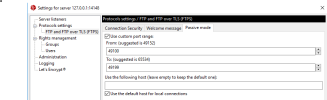
I've set up a Filezilla server on Windows with the following config:


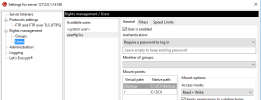
I can successfully connect to this Filezilla service via Filezilla off an external PC
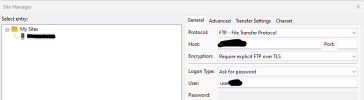
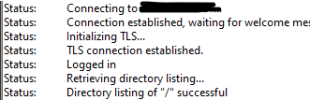
From the PC:
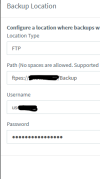
3CX Config:
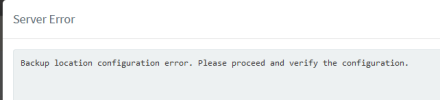
Any advice appreciated
Good morning,
Im having some trouble setting up FTP for my backup location on 3CX.
I've set up a Filezilla server on Windows with the following config:
I can successfully connect to this Filezilla service via Filezilla off an external PC
From the PC:
3CX Config:
Code:
<Date> Info [Type] Message
<06-02-2023 09:05:02> FTP Session 13 <3CXWANIP> [Response] 220-FileZilla Server 1.6.6
<06-02-2023 09:05:02> FTP Session 13 <3CXWANIP> [Response] 220-Please visit https://filezilla-project.org/
<06-02-2023 09:05:02> FTP Session 13 <3CXWANIP> [Response] 220 Welcome to your 3CX Archive!
<06-02-2023 09:05:02> FTP Session 13 <3CXWANIP> [Command] AUTH TLS
<06-02-2023 09:05:02> FTP Session 13 <3CXWANIP> [Response] 234 Using authentication type TLS.
<06-02-2023 09:05:02> FTP Session 13 <3CXWANIP> [Command] USER <ftpusername>
<06-02-2023 09:05:02> FTP Session 13 <3CXWANIP> [Response] 331 Please, specify the password.
<06-02-2023 09:05:02> FTP Session 13 <3CXWANIP> [Command] PASS ****
<06-02-2023 09:05:02> FTP Session 13 <3CXWANIP> <ftpusername> [Response] 230 Login successful.
<06-02-2023 09:05:02> FTP Session 13 <3CXWANIP> <ftpusername> [Command] PBSZ 0
<06-02-2023 09:05:02> FTP Session 13 <3CXWANIP> <ftpusername> [Response] 200 PBSZ=0
<06-02-2023 09:05:02> FTP Session 13 <3CXWANIP> <ftpusername> [Command] PROT P
<06-02-2023 09:05:02> FTP Session 13 <3CXWANIP> <ftpusername> [Response] 200 Protection level set to P
<06-02-2023 09:05:02> FTP Session 13 <3CXWANIP> <ftpusername> [Command] FEAT
<06-02-2023 09:05:02> FTP Session 13 <3CXWANIP> <ftpusername> [Response] 211-Features:
<06-02-2023 09:05:02> FTP Session 13 <3CXWANIP> <ftpusername> [Response] 211 End
<06-02-2023 09:05:02> FTP Session 13 <3CXWANIP> <ftpusername> [Command] OPTS UTF8 ON
<06-02-2023 09:05:02> FTP Session 13 <3CXWANIP> <ftpusername> [Response] 202 UTF8 mode is always enabled. No need to send this command
<06-02-2023 09:05:02> FTP Session 13 <3CXWANIP> <ftpusername> [Command] SYST
<06-02-2023 09:05:02> FTP Session 13 <3CXWANIP> <ftpusername> [Response] 215 UNIX emulated by FileZilla.
<06-02-2023 09:05:02> FTP Session 13 <3CXWANIP> <ftpusername> [Command] PWD
<06-02-2023 09:05:02> FTP Session 13 <3CXWANIP> <ftpusername> [Response] 257 "/" is current directory.
<06-02-2023 09:05:02> FTP Session 13 <3CXWANIP> <ftpusername> [Command] CWD /Backup
<06-02-2023 09:05:02> FTP Session 13 <3CXWANIP> <ftpusername> [Response] 250 CWD command successful
<06-02-2023 09:05:02> FTP Session 13 <3CXWANIP> <ftpusername> [Command] CWD /
<06-02-2023 09:05:02> FTP Session 13 <3CXWANIP> <ftpusername> [Response] 250 CWD command successful
<06-02-2023 09:05:02> FTP Session 13 <3CXWANIP> <ftpusername> [Command] QUIT
<06-02-2023 09:05:02> FTP Session 13 <3CXWANIP> <ftpusername> [Response] 221 Goodbye.
<06-02-2023 09:05:02> FTP Server [Status] Session 13 ended gracefully.
<06-02-2023 09:05:02> FTP Session 14 <3CXWANIP> [Response] 220-FileZilla Server 1.6.6
<06-02-2023 09:05:02> FTP Session 14 <3CXWANIP> [Response] 220-Please visit https://filezilla-project.org/
<06-02-2023 09:05:02> FTP Session 14 <3CXWANIP> [Response] 220 Welcome to your 3CX Archive!
<06-02-2023 09:05:02> FTP Session 14 <3CXWANIP> [Command] AUTH TLS
<06-02-2023 09:05:02> FTP Session 14 <3CXWANIP> [Response] 234 Using authentication type TLS.
<06-02-2023 09:05:03> FTP Session 14 <3CXWANIP> [Command] USER <ftpusername>
<06-02-2023 09:05:03> FTP Session 14 <3CXWANIP> [Response] 331 Please, specify the password.
<06-02-2023 09:05:03> FTP Session 14 <3CXWANIP> [Command] PASS ****
<06-02-2023 09:05:03> FTP Session 14 <3CXWANIP> <ftpusername> [Response] 230 Login successful.
<06-02-2023 09:05:03> FTP Session 14 <3CXWANIP> <ftpusername> [Command] PBSZ 0
<06-02-2023 09:05:03> FTP Session 14 <3CXWANIP> <ftpusername> [Response] 200 PBSZ=0
<06-02-2023 09:05:03> FTP Session 14 <3CXWANIP> <ftpusername> [Command] PROT P
<06-02-2023 09:05:03> FTP Session 14 <3CXWANIP> <ftpusername> [Response] 200 Protection level set to P
<06-02-2023 09:05:03> FTP Session 14 <3CXWANIP> <ftpusername> [Command] FEAT
<06-02-2023 09:05:03> FTP Session 14 <3CXWANIP> <ftpusername> [Response] 211-Features:
<06-02-2023 09:05:03> FTP Session 14 <3CXWANIP> <ftpusername> [Response] 211 End
<06-02-2023 09:05:03> FTP Session 14 <3CXWANIP> <ftpusername> [Command] OPTS UTF8 ON
<06-02-2023 09:05:03> FTP Session 14 <3CXWANIP> <ftpusername> [Response] 202 UTF8 mode is always enabled. No need to send this command
<06-02-2023 09:05:03> FTP Session 14 <3CXWANIP> <ftpusername> [Command] SYST
<06-02-2023 09:05:03> FTP Session 14 <3CXWANIP> <ftpusername> [Response] 215 UNIX emulated by FileZilla.
<06-02-2023 09:05:03> FTP Session 14 <3CXWANIP> <ftpusername> [Command] TYPE I
<06-02-2023 09:05:03> FTP Session 14 <3CXWANIP> <ftpusername> [Response] 200 Type set to I
<06-02-2023 09:05:03> FTP Session 14 <3CXWANIP> <ftpusername> [Command] EPSV
<06-02-2023 09:05:03> FTP Session 14 <3CXWANIP> <ftpusername> [Response] 229 Entering Extended Passive Mode (|||49171|)
<06-02-2023 09:05:04> FTP Session 14 <3CXWANIP> <ftpusername> [Command] MLSD /Backup
<06-02-2023 09:05:04> FTP Session 14 <3CXWANIP> <ftpusername> [Response] 150 Starting data transfer.
<06-02-2023 09:05:04> FTP Session 14 <3CXWANIP> <ftpusername> [Error] TLS session of data connection not resumed.
<06-02-2023 09:05:04> FTP Session 14 <3CXWANIP> <ftpusername> [Response] 425 Unable to build data connection: TLS session of data connection not resumed.
<06-02-2023 09:05:04> FTP Session 14 <3CXWANIP> <ftpusername> [Command] QUIT
<06-02-2023 09:05:04> FTP Session 14 <3CXWANIP> <ftpusername> [Response] 221 Goodbye.
<06-02-2023 09:05:04> FTP Server [Status] Session 14 ended gracefully.
Any advice appreciated


