Help Needed with (3CX) Doorphone

Status
Not open for further replies.

MerV

Free User
Joined
Jan 4, 2023
Messages
6
Reaction score
1
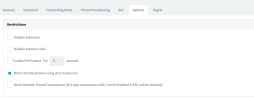
I've been using 3CX as a Doorphone (with Video) system for a little while now but due to a hardware issue I had to do a reinstall of Debian on new hardware. Doorstation has been provisioned and is working but I am not able to provision the Linphone softphones - Error: SIP request (REGISTER) from ***.***.***.*** was rejected. Reason: Block WAN requests is ON. I recall there was a setting "Disallow use of extensions outside the lan" that I had to untick to get the softphones working but this setting is no longer under Extensions->Options->Restrictions.
Any help would be much appreciated, I've been on this for days.
At install I selected 3CX System (Version 18.0.6.889) not 3CX SBC
Install in On-Premises
Options.png
 
I've been using 3CX as a Doorphone (with Video) system for a little while now but due to a hardware issue I had to do a reinstall of Debian on new hardware. Doorstation has been provisioned and is working but I am not able to provision the Linphone softphones - Error: SIP request (REGISTER) from ***.***.***.*** was rejected. Reason: Block WAN requests is ON. I recall there was a setting "Disallow use of extensions outside the lan" that I had to untick to get the softphones working but this setting is no longer under Extensions->Options->Restrictions.
Any help would be much appreciated, I've been on this for days.
At install I selected 3CX System (Version 18.0.6.889) not 3CX SBC
Install in On-Premises
View attachment 33405
"Block remote phones using stun (insecure)"

That's the option, just renamed.
 
Thanks, unselected "Block remote phones using stun (insecure)" but still not able to provision the Linphone softphones.
Error: User or password is invalid from 192.**.**.***. (User: ***, password: **********)
Error: The IP 192.**.**.*** has been blacklisted for 86400 sec.
If I provision the 3CX app, no issue and I get the green light but due to CODEC of system (H264) I'm not able to see video.
I'm sure I am using the correct username and password.
any help will be appreciated
Doorbell (wired directly to switch) provisions no issue.
 
Thanks, unselected "Block remote phones using stun (insecure)" but still not able to provision the Linphone softphones.
Error: User or password is invalid from 192.**.**.***. (User: ***, password: **********)
Error: The IP 192.**.**.*** has been blacklisted for 86400 sec.
If I provision the 3CX app, no issue and I get the green light but due to CODEC of system (H264) I'm not able to see video.
I'm sure I am using the correct username and password.
any help will be appreciated
Doorbell (wired directly to switch) provisions no issue.

This topic should be tagged "UNSUPPORTED" , but , we can still try to help you.
note that as indicated by the setting you are disabling, this is insecure !

now that the disclaimer is done :) , we can start.

First question, is it on the PC or on Mobile that you are trying to use LINPHONE Softphone ?

If PC, I would try the new « 3CX Desktop App » to see if it supports H264 codec .. if no, please use WebClient .. You spend reliability and stability..

If despite my advice, you insist on using Linphone .. share screenshots, parameters to fill in (Leave the fields empty), we will try to guide you through the configuration.

But please consider the reliable options I have described.
 
  • Like
Reactions: Evolute IT
"UNSUPPORTED" sorry, appreciate the help.
I have downloaded and again tried the 3CX softphone (IOS Mobile phone) doorbell rings and voice works but not able to see video therefor I need to use the Linphone App.
Both App (Fermax rebranded Linphone) softphone and Fermax Intercom Wifi handset were working prior to hardware issue then re-installation of 3CX (Debian) now both not working.

I have not changed any of the settings in the Handset or softphone app except for the passwords

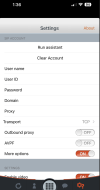
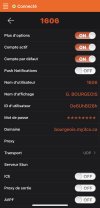
In the setting of the softphone
User name: Extention number
User ID: (Blank)
Password: (Password from Phone Provisioning -> Authentication)
Domain: ********.3CX.com.au
Proxy: (Blank)
Transport: TCP
Outbound Proxy:Off
AVPF: Off
 

Attachments

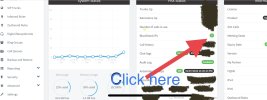
  • System.png
    System.png
    560.4 KB · Views: 6
  • LinPhoneIOSApp.png
    LinPhoneIOSApp.png
    139.2 KB · Views: 6
Try

Username : Extension Number
User ID : ID from Phone Provisioning -> Authentication
Password: (Password from Phone Provisioning -> Authentication)
Transport : UDP
Domain: ********.3CX.com.au
Proxy :
Outbound Proxy: Off
AVPF : Off
 
Thanks G.Bourgeois but tried the below with no luck
User ID : ID from Phone Provisioning -> Authentication and also tried extension
 
Try

Username : Extension Number
User ID : ID from Phone Provisioning -> Authentication
Password: (Password from Phone Provisioning -> Authentication)
Transport : UDP
Domain: ********.3CX.com.au
Proxy :
Outbound Proxy: Off
AVPF : Off


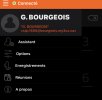
When is done and if not working, check if your iP is Blacklisted on the 3CX PBX.

EBF85DF2-D17C-4C2C-BF38-6BAAD1C504DD.jpeg
 
Last edited:
Thanks G.Bourgeois but tried the below with no luck
User ID : ID from Phone Provisioning -> Authentication and also tried extension

Working for me

A9EC57D8-7608-44F0-8033-8947E39248AF.jpeg


0551A320-1ACF-45C0-8095-6D5AC3C22C2D.jpeg
 
Thank you again, I've been on this for days and tried all sorts of config changes with no luck. I keep getting blacklisted IP's but I delete.
I'm thinking that maybe it has something to do with the set up\install. I'll try and install again and see how I go. I will try on an ESXi machine and build a VM and if that fails I'll go buy new hardware tomorrow.
Thanks again
 
Thank you again, I've been on this for days and tried all sorts of config changes with no luck. I keep getting blacklisted IP's but I delete.
I'm thinking that maybe it has something to do with the set up\install. I'll try and install again and see how I go. I will try on an ESXi machine and build a VM and if that fails I'll go buy new hardware tomorrow.
Thanks again

If your mobile is on a WiFi, on the same network as the 3CX phone system, you could try to put the local IP address of the PBX instead of the FQDN. So domain : 192.168.88.100
 
Mobile is not WiFi but handset is and tried but no good.
Appreciate the help
I'll update on how it goes after I reinstall on different hardware
 
  • Like
Reactions: Guillaume Bourgeois
Status
Not open for further replies.

Forum statistics

Threads
111,974
Messages
590,081
Members
164,899
Latest member
mazet