Hidden Users Visible

biggreyphone

Customer
Joined
Oct 3, 2021
Messages
186
Reaction score
23
I just updated to Version 20.0 Update 3 (Build 786 Beta). When I go to Team in the web chrome app or web GUI, there are hidden extensions that are now visible. They were not visible before and I confirmed that they are still listed as hidden
 
Are you logged in as a regular User or an elevated role?

Are they members of other groups in which their Presence is shared?

Is the Department they are part of set to Publish information/presence to the company?
 
I am logged in as admin. These invisible users are not assigned to a department.
The departments are not set to publish information to the company.
These invisible users have presence turned on on the extension
These are listed under the hidden department category, but the show my calls and presence button are a light blue/grey and are uncheckable in the department listing.
 
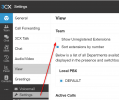
Are they unregistered? I believe I saw a post that those show by default now. It’d be an option on each web client/extension.
 
Yes they are all unregistered. I’m looking under the admin settings under each extension but not sure what to change.
 
it’s on the user side. For example on the mobile app, (3 bars) > Settings > show unregistered extensions
 
I found that 2 of the extensions were still assigned to one of the non-hidden departments. Once I removed them, they were appropriately removed from the Teams display
 
  • Like
Reactions: SteveITS
This works also for the individual user. What if I don't want any staff seeing unregistered extensions?
 

Forum statistics

Threads
111,954
Messages
589,922
Members
164,852
Latest member
priya