Holiday Messages for Department doesn't work

Yellow_Flash

Customer
Advanced Certified
Joined
Mar 11, 2019
Messages
288
Reaction score
37
Hi,

We are running 3CX v20 Update 4.
I was trying to set the Holiday message.
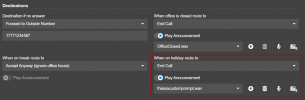
I set the holiday message on Department level only to find that it doesn't work.

Do I need to set the Holiday message in the Call Handling section for each entries??
If this is the case, then what is the point of having a Department Level Holiday?

This used to be such a straight forward thing in V18.
Can someone please shed some light on this?

Thank you.
 
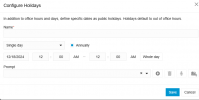
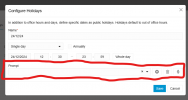
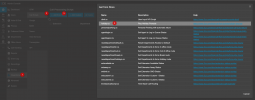
Can you confirm what the field for Prompt does in Office Hours > Office Holidays > Add/Edit?
I would expect that when I call the DID for the department and it goes through to the holiday hours, it would play the prompt associated with the Holiday?

This should be possible without the use of a call script (which I'm led to believe is done on whole trunk, so no good if you want to set it per department)?
 
Can you confirm what the field for Prompt does in Office Hours > Office Holidays > Add/Edit?
I would expect that when I call the DID for the department and it goes through to the holiday hours, it would play the prompt associated with the Holiday?

This should be possible without the use of a call script (which I'm led to believe is done on whole trunk, so no good if you want to set it per department)?
When it is a holiday and the trunk is dialled the call script will kick in and play this prompt.

It is only triggered from the script however.

If you dont add a script only the prompt defined in the call handling entities will be played

1734527419072.png
 
When it is a holiday and the trunk is dialled the call script will kick in and play this prompt.

It is only triggered from the script however.

If you dont add a script only the prompt defined in the call handling entities will be played

View attachment 45700
Can you add something to this screen indicating that the call script is needed for the prompts to play?

If the call script is in play and a department isn't scheduled for a holiday, that department just does normal routing correct?

1734527699087.png
 
What does this do? I couldn't find any way to playing the prompt I selected here (is it specific to scripts as suggested above?):1734529194798.png
 
Can you add something to this screen indicating that the call script is needed for the prompts to play?

If the call script is in play and a department isn't scheduled for a holiday, that department just does normal routing correct?

View attachment 45701
The destination will also be triggered after this prompt is played during a holiday. This is just intercepted during the holiday period.
 
Hi @NicholasP_3CX

The issue i have now is the same as before.
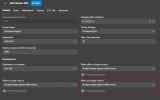
Instead of just adding one entry under the "Configure Holidays" option in v18, now we have to go and make changes to each DID because there is an option that says "When on holiday route to".
So irrespective of what you have provided before, the calls will still get routed to whatever option is provided there, the default option of which is "Accept anyway".
This is just such a pain where we have to make changes to hundreds of entries in call Handling Page.
 
  • Like
Reactions: EmmettsIT
Is there a way to override all these holiday settings at a system level like there was in v18?

Can we add the days we want the system to go offline and select the prompt that needs to be played system wide for these days and it just works?
 
  • Like
Reactions: EmmettsIT
We used to have it this way but then we were getting complaints of being too rigid. Especially in countries where they span multiple time zones, and larger corporation having multiple departments with differing times.

So we made it more granular to accommodate.

But I guess we cant keep everyone happy. Otherwise we would be ice cream, and not a communications software company.
 
  • Haha
Reactions: bitn2
When it is a holiday and the trunk is dialled the call script will kick in and play this prompt.

It is only triggered from the script however.

If you dont add a script only the prompt defined in the call handling entities will be played

View attachment 45700
I can't get the instructions to work on my system. Can you take a video of how you would configure it from scratch for multiple extensions in different departments with step by step clicks I think everyone here would appreciate it? Written instructions are okay but I found two written mistakes in the article without looking too hard.

Thanks
 
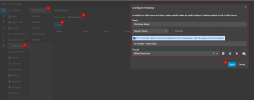
First of all, define your holiday period.
1734681486634.png

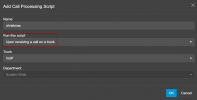
Next download the script

1734681525858.png

Now.... it's REALLY really...... REALLY REALLY.. (you get the point) important that this script is triggered when a call is received on the trunk, not when a DID is dialled and not when a dial code is pressed.

THIS IS ONLY TRIGGERED WHEN A CALL IS RECEIVED ON THE TRUNK!!!!!
1734681690269.png

There is no further configuration of the script needed.

The way things will work now is that when someone dials a number (Main trunk number or DID) on this trunk, when its a holiday it will go play the prompt that is recorded for this holiday, and then process the call routing as normal.

So what happens when I call a queue with a DID on this trunk?

In my first scenario here, it will play the holiday prompt and just send the call to the queue, because in its holiday destination it has accept anyway

1734682130406.png

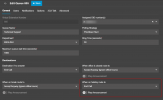
Just define your preferred holiday destination.

1734682103631.png

In this case now, i will receive the call play the holiday prompt and dump the call. Of course you could change this destination to be a voicemail, external number etc etc.
 
First of all, define your holiday period.
View attachment 45745

Next download the script

View attachment 45746

Now.... it's REALLY really...... REALLY REALLY.. (you get the point) important that this script is triggered when a call is received on the trunk, not when a DID is dialled and not when a dial code is pressed.

THIS IS ONLY TRIGGERED WHEN A CALL IS RECEIVED ON THE TRUNK!!!!!
View attachment 45747

There is no further configuration of the script needed.

The way things will work now is that when someone dials a number (Main trunk number or DID) on this trunk, when its a holiday it will go play the prompt that is recorded for this holiday, and then process the call routing as normal.

So what happens when I call a queue with a DID on this trunk?

In my first scenario here, it will play the holiday prompt and just send the call to the queue, because in its holiday destination it has accept anyway

View attachment 45754

Just define your preferred holiday destination.

View attachment 45752

In this case now, i will receive the call play the holiday prompt and dump the call. Of course you could change this destination to be a voicemail, external number etc etc.
It worked with the above instructions. Thank you. I think there are still some pieces missing that I hope will get cleared up but this gets us to where we were trying to be since switching off version 18.
 
Can you add something to this screen indicating that the call script is needed for the prompts to play?

If the call script is in play and a department isn't scheduled for a holiday, that department just does normal routing correct?

View attachment 45701
This is an absolute must, there is currently no indication on the holiday prompt screen that it will not work unless some extra configuring is done. Since that script is so essential to so many people's workflow can it please just be natively integrated into 3CX? Even if it requires a toggle to enable that is somewhere obvious labelled "Enable Holiday prompts for this department" or something.

I can only imagine how many other people have set their Christmas holidays and gone home thinking it is working fine, only to come back next year to possibly hundreds of misdirected calls.
 

Latest Posts

Forum statistics

Threads
111,962
Messages
589,987
Members
164,867
Latest member
swegner