Holiday Prompt + Access to Menu

ITSP

Premier Customer
Joined
May 4, 2022
Messages
66
Reaction score
10
Hi,

In the old versions (16 if I recall correctly), whenever the system was in holiday mode, the prompt would get played but the main attendant menu would still be available. This allowed us to simply change the "front" part of the greeting from "Welcome to so-and-so. Press X for department Y ..." to "You have reached us during a holiday. The office will reopen next week. Press X for department Y".

The reason we want to continue doing it this way is because some departments still work during holidays.

With the current version, it seems like when the system is under holiday mode, it simply plays the prompt but does not allow access to the menu anymore. The only way we can make this work is by changing the prompt for "During office hours" to the holiday message, but that means we have to set it up on the day of the holiday itself and have to remember to take it off after the holiday, whereas we used to be able to rely on the system to just put the prompt back to the normal office hours one when it is no longer a holiday.

Anyone have a workaround?
 
There doesn't seem to be a Call Processing Script option in Advanced (or anywhere else for that matter). Perhaps this has been deprecated?
 
Hi @ITSP ,

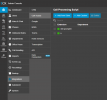
Look under Integrations:

1751356803189.png

Best,
KS.
 
  • Like
Reactions: ITSP and Evolute IT
Last edited:
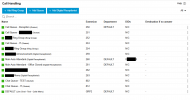
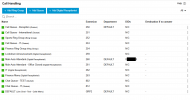
This is our Call Handling page:

1751401084952.png

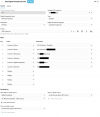
And inside the Main Auto Attendant settings:

1751400966769.png

With the script set to run when a call comes through the trunk, it goes to 260 Main Auto Attendant and plays the Office Open.wav file. The holiday is named "Term 2 Break" and there is an audio file named "Term 2 Break.wav" which it should've found, played and then routed it to 261 Main Auto Attendant - Office Closed.

If the script is set to run when the DID is called, it just drops the call.
 

Attachments

  • 1751400821927.png
    1751400821927.png
    36.7 KB · Views: 3
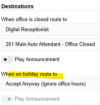
Change DR x260 setting "When on holiday route to" to DR 261. Your screen cap has it set for "office is closed" which is not the same as a configured holiday, with the holiday routing set to ignore office hours.

"When on holiday route to" > Play Announcement can be used for a generic "we're closed for the holiday" message that plays before the transfer to x261. Importantly, Play Announcement is not a DR so you can't say to press any buttons...we have one client whose original partner set the DR message to play there also, so it played twice, and the first one "didn't work."

The holiday script is for a message for each specific holiday, such as, "happy new year! we're closed." The sound file is chosen in the properties of the holiday, under office hours.
 
Change DR x260 setting "When on holiday route to" to DR 261. Your screen cap has it set for "office is closed" which is not the same as a configured holiday, with the holiday routing set to ignore office hours.

"When on holiday route to" > Play Announcement can be used for a generic "we're closed for the holiday" message that plays before the transfer to x261. Importantly, Play Announcement is not a DR so you can't say to press any buttons...we have one client whose original partner set the DR message to play there also, so it played twice, and the first one "didn't work."

The holiday script is for a message for each specific holiday, such as, "happy new year! we're closed." The sound file is chosen in the properties of the holiday, under office hours.

Hi Steve,

Yes, we understand that's now how it works. If we set DR 260's "When on holiday" to DR 261 and toggle the "Play Announcement", it plays the "Term 2 Break.wav" (but it doesn't allow us to press any menu items at this point), then it routes the call to DR 261, which plays it's normal "Office Closed.wav" file (at this point, the caller is allowed to press menu items).

But in V16, it didn't use to be like that. The problem with the current flow is that we now have to set it manually on the holiday itself and also remember to take it off after the holidays. This was automatically done for us previously.

We can achieve what we want by breaking the process into smaller work flows and breaking the announcements as well, just thought I'd ask if there was a way to get back the old behaviour without doing so.
 
Hmm. For clients with per-holiday recordings, we set the file on the holiday time entry, once, and only need to change the holiday date every year.
 
Hmm. For clients with per-holiday recordings, we set the file on the holiday time entry, once, and only need to change the holiday date every year.

Thanks for continuing to look into this Steve. Looks like I may have jumped the gun when I said we could do what we wanted if we broke up the announcements, but that still didn't work.

Just to be clear, what we wanted to do was when a call comes in on the main trunk, it would be normally routed to 260 during normal office hours, play the Office Open.wav file which contains the welcome message and the menu items. When the office is closed (after hours), the call is routed to 261, and the the Office Closed.wav file played which contains the welcome message and the menu items for after office hours. That all works.

But in addition to that, we wanted a holiday greeting which we could set under the Office Holidays section. This would automatically play the holiday message ("Happy New Year. We're closed until Jan 5.") and then route the call to 261. This offers us the convenience of setting the holiday dates and message in advance with the system automatically applying them and taking it out.

We can't make this work now (it used to work in V16) even with the use of the script (unless we're configuring it wrong).
 
With the script in place, set the prompt on the holiday.

Then set this routing on x260 with "play announcement" off, to route to 261:
1751553967016.png
I can't test this right now but I'd expect the script to play the New Year's file then the DR sends the call to 261.

Edit: well it lost my attachments, kinda fixed.
 
Last edited:
Hi Steve,

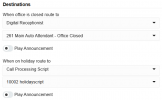
If I set DR 260 to the below settings (and the script has the value 261 as the extension to redirect to), the call gets dropped with nothing being played at all.

Screenshot 2025-07-08 133604.png

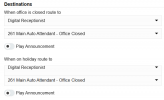
If I set DR 260 to the below settings, the normal DR 261 menu gets played (no holiday message).

Screenshot 2025-07-08 133714.png

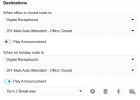
If I set DR 260 to the below settings, it kind of works. The holiday message gets played, then it goes to DR 261 and the menu gets played and the user is able to enter extension numbers. However, this means we have to manually turn off the Play Announcement toggle because even after I've set today as no longer a holiday, the holiday message still gets played.

Screenshot 2025-07-08 133736.png
 
Hi,

Was the script attached properly to the trunk? Can we see the Script Integration page? Let's start from there.

KS.
 
the call gets dropped
To echo Kyriacos, the script is set up in the integration to run on a trunk (steps 5-7) not in the DR. The script has already run by the time it gets to the DR and the DR "knows" it is a holiday so uses the holiday routing.
 

Latest Posts

Forum statistics

Threads
111,962
Messages
589,980
Members
164,864
Latest member
SCarpenter@fifthavenue-la