- Joined
- Aug 5, 2020
- Messages
- 14
- Reaction score
- 12
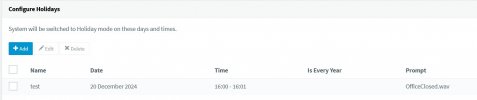
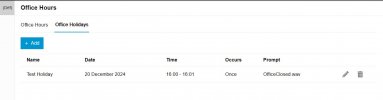
However in V20 I do the same but the call goes to my out of hours IVR without playing this prompt...am I missing something?
is this script pre-written, e.g. I don't have to edit anything?You have to activate holiday.cs script from the store (in integrations area) for your trunk(s). Then your sound files are played for incoming calls on this trunk(s).
yes.is this script pre-written, e.g. I don't have to edit anything?
Kudos to you, this actually worked, I tried it the other day but selected DID's not Trunk and it totally ruined the system, calls just ended, when removing the script the inbound rules stayed present so calls still ended. As that was a live system I restored it back there and then as I didn't have time to troubleshoot so was sceptical if this would work.yes.![]()
@Alphabetic This is only if you want a single prompt, for different prompts on different days, you have to use :
If you want to play the holiday prompt you need to go to the destination and flick the setting "Play announcement" under the holiday section.
You have to activate holiday.cs script from the store (in integrations area) for your trunk(s). Then your sound files are played for incoming calls on this trunk(s).
Kudos to you, this actually worked, I tried it the other day but selected DID's not Trunk and it totally ruined the system, calls just ended, when removing the script the inbound rules stayed present so calls still ended. As that was a live system I restored it back there and then as I didn't have time to troubleshoot so was sceptical if this would work.
Thanking you![]()
Hmm, I hadn't realized it changed. I guess we need to re-add, or copy/paste from one with the update?Yeah, since v20 Update 4 the holiday.cs script works very well.
That’s what the script does.Why not just have 3CX play the prompt that's defined under the department holiday when it detects a call to the department during the defined holiday period??
Point is, why have to mess around with a script? Why not just have the PBX do natively do just that?That’s what the script does.
The holiday script essentially replaces the HOL IVR.Yeah, I feel like the switch to v20 was rushed overall. The release phases made no sense. Putting out a product with missing features from the version before, then mandating migration due to licensing changes etc. For example, hot desking wasn't available until some time after the initial v20 release, I think 2 or 3 updates after.
I've been using 3CX since v11 in 2012. Never really had issues, but there are times when I find myself asking "why is it this way?".
Don't like that I was forced to move from a perpetual license either to annual. I've always paid maintenance so even if I decided to stick with a version, I could have on perpetual. Now I believe if it's not renewed, the product is deactivated? I am and have always been on prem.
I bought perpetual and at that time I bought a product I could have owned, now I'm forced out of product ownership.
Anyway, that's off topic. Hope the holiday prompt thing can be reviewed and some more though put into it.

Founded in 2005, when VoIP was an emerging technology, 3CX has gone on to establish itself as a global leader in business communications.