Holiday prompts

brenrich101

Premier Customer
Basic Certified
Joined
Feb 15, 2022
Messages
33
Reaction score
7
Just gearing myself up for the Christmas break, when most of our company shuts down for a week.

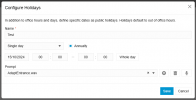
For testing purposes, I've created a department, assigned it office hours and have set today as an Office Holiday with a test message assigned.
1728990365676.png

What is the expected functionality of this? I would now expect that whenever anybody is called in that department, it would instead play the 'AdaptEntrance.wav' prompt. But it doesn't.

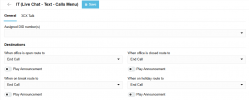
Is the routing for this controlled in the department settings of the Call Handling section? I'm kind of led to believe it's not because if that was the case then surely whenever anybody in the department is called now it should just end the call as per the directions below (or does this only apply to the Assigned DID number(s)? But then in the holiday bit in here I can assigned another prompt, so which one gets played?
1728990536331.png

It's probably me not understanding it, but willing to try and get my head around it! Thanks :)
 
Thanks, while I get the concept, this should be possible without the use of a script, no?

If a DID is set up in the department, and the Play Announcement is set up when on holiday in the department, then if anything it should just check the Office Holidays section (ignoring the prompt where you set the days), and play the department prompt on those days?

1728993406641.png
 
I'm also still playing around with this. Although your explanation sounds the most logical one, it doesn't work that way. You need the script to be able to play the prompt which you set up at the holiday level.

So far after my testing, I found out the following:
If no prompt is set, the script will do nothing, it just routes the call to the office open destination.
If the prompt is set, it will play the prompt, but after that it won't follow the holiday routing (end call).

So I haven't been able to get this to work perfectly yet, i'm hope somebody has and can give some more information.
 
I'm also still playing around with this. Although your explanation sounds the most logical one, it doesn't work that way. You need the script to be able to play the prompt which you set up at the holiday level.

So far after my testing, I found out the following:
If no prompt is set, the script will do nothing, it just routes the call to the office open destination.
If the prompt is set, it will play the prompt, but after that it won't follow the holiday routing (end call).

So I haven't been able to get this to work perfectly yet, i'm hope somebody has and can give some more information.
I did get this working without a script.

I created a new test extension, 'User' and department 'Sales'. I assigned 'User' to 'Sales'.
I set up the Office Hours for 'Sales', went into the Call Handling section, then into the 'Sales' department (denoted by Live Chat - Text - Calls menu with the GRP prefix). I set the DID up in here, as well as the routing for open, closed, and holiday (I assigned the holiday prompt in here).
I then went back into the Office Hours menu, selected the department, and added a Holiday of today. When I rang the DID from another number, it played the Holiday prompt I selected in the Call Handling section.

So this does work as I would expect it to. I do have to now adjust all of my queues and IVR's etc that had DID's and routing, and implement some new departments, but it's probably not a bad thing to tidy up following a major update anyway.

Only thing I have noticed is it appears that assigning a prompt to a specific holiday in advance doesn't work (for instance here in the UK I would set up the bank holidays (says we're open again tomorrow) and Christmas (says we're open again on 2nd Jan) at the start of the year, then I wouldn't have to worry). I have seen other threads and requests for this, so I know that one isn't just me! :) ...unless this is where the script comes in? Does it check for a specific Holiday date and plays a specific prompt?
 
Only thing I have noticed is it appears that assigning a prompt to a specific holiday in advance doesn't work (for instance here in the UK I would set up the bank holidays (says we're open again tomorrow) and Christmas (says we're open again on 2nd Jan) at the start of the year, then I wouldn't have to worry). I have seen other threads and requests for this, so I know that one isn't just me! :)
That's where the script comes in. With the script it should be possible to preschedule holidays with the prompt for those holidays, for instance 1 for christmas, 1 for easter etc.
The script would trigger for every call received on the trunk, and if the holiday date is current, it would play the prompt and route the call accordingly.
I haven't been able to get this to work yet.
 
  • Like
Reactions: Evolute IT
That's where the script comes in. With the script it should be possible to preschedule holidays with the prompt for those holidays, for instance 1 for christmas, 1 for easter etc.
The script would trigger for every call received on the trunk, and if the holiday date is current, it would play the prompt and route the call accordingly.
I haven't been able to get this to work yet.
Hi,
maybe you are missing the step that the trunk must be associated with the department instead of “System-wide”, otherwise it won't work even if you have only one department.
https://www.3cx.it/doc/prompt-vacanze/#h.4c1uot5r7mdf
On the trunk --> Options --> Limit to: Name_Department
So it started working
 
  • Like
Reactions: Evolute IT
Hi,
maybe you are missing the step that the trunk must be associated with the department instead of “System-wide”, otherwise it won't work even if you have only one department.
https://www.3cx.it/doc/prompt-vacanze/#h.4c1uot5r7mdf
On the trunk --> Options --> Limit to: Name_Department
So it started working
What if you have more than one department? I've tried using the DID option instead but I can't get this to work either.
 
What if you have more than one department? I've tried using the DID option instead but I can't get this to work either.
I have configured a department for each number and it works correctly, obviously I had to create different holiday scripts for each department
 

Forum statistics

Threads
111,955
Messages
589,925
Members
164,855
Latest member
parik24pro