Hot Desking - Can't Assign Ext

Status
Not open for further replies.

darenfriday

Customer
Basic Certified
Joined
Jul 10, 2016
Messages
52
Reaction score
3
Hi Chaps

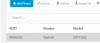
I've managed to get my four Yealink T23G handsets in the Hotdesking window and they are listed in the Phones list but the 'Assign Ext' button stays greyed out.


Help please

Thanks

Daren
 

Attachments

  • Capture.PNG
    Capture.PNG
    4.3 KB · Views: 16
You do not assign it to an extension via the 3CX management console

This is done on the phone, using the ext number and voicemail pin - you need to allow the extension to be used by hotdesking

https://www.3cx.com/docs/hot-desking/

What is displayed on the phone screen ?
 
Last edited:
It does work, I was just following the video Paul sent me and it said to assign from the management console
 
Since the phones are listed in the Hotdesking tab and are listed in the phone tab as well all you need to do is login to the phone as an extension.
You should see the phone provisioned as HDxxxx. Ensure the extension has the right to use hotdesking from it's Option tab and login to the phone using the dial code and the pin number as specified in the guide.
 
Status
Not open for further replies.

Latest Posts

Forum statistics

Threads
111,885
Messages
589,545
Members
164,744
Latest member
johnblackwood1