Hot desking users can not log in or log out

Status
Not open for further replies.

Lee Cramman

Premier Customer
Advanced Certified
Joined
Jul 9, 2018
Messages
694
Reaction score
166
V18 on GCE, 2 sites each with with SBC's currently on the 18.0.30 beta.

Since this morning none of our hot desking users from either site can either log on or off, they get the "Access denied" message.

Users currently logged in can still use their phones fine. Extensions directly assigned to a user work fine. Manually logging a user off from the admin portal means they no longer show as logged in on the portal but still appear to be logged in on the phone (although their phone no longer works at that point).

I'm scratching my head a bit here as to where to even start troubleshooting this as I've never come across the problem before.

There have been no recent changes to our overall setup or networking other than an update of the SBC's but we have been running for several days without issue since that update.
 
we've excalty the same issue at this moment. Hotdesking and SBC are not working.
I will register a ticket at 3CX
 
  • Like
Reactions: Lee Cramman
Same issue on 16.0.8.9
 
Thanks to the quick reaction of Charalambos Eleftheriou (Team Leader Support of 3CX)

I can tell you the forum post is related to Issues caused by certificate expiration from lets encypt in the form of the DST Root CA X3 which is replaced by the “root certificate” called ISRG Root X1 of which we have support for in our certificates from let's encrypt, and if you access your management console this root certificate is present and correct as there will be no errors in the management console unless your certificate has expired.

The issue is that the phones themselves may not be updated to the correct firmware, so please check that they are using the latest firmware of which has also the root certificate updated.
 
  • Like
Reactions: Charles_3CX
All our phones are on recommended firmware.

There are a mixture of different phones, all supported by 3cx so this seems unlikely to be our problem.
 
Last edited:
If you check the guide issued by Sealink regarding the firmware found here https://support.yealink.com/en/portal/knowledge/show?id=bab64fcca62fd012b682c533, it lists the certificates that the phones support for which version of the firmware. Then if the phones are using the correct version i.e Older T4X T2X T19 etc. are using the firmware version xx.80.xx.xx and above or the newer ones using the xx.71.xx.xx or above these versions will have the new root certificate already.

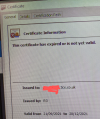
Another check to do is to make sure that the certificate chain is correct within the 3cx system, you can check your certificate from the browser by pressing the lock icon next to the URL and making sure that the certificate chain has the correct root certificate.

Then I also can suggest reloading the correct fimware version again to one of the phones manually from the phone's UI, to test with, and try to reprovision it again remotely if this is still an issue I can suggest contacting Yealink support directly.
 
If you check the guide issued by Sealink regarding the firmware found here https://support.yealink.com/en/portal/knowledge/show?id=bab64fcca62fd012b682c533, it lists the certificates that the phones support for which version of the firmware. Then if the phones are using the correct version i.e Older T4X T2X T19 etc. are using the firmware version xx.80.xx.xx and above or the newer ones using the xx.71.xx.xx or above these versions will have the new root certificate already.

Another check to do is to make sure that the certificate chain is correct within the 3cx system, you can check your certificate from the browser by pressing the lock icon next to the URL and making sure that the certificate chain has the correct root certificate.

Then I also can suggest reloading the correct fimware version again to one of the phones manually from the phone's UI, to test with, and try to reprovision it again remotely if this is still an issue I can suggest contacting Yealink support directly.
We mostly have the following types of endpoint (all Yealink) on the following firmware versions:

T21P E2 - 36.83.0.140
T31P - 124.86.0.20
T41P - 36.83.0.130

So... all should be good as they're all above the versions specified.

However, we have also started to see users trying to log into the web client have certificate problems as well. So the idea that this may be a certification problem sounds very plausible, but perhaps it isn't a problem with the endpoints, perhaps it's the PBX itself?
 
Interesting, then the issue is the certificate in your case, I will Pm you shortly.
 
in this case, check and make sure that the certificate chain is correct within the 3cx system, you can check your certificate from the browser by pressing the lock icon next to the URL and making sure that the certificate chain has the correct root certificate and are all valid.
I think our posts crossed :)

Please see above
 
I will PM you shorty
 
  • Like
Reactions: Lee Cramman
Starting to panic now... big office move due on Monday + no hot desk phones = disaster

Running out of time :(
 
Check your PM
 
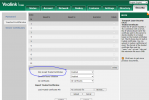
Managed to resolve this - 3CX advised us they changed a TLS certificate recently which Yealink didn't like. This broke all of our phones which connect via TLS.

To resolve this issue in particular we changeda setting in the Yealinks - "Only Accept Trusted Certificates" to "Disabled" which allows the users to log in and out of the hotdesk. We use a custom template also so we edited the following line also, which stops the phone from reverting the change;
security.trust_certificates =

Changed 1 to 0
 

Attachments

  • YealinkTrusted.png
    YealinkTrusted.png
    51.4 KB · Views: 26
This will solve the problem temporarily so that you can provision the phone until the phone is provisioned. We are though currently looking into the cause of the issue and will have an update as soon as we have completed our investigation.
 
Last edited:
  • Like
Reactions: Evolute IT
This will solve the problem temporarily until the phone reprovisions (default every 24 hours). We are though currently looking into the cause of the issue and will have an update as soon as we have completed our investigation.
Surely by editing the custom template we have prevented the phone from reverting the change on reprovisioning, unless I'm mistaken?
 
Please also note that our Q&A team in cooperation with Yealink are currently investigating the root cause of the issue and we will provide an update as soon as they have concluded their investigation and can provide a permanent solution.
 
  • Like
Reactions: Phil-STIC
This also causes us several problems. We will do all the firmware updates as soon as possible, but I fear that some older models, like the T42G, will not be able to communicate in https anymore...
We have several thousand devices to support... if a solution can be applied to the 3CX fqdn level, it would be greatly appreciated.
 
I was told earlier the only option was to blow away our install and start again from backup.

Sounds like this will not fix the problem... I don't really want to attempt this unless there's a good chance it will work!
Managed to resolve this - 3CX advised us they changed a TLS certificate recently which Yealink didn't like. This broke all of our phones which connect via TLS.

To resolve this issue in particular we changeda setting in the Yealinks - "Only Accept Trusted Certificates" to "Disabled" which allows the users to log in and out of the hotdesk. We use a custom template also so we edited the following line also, which stops the phone from reverting the change;
security.trust_certificates =

Changed 1 to 0
Surely by editing the custom template we have prevented the phone from reverting the change on reprovisioning, unless I'm mistaken?

I tried doing this manually earlier to identify if it was a certification problem. It allowed the hot desking phone to provision but then it stopped working (presumably as it picks up the template it overwrites the setting).

You can't use custom templates on hot desking phones...
 
The unsupported way is go into the backend of the 3cx system and change the default template. This is working for one of my clients that has a lot of hotdesking phones. The downside is Yealink has this on by default, so you have to login to each phone and turn it off. Once it reprovisions it will stay off if you updated the default template. This can only be done at the file level and not through the 3cx web interface. In the past when I have edited the default template, it will revert back when you run a 3cx update.
 
Status
Not open for further replies.

Forum statistics

Threads
111,977
Messages
590,090
Members
164,904
Latest member
gdstratton