HotDesking issue using 3CX

Status
Not open for further replies.

Kwang Mien

Silver Partner
Advanced Certified
Joined
May 14, 2020
Messages
255
Reaction score
17
Hi,

I have 2 issues with using HotDesking.

My 3CX version is version 16.0.9 on Debian 9.

Setup
====
1. Our 3CX Server is in our private cloud
2. 3CX SBC is installed in our customer office network
3. 3CX SBC and IP Phone are in the same local network
4. Setup an instance of SBC in 3CX and also created a HotDesking Extension for the IP Phone
5. IP Phone is able to register to 3CX Server via the SBC.

HotDesking Scenario
================

1. Dial *77*001*
2. Enter the pin code
3. Heard the message "Login successful. phone reset to my account"
4. When I tried to call out, the call did not go through. From the SBC, there was a SIP 403 Forbidden from SBC to the phone.
5. When I tried to logout by dialing *77*5*, heard the message "Access Denied"

Can anyone advise on the issue of calling out after login as the hotdesk extension ? Why was there a Forbidden message ?
What should be the proper way to logout from the HotDesk extension ?

Thanks.

Regards,
Kwang Mien
 
If you setup the phone as a normal extension, do you have the issue ?
 
If you setup the phone as a normal extension, do you have the issue ?
There is no issue for outgoing call with normal extension
 
There is no issue for outgoing call with normal extension

You need to resolve this, check the activity log as it would appear your sip is blocking outgoing calls

Do incoming calls work

Is sip trunk registered , green icon under sip trunks

What is your sip provider
 
Hey @Kwang Mien,

There is another scenario in which this could happen. You may have successfully logged into hotdesking but that does not necessarily mean that the IP Phone has provisioned with the new extension. After you hear the "login success message" give the IP Phone some time to reprovision with the new settings, otherwise, you'll essentially be trying to make a call with the hotdesking virtual extension (e.g HD00001) for which calls are forbidden hence the 403 message.

When it re-provisions, you should see the new extension on the phone instead of the HD extension, do you see 001 on the IP Phone's screen and still get the error when trying to make a call?
 
Hey @Kwang Mien,

There is another scenario in which this could happen. You may have successfully logged into hotdesking but that does not necessarily mean that the IP Phone has provisioned with the new extension. After you hear the "login success message" give the IP Phone some time to reprovision with the new settings, otherwise, you'll essentially be trying to make a call with the hotdesking virtual extension (e.g HD00001) for which calls are forbidden hence the 403 message.

When it re-provisions, you should see the new extension on the phone instead of the HD extension, do you see 001 on the IP Phone's screen and still get the error when trying to make a call?
Hi Chris,

After login and leave the phone for more than an hour, it is still showing HD00001.

I check the phone section in 3CX server, it is provisioned.

1635491272205.png

At the Hotdesking section, 001 is login

1635491410112.png
Is there any other settings to configure ?

Regards,
Kwang Mien
 
Okay, in that case, you're issue is that the device is not provisioning for some reason. We might need a bit more info to figure this out:

• What I Phone are you using and what firmware is it running?

• Are you using a custom FQDN or a 3CX one?

• Can you access the Management Console, go to Updates(upper-right corner) and check to see if there is an available Hotfix update?

• If you factory reset the same device and then try to provision it from the "Phones" section as a normal extension,(not HD) does it provision okay in that case?

Note: To provision it as a normal extension you would have to delete it's mac address from the Hotdesking section.
 
Hi Chris,

a. Phone is Fanvil X3S version 2.14.0.7387
b. Domain is a custom FQDN
c. There is a available Hotfix update
d. It provision provision ok as a normal extension
 
I suspect the issue is related to the certificates the device trusts.

Could you give the following a try?

1. Add the device back in hotdesking in the Management Console.
2. Factory reset it and then provision it to the HD extension from the "Phones" section.
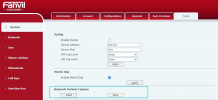
3. Once it provisioned, access the device's Web Gui and go to "System(left) >> Tools(top-right)" and click on "Start" to start a packet capture:
1635496041589.png
4. While the packet capture is running, try to log the extension into hotdesking.
5. Wait for the "login success" message and then wait at least another 3 minutes. Confirm nothing happened and then stop the packet capture on the device.
6. Send me the .pcap file via PM so that I can have a quick look.
 
I suspect the issue is related to the certificates the device trusts.

Could you give the following a try?

1. Add the device back in hotdesking in the Management Console.
2. Factory reset it and then provision it to the HD extension from the "Phones" section.
3. Once it provisioned, access the device's Web Gui and go to "System(left) >> Tools(top-right)" and click on "Start" to start a packet capture:
View attachment 25543
4. While the packet capture is running, try to log the extension into hotdesking.
5. Wait for the "login success" message and then wait at least another 3 minutes. Confirm nothing happened and then stop the packet capture on the device.
6. Send me the .pcap file via PM so that I can have a quick look.
I have the wireshark capture. How can i send to you ?
 
I'll PM you shortly.
 
As per our PM conversation, it seems that the device is rejecting the certificate used for the FQDN. That said, I'd recommend checking with Fanvil to first determine what certificates are trusted by the device and if the one in use is not one of them, find out if there's a way to allow the device to trust this particular one.
 
As per our PM conversation, it seems that the device is rejecting the certificate used for the FQDN. That said, I'd recommend checking with Fanvil to first determine what certificates are trusted by the device and if the one in use is not one of them, find out if there's a way to allow the device to trust this particular one.
I have disabled the verification of the certificate in the Fanvil phone. Now i am able to login as the extension and make calls out. Also, i am able to logout from the extension. Thanks for your help on this.
 
  • Like
Reactions: ChrisC_3CX
I have disabled the verification of the certificate in the Fanvil phone. Now i am able to login as the extension and make calls out. Also, i am able to logout from the extension. Thanks for your help on this.
That would confirm our findings then so I do recommend looking into this further in order to determine what would be required to allow the device to continue functioning normally while also keeping the certification verification on.

Do bear in mind that our templates will most likely re-enable that setting meaning that you will need to disable it every time you want to re-provision which will undoubtedly prove tedious especially when using hotdesking.
 
Status
Not open for further replies.

Forum statistics

Threads
111,975
Messages
590,084
Members
164,903
Latest member
dross