Hotdesking not working with SBC

Status
Not open for further replies.

Remco Straaten

Bronze Partner
Basic Certified
Joined
Nov 17, 2021
Messages
25
Reaction score
3
Hi,

Host location: 3CX
Yealink: T41S
SBC setup correctly

We did the following steps:
https://www.3cx.com/docs/hot-desking/

We currently have a customer hosting a 3cx central 4SC Enterprise by 3CX. As a result, we have set up an SBC to ensure that hot desking works.

Unfortunately, the hotdesking is not working properly. As soon as we configure it with MAC address and the given data, the device is placed between the phones. After we have made the link according to the links in the general explanation, we constantly get the message "Account invalid"

We hope someone can help us.
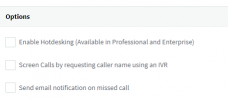
 
Have you enable hotdesking for the extension, under user - options

1637229453335.png
 
Hi Remco,


1. Are the Yealinks running firmware 66.86.0.5? If not upgrade them using this guide here
https://www.3cx.com/sip-phones/yealink-t4-series/

2. What do you mean by this:
After we have made the link according to the links in the general explanation
There is no link to make for Hotdesking. Please describe in more detail what you mean so we can understand if there was a problem during this part.

3. The SBC must be installed on the same LAN as the phones, same subnet, with multicast allowed on the network. If this is not the case, then the phones cannot provision (regardless of hotdesking)
 
1. Yes we updated the firmware to the correct version.
2. By that I mean the video and link from 3CX itself. We followed these steps.
3. Yes we did
 
Hold down the OK button on the Yealink, and then confirm the factory reset dialog (10 seconds).

When the Yealink resets, it will startup again and eventually go to idle.

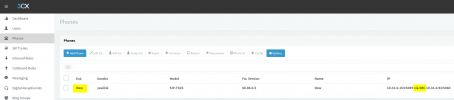
When this happens, do you see it appearing in your phones section in bold as "new" and via SBC?

1637230764195.png
 
Yes I did:
6da1cddfdcc4914b080a8769097b92bf.png
 
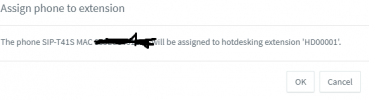
Ok all good so far, so when you tick this device and click "Assign Ext" do you get the prompt that this phone will be provisioned to "HD000001" ?
 
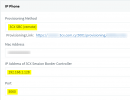
Ok, and under your HD00001 in the Hotdesking page, do you have the correct settings as highlighted here?

- Provisioning Method
- IP of SBC machine
- Port of SBC machine
- Provisioning link shows your full FQDN and HTTPS port (not an IP address)

1637233117771.png
 
Ok, please send me a private message with your FQDN and key, so that I may check a couple of things from my end.
 
Ok everything looks good from my end too. This leaves a few suspects that can cause this:

Suspects:

1. NTP: If the phones cannot pick up the correct time via NTP, they will not be able to make a TLS connection to your PBX, and hence they cannot be provisioned

2. DNS: If your local DNS that serves the phones does not resolve the FQDN IP correctly, the phones will not be able to reach the PBX

3. Internet connection: If the phones are installed in a subnet or VLAN that cannot access the internet, the phones will not be able to reach the PBX to fetch their provisioning files. Same goes for firewalls that geo-block certain IP ranges


Checks you can do

1. Check the time and on the phones, manually put the correct time into one phone and then try to provision it in case the time/date was wrong. If this solves the problem then you likely have an NTP issue in your network.

2. This is a bit tricky: you have to log into a phone's web UI, start a pcap and then send the provisioning command from 3CX. You should then stop the pcap after 30 sec or so and filter it for dns. Analyzing the pcap in Wireshark, you should see dns queries and dns replies for your FQDN. The reply in the capture must contain the same IP Answer as you would get if you typed your FQDN into Google's DNS Resolver. If not, then you likely have a DNS issue.

3. This can be even trickier, I can suggest a few things once you have checked the above.
 
Hi,

We tried on multiple networks at home and on office. So DNS can't be the problem. timezone is correct. So I think we need to do step 3.

And we used multiple 3cx hostings, hosted by 3cx, hosted by provider and ourself.
 
Everything we try the message is when we entering the dial code for loggin in: *77*100* it says "Invalid account" and account unregisterd.
 
Do you see the "Invalid Account" and "Account unregistered" message on the T41S screen or is it an audio message? Also, why two different messages? In what cases do you get the first and in what the second? Please elaborate a bit on this because we might be missing something and clear information is key to figuring out what's happening exactly.

Please also confirm if the IP Phones are provisioning with the Hotdesking extension at all. Do you actually see HD00001 on the T41S screen or not? If you cannot see HD0001 what appears on the T41S screen instead?
 
Hi,

We tried on multiple networks at home and on office. So DNS can't be the problem. timezone is correct. So I think we need to do step 3.

And we used multiple 3cx hostings, hosted by 3cx, hosted by provider and ourself.

This could actually be proof that DNS is indeed the problem, because testing on any different networks would have failed if there is a DNS issue.

Better check it against an external server like Google's DNS and read the IP that is contained in there.

Confirm that you see the correct IP in the answer (the one you also see in your PBX dashboard).

This would give us more confidence that we aren't facing a DNS issue and can then look for other problems.
 
Status
Not open for further replies.

Members Online Now

Forum statistics

Threads
111,832
Messages
589,278
Members
164,662
Latest member
DejanMDS